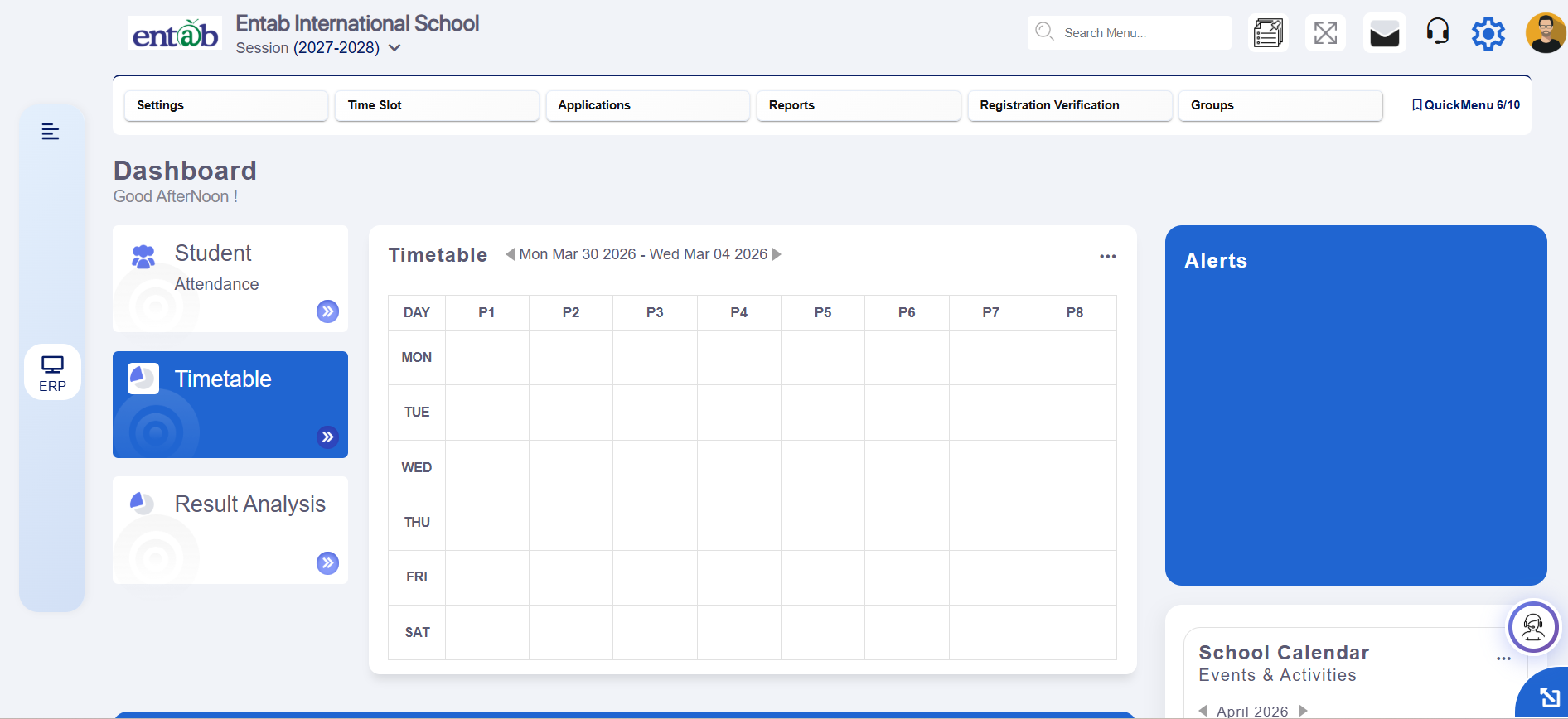
Welcome to our community page where you will find updates on the modules with versions under drop down menu to get the information you've been searching for.
Each modification implemented and the issue getting resolved from it gets highlighted.
To open the particular module, click on the 'ERP' visible on the left side.
After clicking on it, a list will be viewable. Once the specific module is selected, the new features functionalities with infographics and the way to navigate are shared as well.
At the end, we request you to subscribe us so that an alert/notification is sent to you to be in sync with the module's update ASAP.
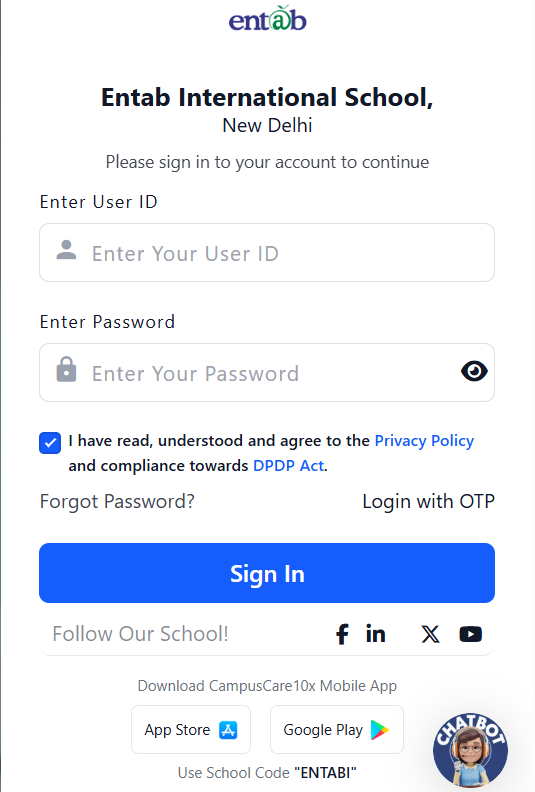
To enhance account security and enforce periodic password updates, a password expiry mechanism with timely reminders has been introduced for Admin and Employee roles on the 10X login page.
Key Functionality
Role-Based Applicability
Applicable only for:
Admin
Employee
Expiry Logic
Password expiry is calculated based on credential creation date.
Expiry cycle:End of the respective month.
Pre-Expiry Notifications (Login-Time Popups)
3 Days Before Expiry
Title: Password expiring soon
Message: Your password will expire in 3 days. We recommend changing your password.
Buttons
Change Password → Redirect to Change Password screen
Continue → Proceed with login
2 Days Before Expiry
Same structure with updated message: “Your password will expire in 2 days…”
1 Day Before Expiry
Same structure with updated message: “Your password will expire in 1 day…”
On Expiry (Last Day of the Month)
Title: Password expired
Message: Your password has expired. Please change your password to continue.
Button: Change Password only
Restriction : User cannot proceed to login until password is changed.
Proactive Alerts: Users are notified before expiry to avoid disruption.
Controlled Access: Prevents login with expired credentials.
Improved Compliance: Aligns with security best practices.
Better User Experience: Clear prompts with guided actions.
What’s New in School Online
This release strengthens parent communication and usability across the School Online module by ensuring instant notifications, clearer student identification, and configurable messaging control. Parents now receive real-time push alerts when diary entries are assigned, while staff can select students more accurately in circulars using admission number and class details. Schools also gain the flexibility to enable or disable the Student Message tab centrally, allowing communication channels to align with institutional policies and improving overall engagement and responsiveness.
Feature 1: Push Notification on Diary Assignment to Students
Purpose
To improve parent communication and ensure timely awareness of academic updates, the Diary Assigner feature has been enhanced with automatic push notifications. Parents are now instantly notified on the mobile app whenever a diary entry is assigned to their child, strengthening engagement and reducing missed information.
Key Functionality
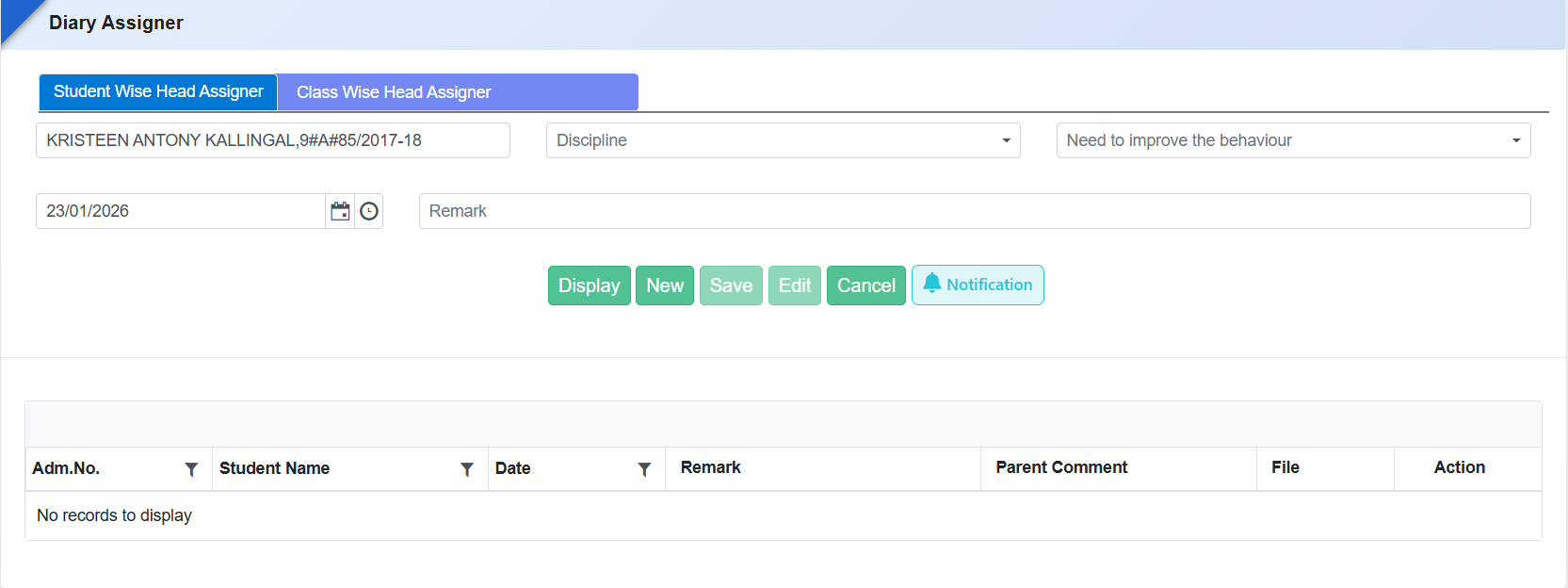
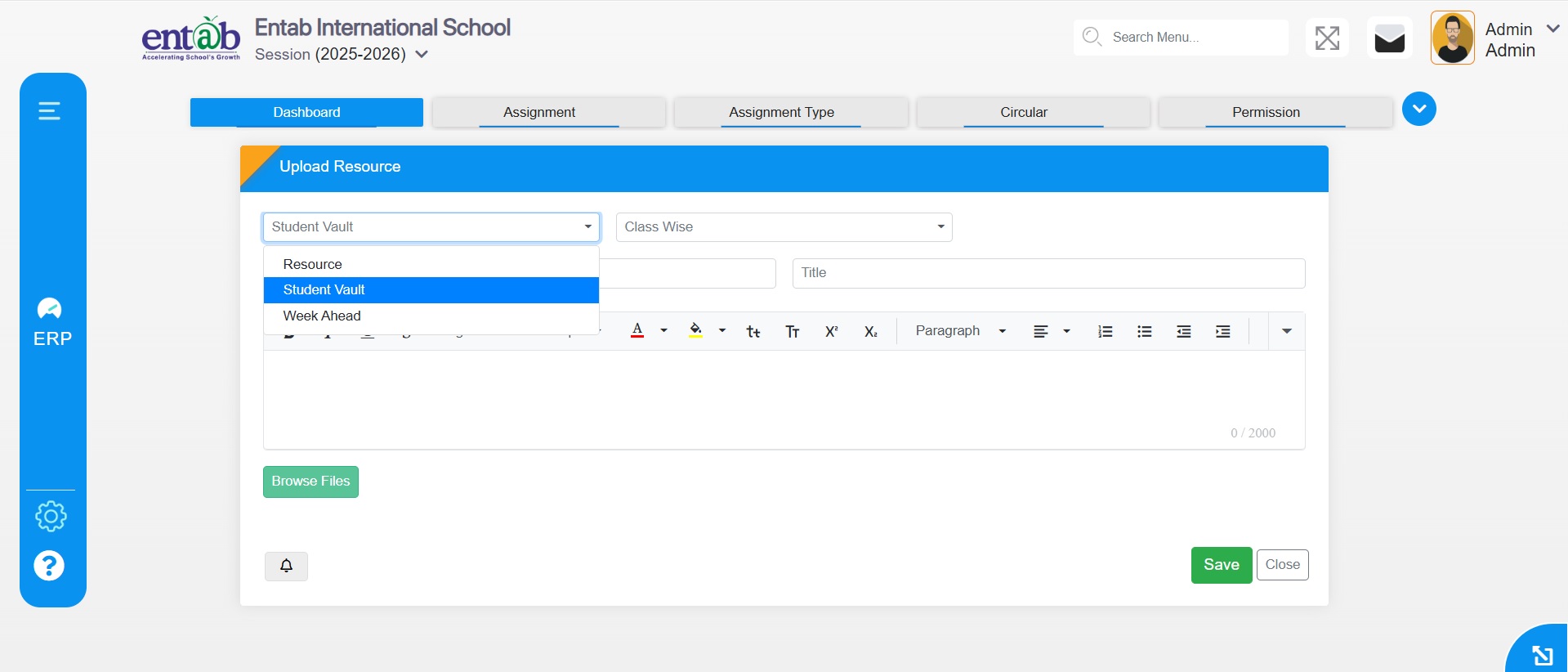
Introduced a “Notification” button in the Diary Assigner form.
The button is enabled by default, ensuring parents are notified automatically.
On diary assignment, a push notification is sent to parents via the mobile app only.
A Notification button is available on the form to manage or trigger notifications as required.
Benefits
Timely Parent Updates: Parents receive instant alerts for diary assignments.
Improved Engagement: Keeps parents informed about daily academic activities.
Reduced Missed Communication: Ensures diary updates are not overlooked.
User-Friendly Control: Default notification setting with manual override if needed.
Digital-First Communication: Strengthens mobile app usage and communication efficiency.
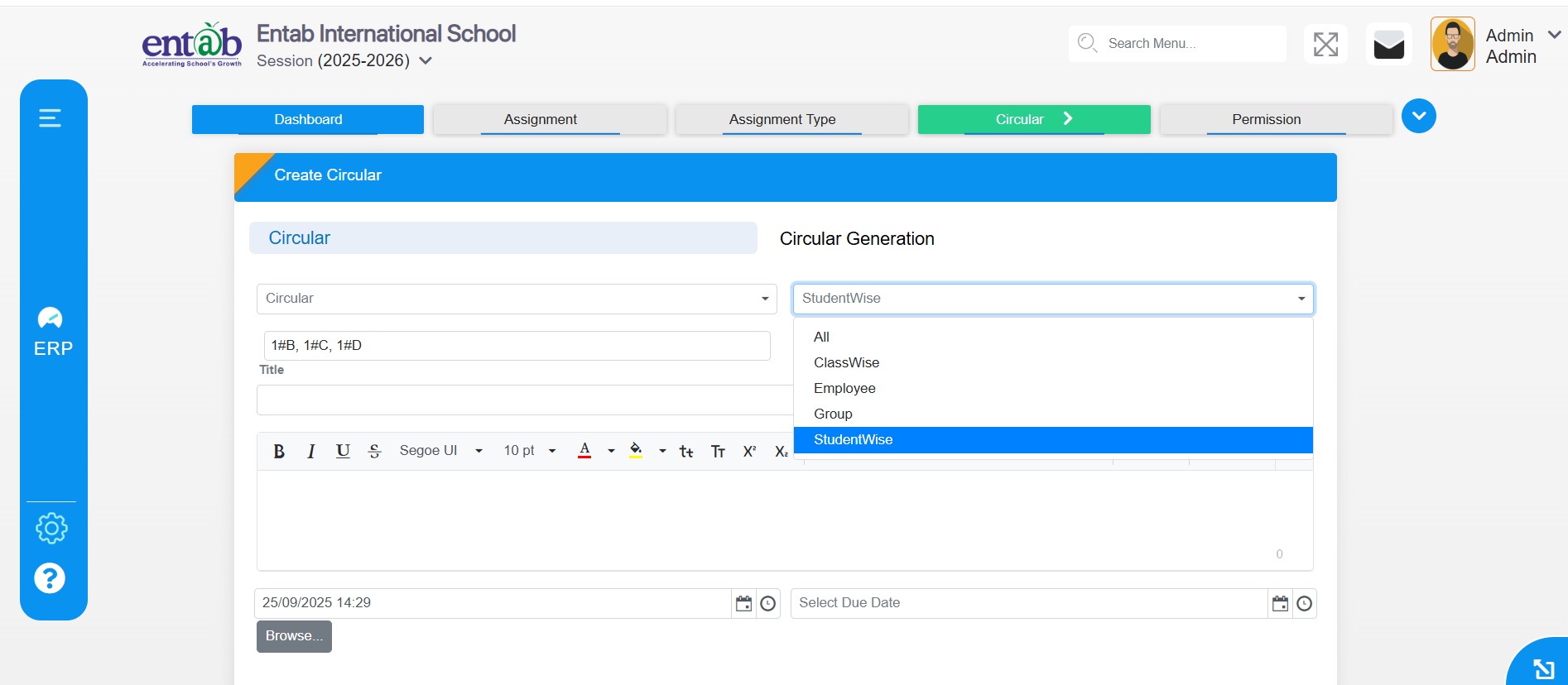
Feature 2: Enhanced Student Identification in Student-wise Circular
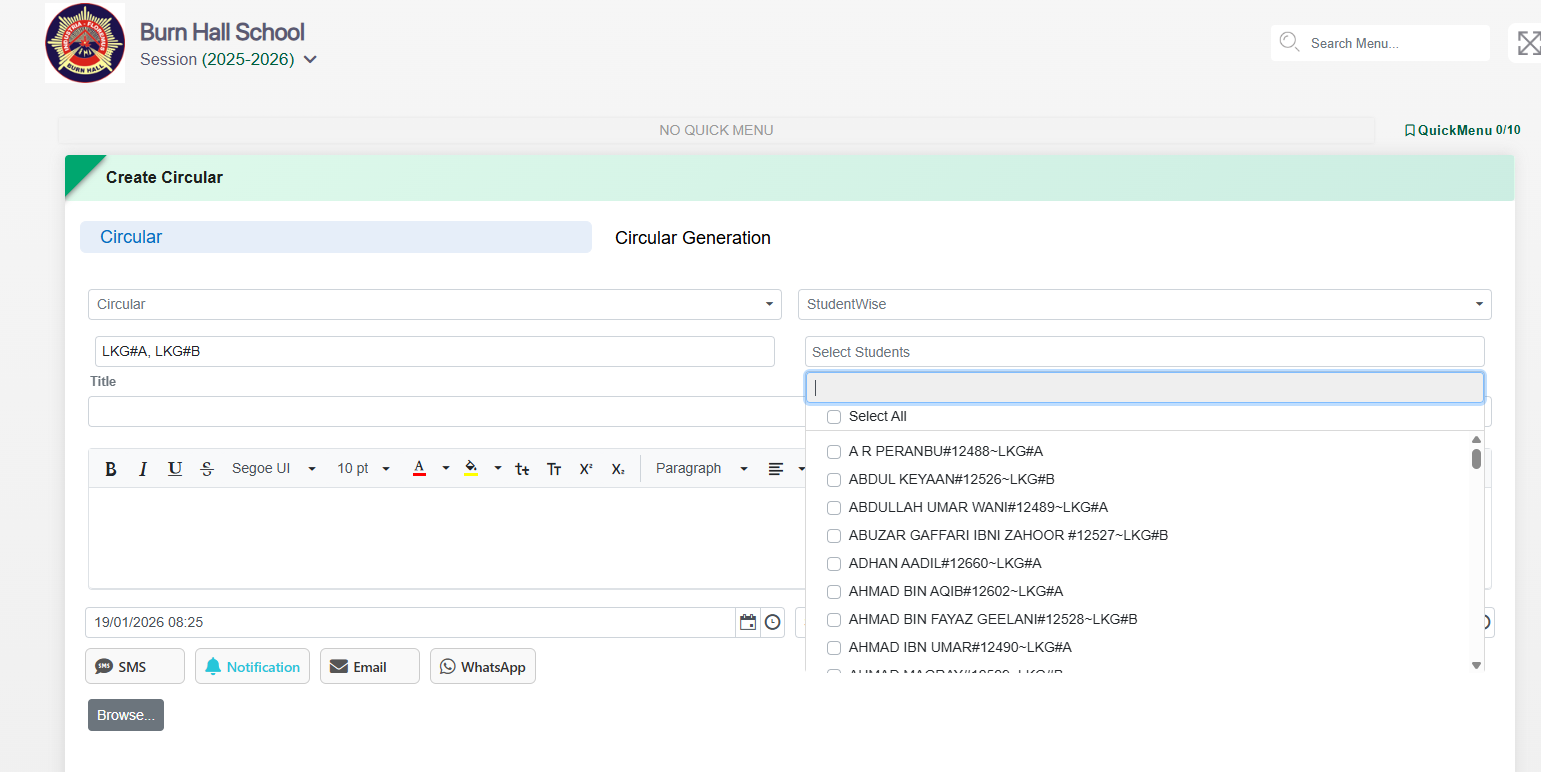
To avoid ambiguity while sending circulars and help schools accurately identify students, the Student-wise Circular selection has been enhanced to display additional student details along with the name.
Key Functionality
In Student-wise Circular, the student list now displays:
Student Name
Admission Number
Class & Section
Helps users clearly distinguish between students with similar names while selecting recipients.
To give schools better control over student communication visibility, a new configuration has been introduced to enable or disable the Student Message tab as required.
Key Functionality
Added a Message Enable / Disable toggle in General Settings.
Allows schools to show or hide the Student Message tab for students.
Setting applies centrally based on school communication policy.
Feature 1: Provision to Delete Assigned Diary Entries
This enhancement provides schools with greater flexibility
and control by allowing the deletion of incorrectly assigned
diaries for both student-wise and class-wise assignments.
Navigation
School Online → Diary Assigner
Key Functionality
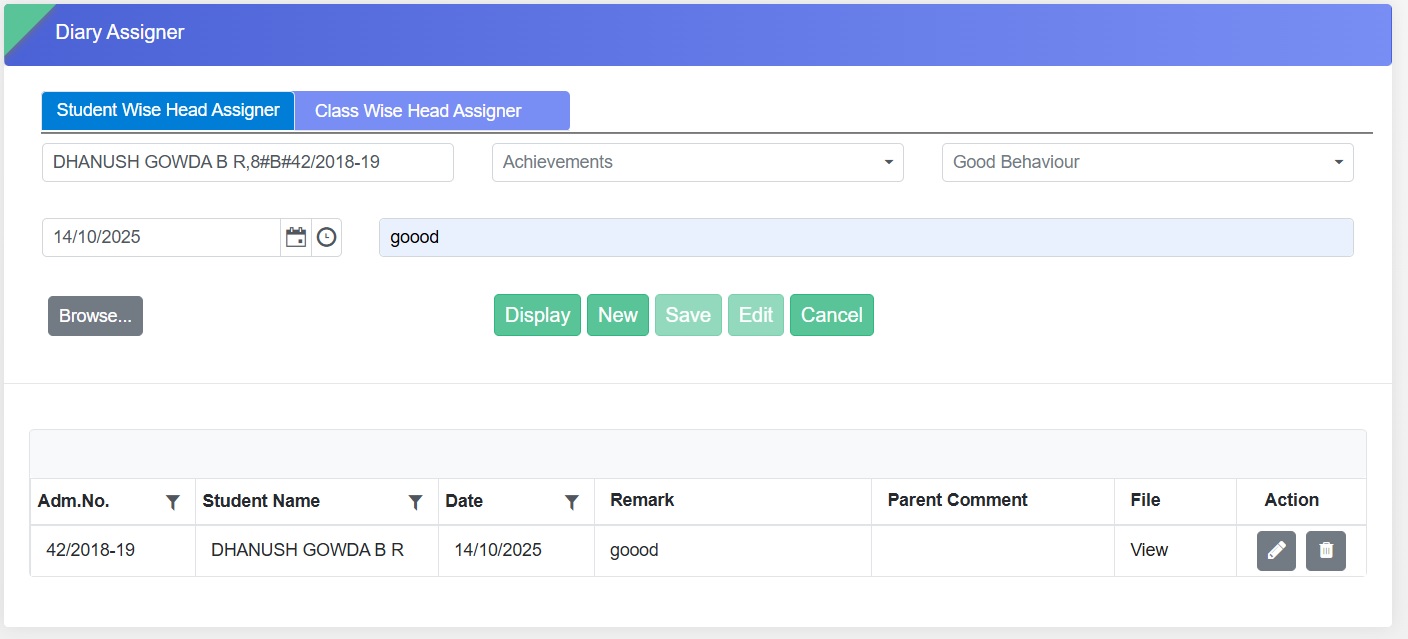
Delete option has been introduced for:
Student-wise Head Assigner
Class-wise Head Assigner
Enables users to remove wrongly assigned diary entries
easily.
Ensures that only valid and accurate diary assignments are
maintained in the system.
Benefits
Allows quick correction of wrongly assigned diary entries.
Improves accuracy and reliability of diary records.
Enhances administrative control and reduces dependency on
backend support for corrections.
Feature 2: Group Report Enhancement
To provide schools with a clear and structured overview of
all groups created in the system, along with visibility into
how many users are assigned under each group.
Key Functionality
Added a new report under School Online → Reports → Group
Report.
The report includes the following filters:
Group Name
Group Visibility
Group Type – Classwise, Student Wise, Employee Wise, or
Housewise
Displays details of each group along with the count of
users assigned to it.
Benefits
Enables schools to easily monitor and manage group
structures.
Helps identify unassigned or duplicate groups to maintain
data consistency.
Provides quick insights for administrative decisions
related to class, employee, or house-based grouping.
Enhances transparency and control over group management
across the school system.
Feature 1: Provision for Student-wise Assignment, Circular,
Student Vault
We are excited to introduce enhancements in the Student
Online Module that bring more personalized and secure
management of student activities and information.
Key Functionality
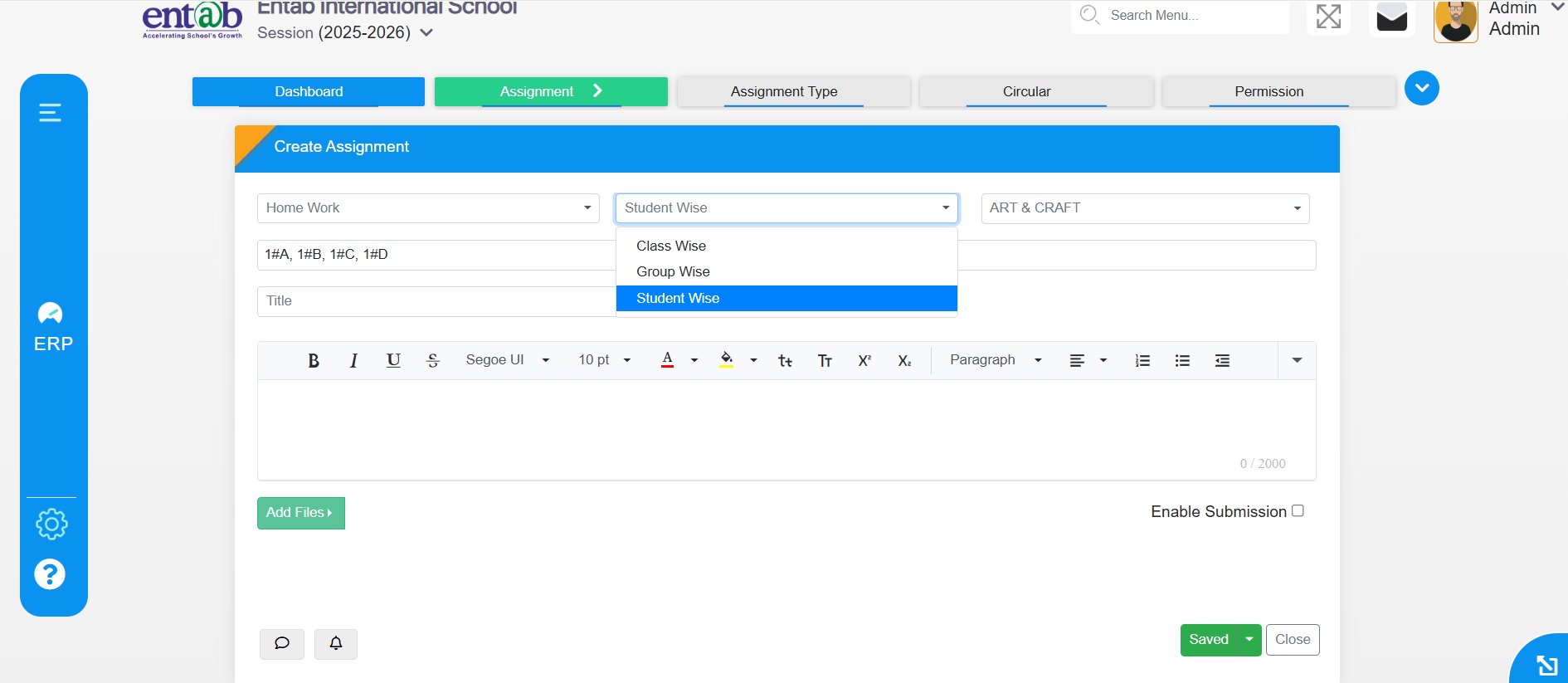
Student-wise Assignment: Teachers can now create,
assign, and track assignments for individual students.
Student-wise Circular: Notices can be sent directly to
selected students.
Student Vault: Secure repository for storing and
managing student documents.
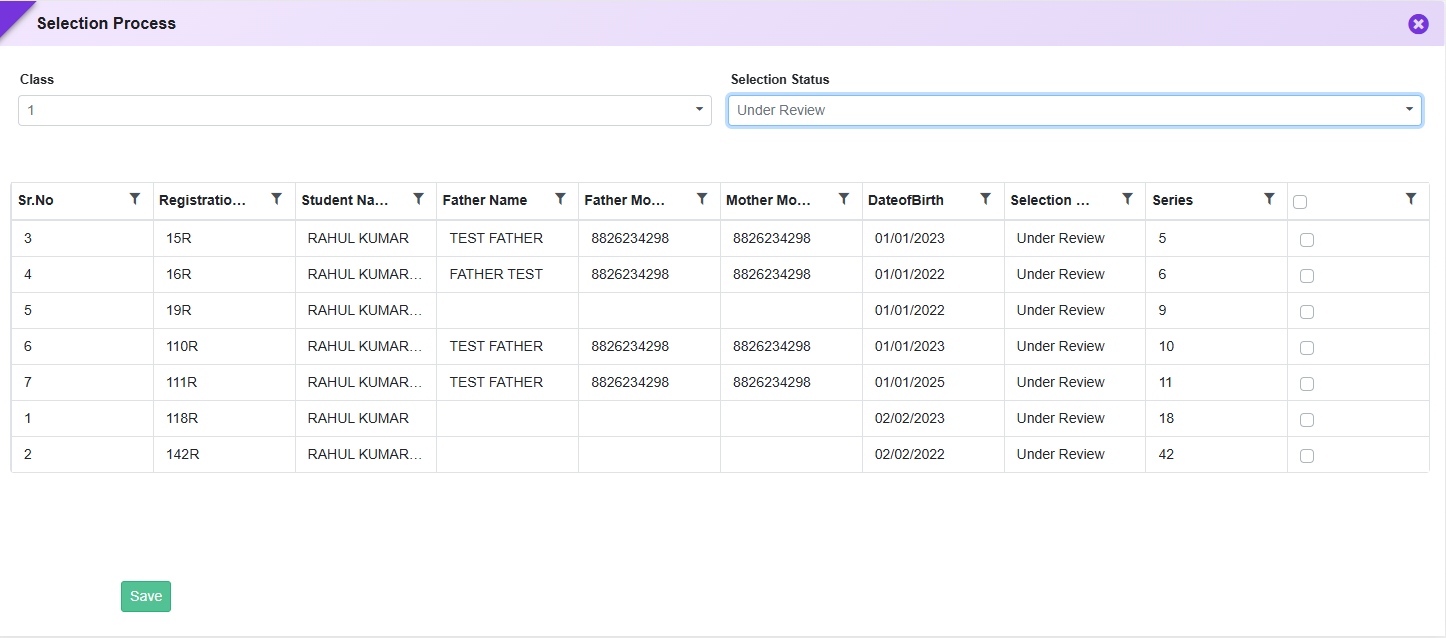
To improve efficiency in registration processing and provide quick access to student information, enhancements have been introduced in the Registration Details screen. These updates enable instant document preview and simplify bulk actions during selection and student transfer processes.
Key Functionality
Document & Registration Form Preview
Added a new Date of Birth column in:
Registration Module → Entry → Registration
Uploaded Documents Preview
Staff can click to preview uploaded documents such as:
Aadhaar Card
Registration Form Preview
Clicking on the Student Name will open the complete registration form preview.
Displays all submitted details including personal, academic, and uploaded documents.
“Apply All” Option for Bulk Processing
Added “Apply All” option in:
Selection Process Form
Transfer to Student Form
Functionality:
Allows applying a selected action/status to all listed students in one click.
Eliminates the need for individual selection.
Example Use Cases:
Mark all students asSelected / Rejected / Waitlisted
Transfer all eligible registrations to Student Master in bulk
Key Benefits
Faster Verification: Instant preview of documents without download.
Improved Decision Making: Easy access to complete registration form.
Time Saving: Speeds up admission and selection workflows.
Better User Experience: Simplifies navigation and reduces clicks.
Feature 2: Separate Admission & Print Form Management in Registration
Introduced separate upload options for Print Form and Registration (Admission) Form in Certificate Settings to support different document formats. Additionally, enabled Admission Form download from Offline Forms and included it in Registration Bulk Download, allowing schools to share admission forms without transferring students to the Student Information module.
Feature 3: Extended Sibling Mapping in Online Registration
Enhanced the Online Registration form to support mapping of up to 4 siblings under Master Setting → Registration Field Selection → Header → Sibling in this school. Added two additional sibling sections with fields including Admission No, Name, Class & Section, Father Name, and Mother Name, enabling schools to capture complete sibling details in a single registration form.
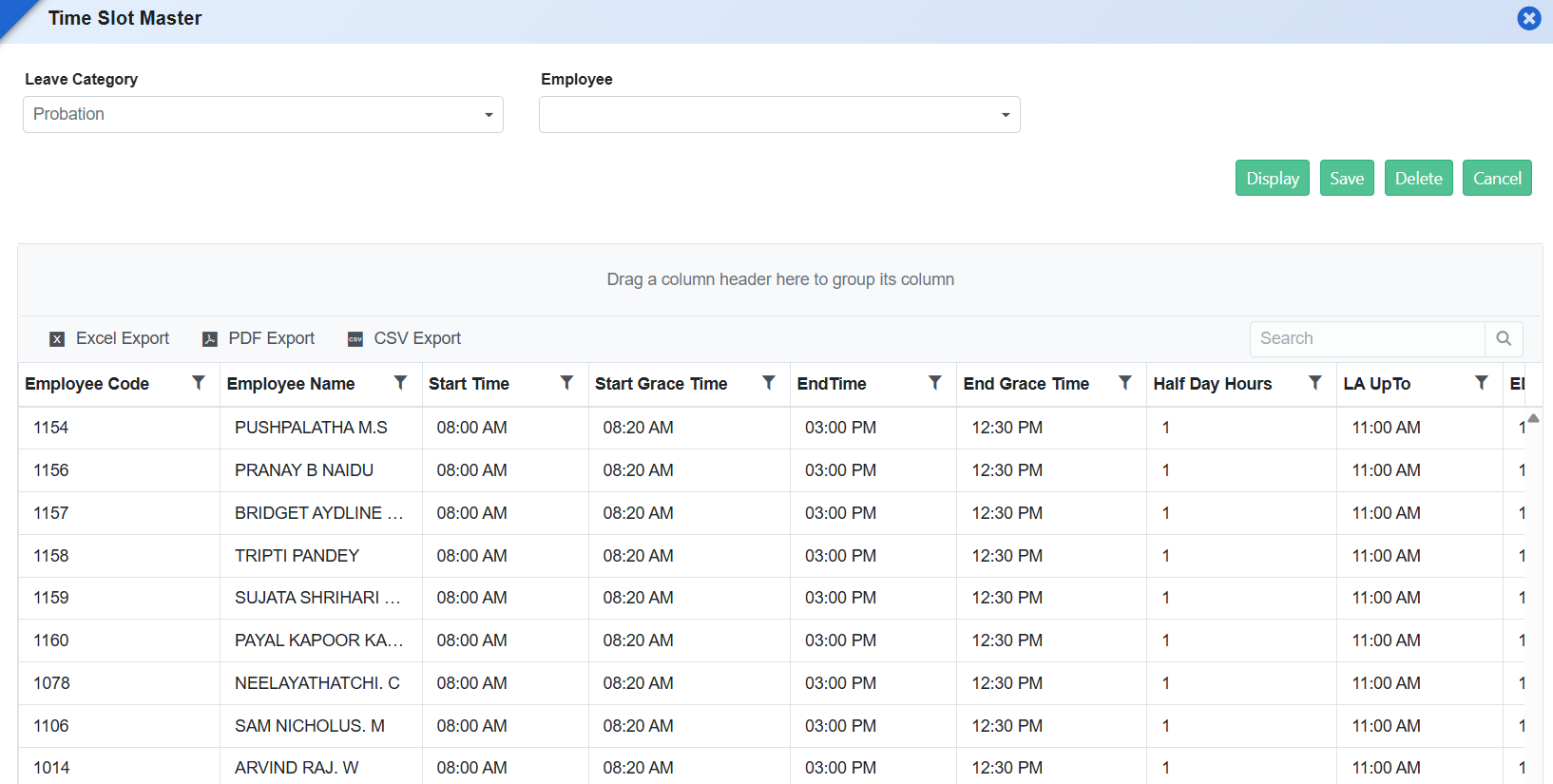
Feature 4: Time Slot Selection for Parent Interaction
Introduced a Time Slot Master to allow schools to define available time slots for parent interactions related to registration, enquiries, etc. Parents can select a preferred time slot from the available options during the process, enabling better scheduling and organized communication.
Enhanced the registration experience by introducing a “Resend OTP” option in the OTP verification screen to handle cases where OTP is not received. Additionally, improved document downloads by ensuring thatPrint Forms and Slips are saved using the Student’s Name instead of system-generated file names, enabling easier identification and better usability.
Feature 6: Registration Form Preview for Parents (Post Submission)
After successful registration submission and payment, parents can log in to their account andpreview the submitted registration form. Editing of details is restricted after final submission,ensuring data integrity while still allowing parents to review the entered information.
What's New in Registration
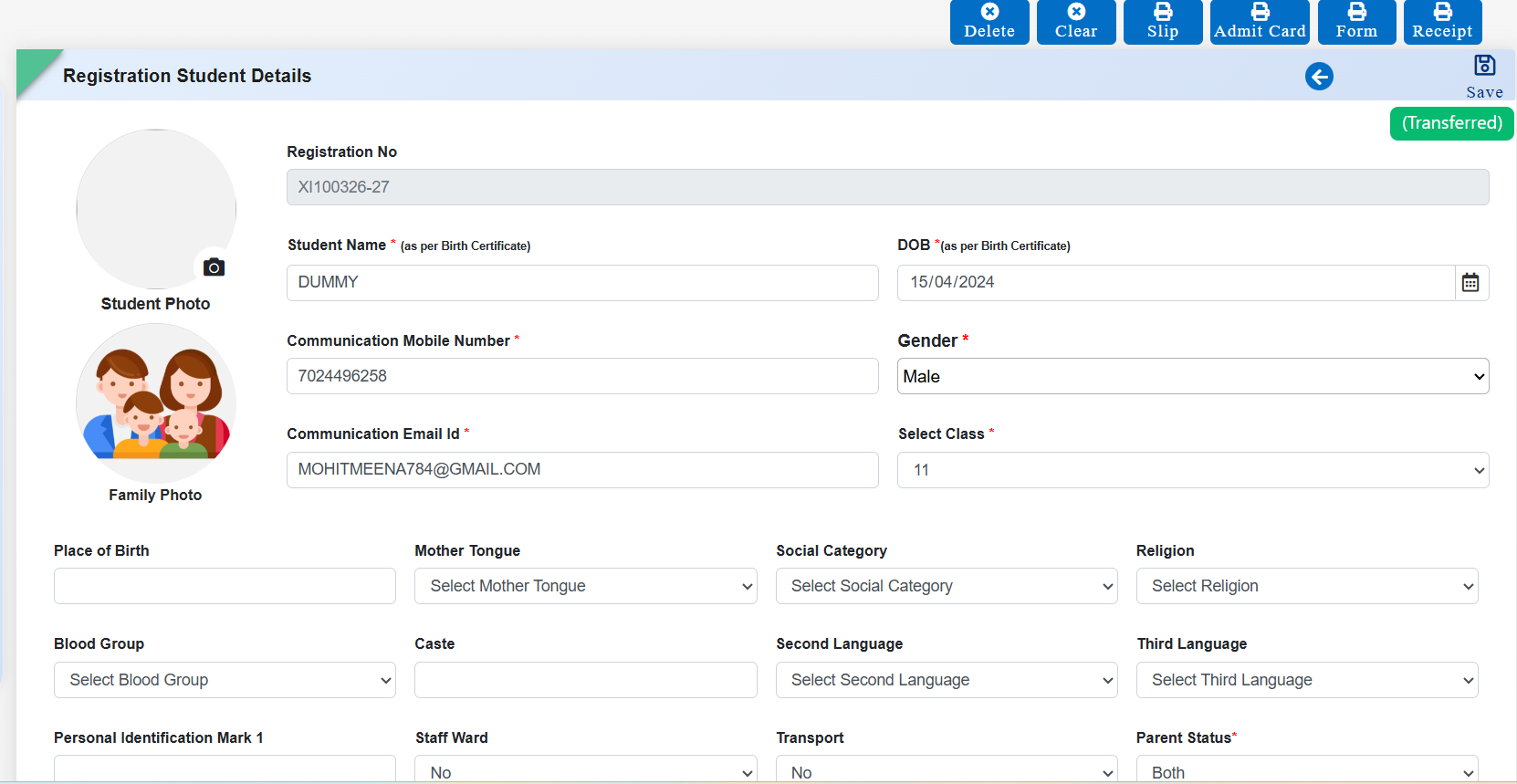
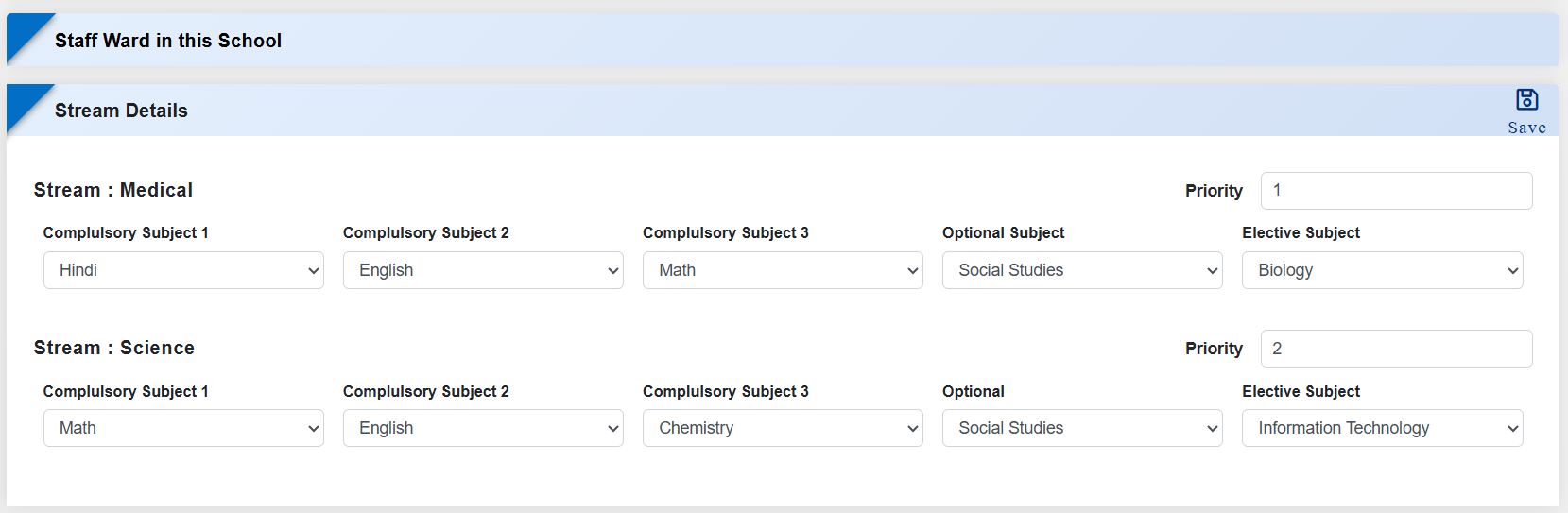
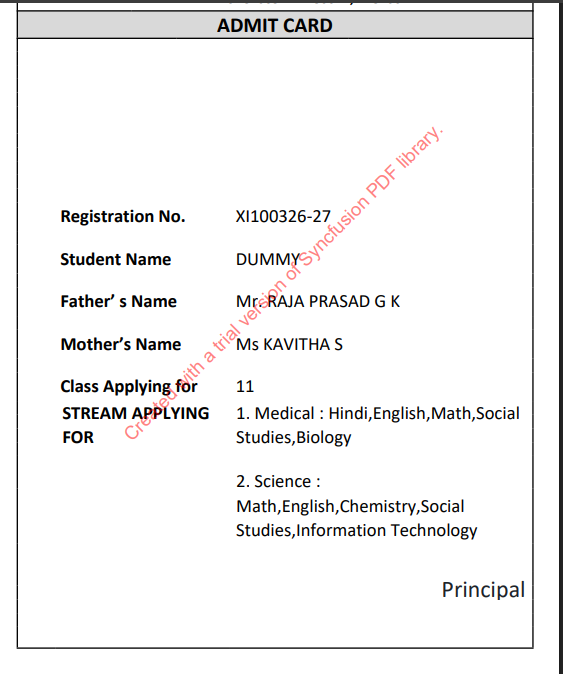
The Registration module has been strengthened to ensure that Admit Cards accurately reflect each student's selected stream and subject preferences captured during registration. Schools can now configure admit cards to display stream details priority-wise (e.g., only Priority-1 or multiple preferences) along with the exact subjects chosen by the student. This eliminates data mismatches, improves clarity for parents and students, and supports schools managing multiple streams with flexible admission policies.
Feature 1: Stream & Subject Display Configuration in Admit Card
Purpose
To make admit cards more informative and aligned with the student's registration choices, new provisions have been introduced to display stream and subject details directly on the Admit Card. This enhancement ensures that the admit card accurately reflects the stream preference and subject selection made by the student during registration, reducing ambiguity and improving communication with students and parents.
Navigation
Registration → Certificate Setting → Admit Card
Key Functionality
Added new tags for Stream and Subject in Admit Card Certificate Settings.
Enables schools to fetch and display stream data preference-wise:
Print only Priority 1 stream, or
Automatically fall back to the next priority if Priority 1 is unavailable, or
Display multiple preferences (e.g., Priority 1 to 3) as configured.
Subjects are displayed based on the student's selected subjects during registration.
Ensures the admit card prints the actual stream selected/filled by the student, with priority-based control.
Key Benefits
Accurate Representation: Admit cards now clearly reflect the student's chosen stream and subjects.
Preference-Based Control: Schools can decide whether to show only Priority 1 or multiple stream preferences.
Reduced Confusion: Eliminates mismatch between registration data and admit card details.
Professional Documentation: Produces clear, complete, and reliable admit cards for examinations.
Flexible Configuration: Supports multiple-stream schools with varying admission and preference policies.
Feature 1: Health Card Upload and Download Option
This enhancement introduces an option to upload and download
the Health Card (Medical Form) within the Registration
module, simplifying health record management for both
administrators and parents.
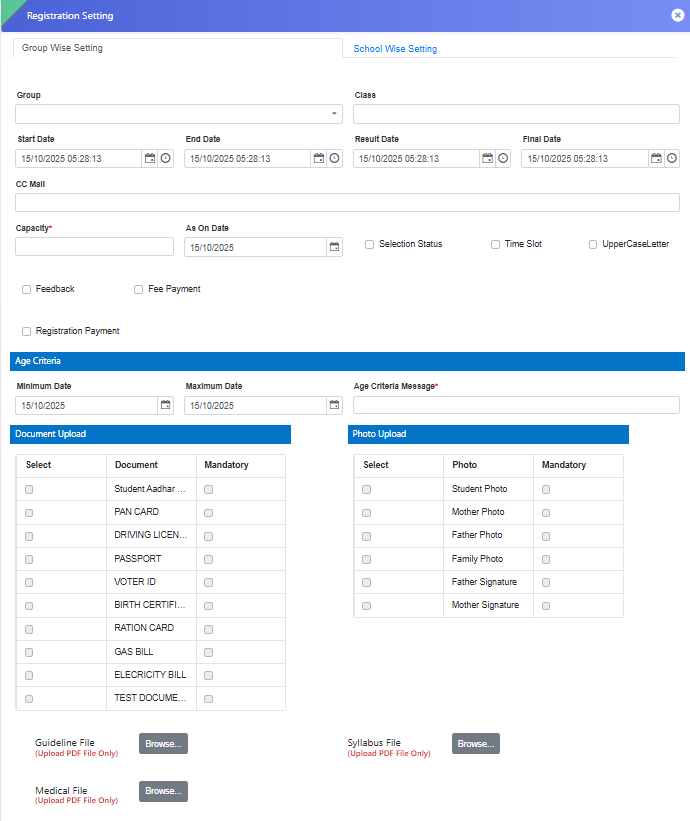
Under Group-wise Setting, an option has been added to
Upload and Download the Health Card (Medical Form).
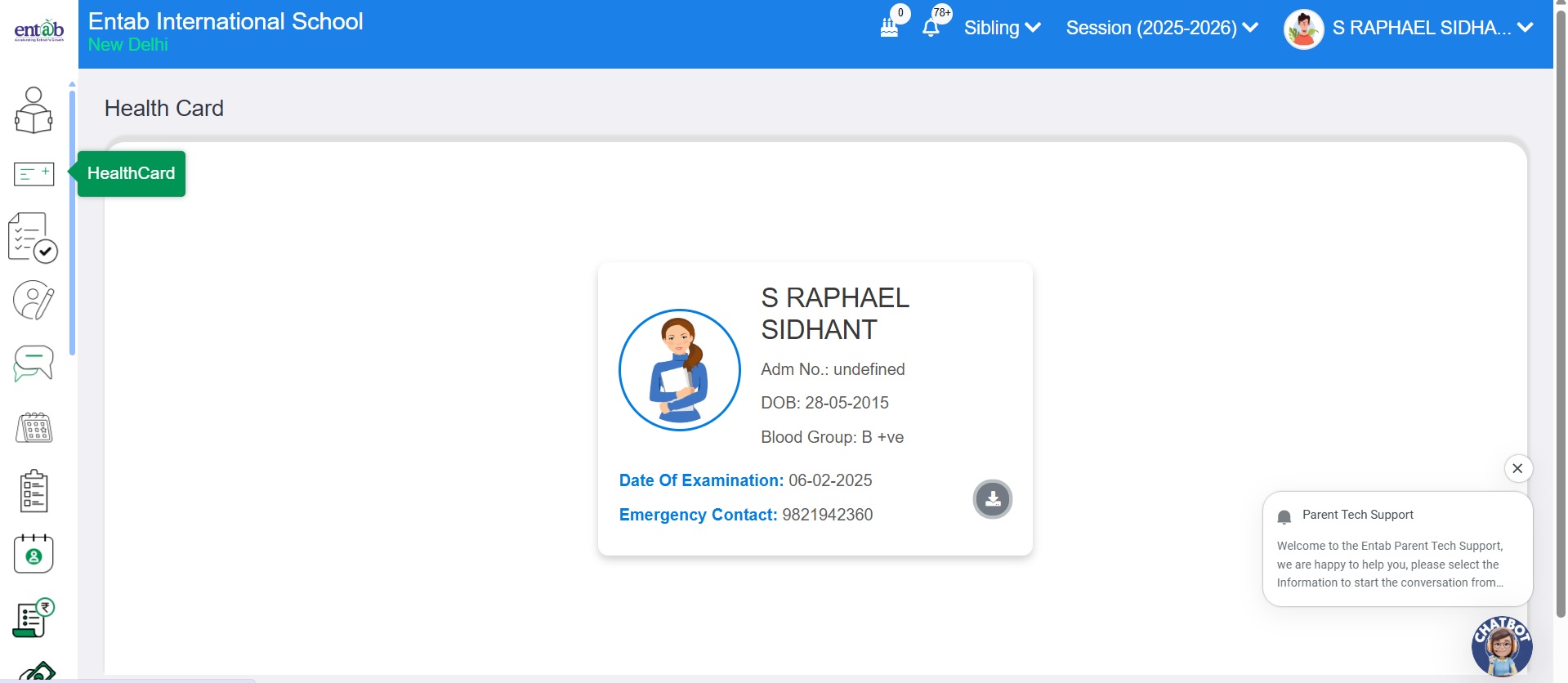
On the Parent Portal, Health Card module is available in
the side menu.
Parents can conveniently download the Health Card
directly from this module or from the Download
Guidelines section during registration.
Key Benefits
Provides a centralized and organized way to manage
student health records.
Enables parents to easily access and download the Health
Card without manual support.
Improves efficiency and transparency in the health
document submission process.
Feature 2: Addition of APAAR ID and SRN Fields in
Registration Form
To enhance student identity management and align with
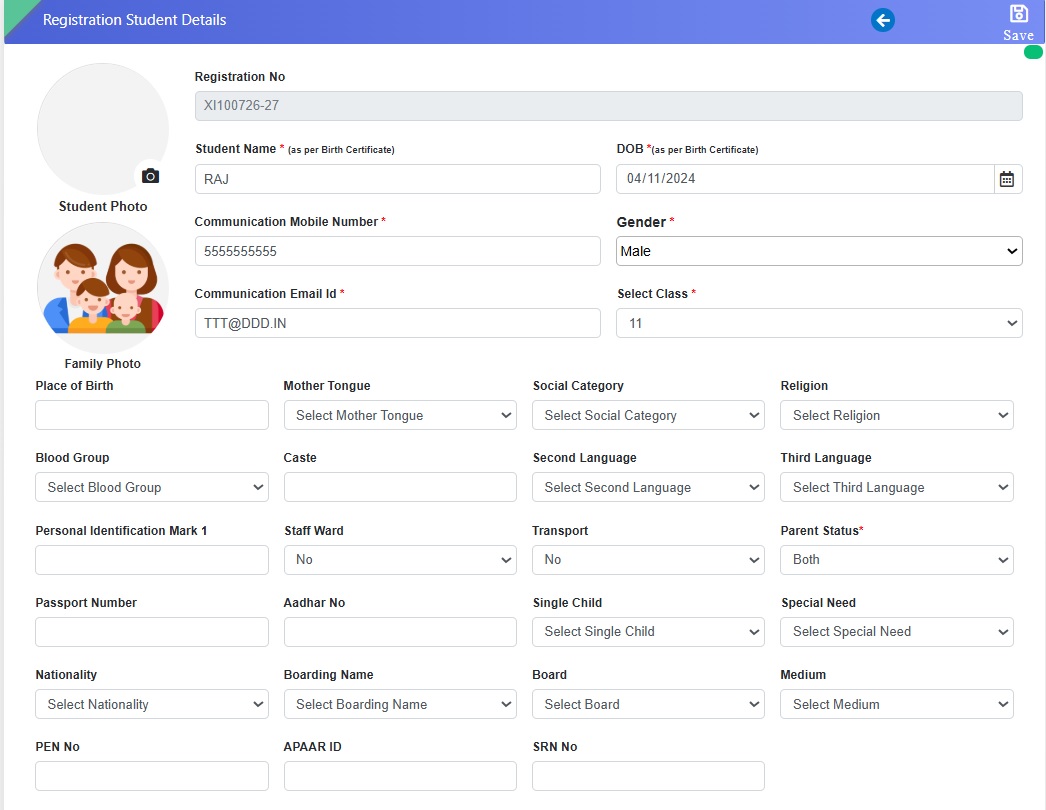
updated institutional requirements, two new fields — APAAR
ID and SRN — have been added to the Registration form.
Navigation
Registration → Entry → Registration
Key Functionality
New fields APAAR ID and SRN have been introduced
alongside PEN and Aadhaar Number in the Registration
form.
Both fields are alphanumeric in nature and can be
entered during the registration process.
The captured details will be stored along with other
student information for future reference and reporting.
Key Benefits
Supports compliance with updated student identification
and record-keeping standards.
Ensures a more comprehensive and accurate student
information database.
Facilitates smoother data exchange and verification with
external educational systems.
Feature 3: Auto-Assignment of Roll Number on Student
Transfer
This enhancement ensures accurate and sequential roll number
assignment when students are transferred from the
Registration module to the Student Information (SI) module.
Key Functionality
When a student is registered and transferred to the SI
module, the system will now automatically assign a Roll
Number based on the Max +1 series logic.
This replaces the earlier behavior where the Roll Number
was assigned as 0 by default.
Ensures consistent roll number sequencing without manual
intervention.
Key Benefits
Automates roll number generation, reducing manual effort
and errors.
Maintains proper sequencing and data consistency across
modules.
Improves accuracy and reliability during the student
transfer process.
With this update, users can now instantly download
registration receipts post offline entry, bringing greater
convenience and efficiency to the registration process.
Key Functionality
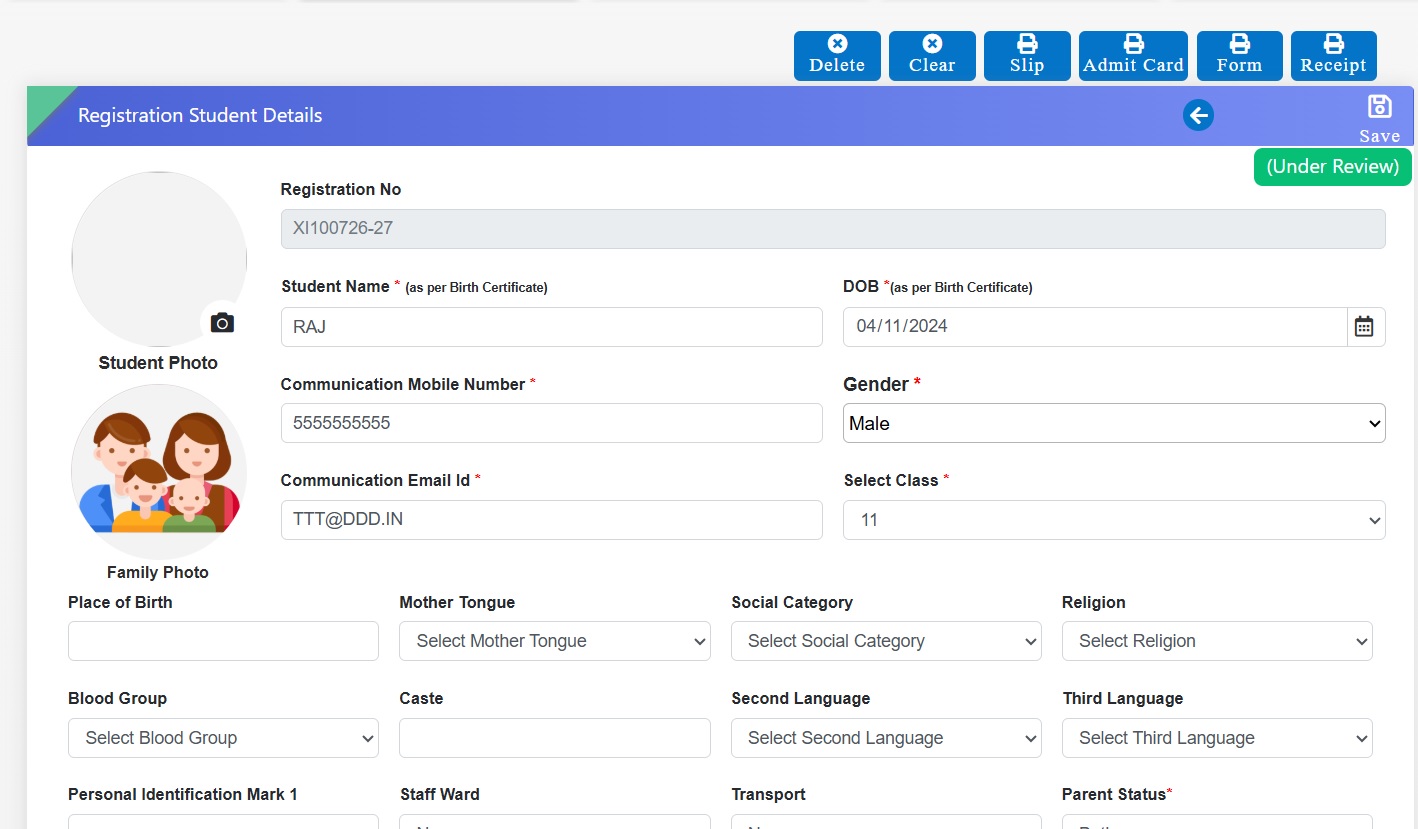
A new Registration Receipt tab has been introduced in
the Registration section.
Once an offline registration entry is saved, users can
directly download the receipt from the same form.
Alternatively, after saving the offline registration,
the system can auto-redirect to the Registration
Collection page, where the Receipt Download option is
also available.
Key Benefits
Provides quick access to registration receipts without
navigating to multiple pages.
Enhances efficiency in managing offline registrations
and payment confirmations.
Improves user experience with a seamless, one-click
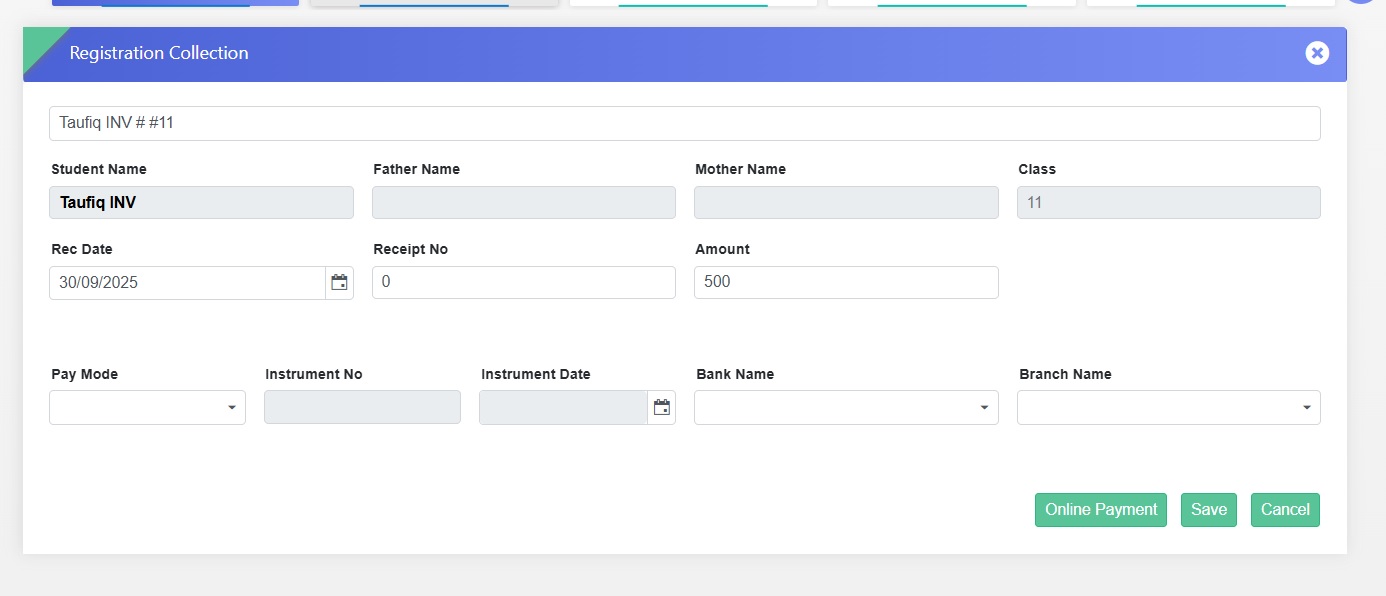
receipt download process.
Feature 1: Scan & Pay Enabled for Registration Fee
Collection
The Registration module has been upgraded to support Scan &
Pay at the school counter, alongside other payment modes,
for collecting registration fees more conveniently.
Flexible Payments: Supports both Scan & Pay and
traditional payment options.
Parent Convenience: Enables quick and hassle-free
registration fee payment at the counter.
Simplified Workflow: Makes fee collection faster and
more efficient for school staff.
Feature 2: Scan & Pay Enabled for School Fee
Post-Registration
Once a registration is confirmed, schools can now collect
school fees directly through the Registration module at the
counter, using Scan & Pay along with other enabled payment
modes.
Navigation
Registration → Registration Collection Transfer → Online
Payment
Key Benefits
Seamless Transition: Move smoothly from registration
confirmation to fee collection.
Multiple Payment Options: Supports Scan & Pay and other
payment modes.
Convenient for Parents & Staff: Reduces steps and
simplifies the collection process.
Feature 3: Auto-Generate Receipt Numbers for Registration
Collection
The Registration module now supports automatic receipt
number generation during registration fee collection,
ensuring accurate tracking and streamlined record
management.
Key Benefits
Better Tracking: Each payment is linked to a unique
receipt number.
Improved Transparency: Easy reference for parents and
school staff.
Organized Records: Simplifies reconciliation and audit
processes.
STUDENT INFORMATION MODULE & TRANSPORT MODULE UPDATES
To improve report readability, optimize page utilization, and reduce manual formatting efforts in exports (PDF/Excel), enhancements have been introduced in Student Report Settings and Analysis Reports.
Key Functionality
Student Summary Age-wise Report Enhancement
Gender in short format: M (Male), F (Female).
Added option to configure column width from report settings.
Ensures report fits within single-page view (PDF).
Social Category & Gender-wise Report
Introduced a new report: “Social Category-wise and Gender-wise Report”.
Displays data with bifurcation based on:
Social Category (e.g., General, OBC, SC, ST, etc.)
Gender (Male/Female)
Provides combined analytical view in a single report.
Analysis Reports Formatting Controls
Added alignment options for report values: Left / Center / Right alignment.
Added provision to make border lines bold.
Aligns formatting with Page Setup configuration.
Applies to both PDF and Excel outputs.
Key Benefits
Optimized Page Usage: Reports fit in one page, reducing paper wastage.
Improved Readability: Cleaner format with proper alignment and spacing.
Reduced Manual Effort: Eliminates need for post-export formatting in Excel.
Better Analysis: Social category and gender combined view aids decision-making.
Flexible Reporting: Users can customize layout as per requirement.
What’s New in Student Information
This release strengthens student data quality, reporting flexibility, and statutory readiness across the Student Information module. Schools can now create richer custom reports with student and parent images, present clearer tenure details in certificates, and generate UDISE submissions aligned with configured exam results.
The new Student Field Status tool enables proactive monitoring and correction of missing data through export and bulk upload. This helps institutions maintain accurate, compliant, and well-organized student records with reduced manual effort.
Feature 1: Student & Parent Image Fields in Custom Reports
Purpose
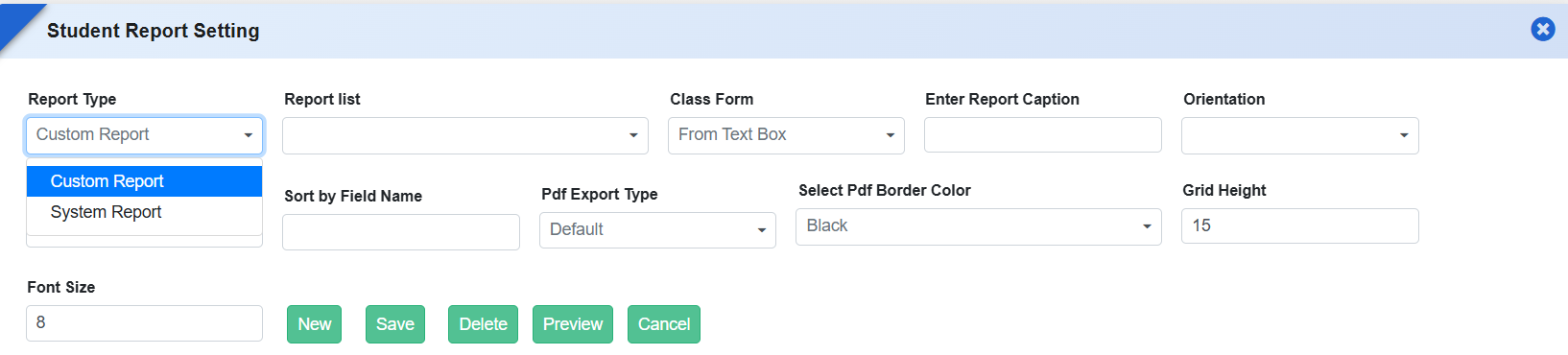
To enhance report personalization and improve visual identification, additional image fields have been introduced in System Report Settings for Custom Report Types. Schools can now include student and parent photographs directly in custom reports.
Key Functionality
Added the following fields under Report Settings → System Reports → Custom Report Type:
Student Photograph
Father’s Image
Mother’s Image
Guardian’s Image
Users can select these fields while designing custom reports.
Selected image fields are automatically rendered in generated reports.
Key Benefits
Enhanced Report Presentation: Improves visual clarity and completeness.
Flexible Report Design: Schools can choose where images are required.
Reduced Manual Effort: Eliminates the need to attach photos separately.
Better Identification: Useful for certificates and verification documents.
Feature 2: Date of Joining & Date of Leaving Tags in Certificate
Purpose
To support clearer academic timeline representation in certificates, new date-related tags have been introduced with a Month–Year format. This ensures certificates display student tenure information in a clean, standardized, and readable manner.
Key Functionality
Added new tags in Student Reports → Certificate Setting:
Date of Joining
Date of Leaving
Dates are displayed in Month Year format (e.g., January 2025, July 2026).
Tags can be used in all applicable certificate templates.
Feature 3: Student UDISE Static Report with Exam-Based Configuration
Purpose
To support accurate statutory reporting and ensure consistency in UDISE submissions, a new Student UDISE Static Report has been introduced. This report is generated based on exam configuration settings, ensuring that the final academic result reflected in the UDISE report aligns with the school’s defined exam structure.
Key Functionality
Introduced a new Student UDISE Static Report under Student Information → Reports.
Requires Exam Settings selection to generate the final result in the UDISE report.
The report fetches result data based on the configured exam (e.g., Current Exam / Previous Exam) as defined in Report Settings.
Ensures consistency between academic results and UDISE reporting data.
Key Benefits
Accurate Statutory Reporting: Ensures UDISE data reflects correct final exam results.
Configuration-Driven Output: Schools can control which exam data is used for reporting.
Reduced Data Mismatch: Aligns report output with academic settings and evaluations.
Audit & Compliance Ready: Supports reliable data submission to education authorities.
Feature 4: Student Field Status & Data Updation Management
Purpose
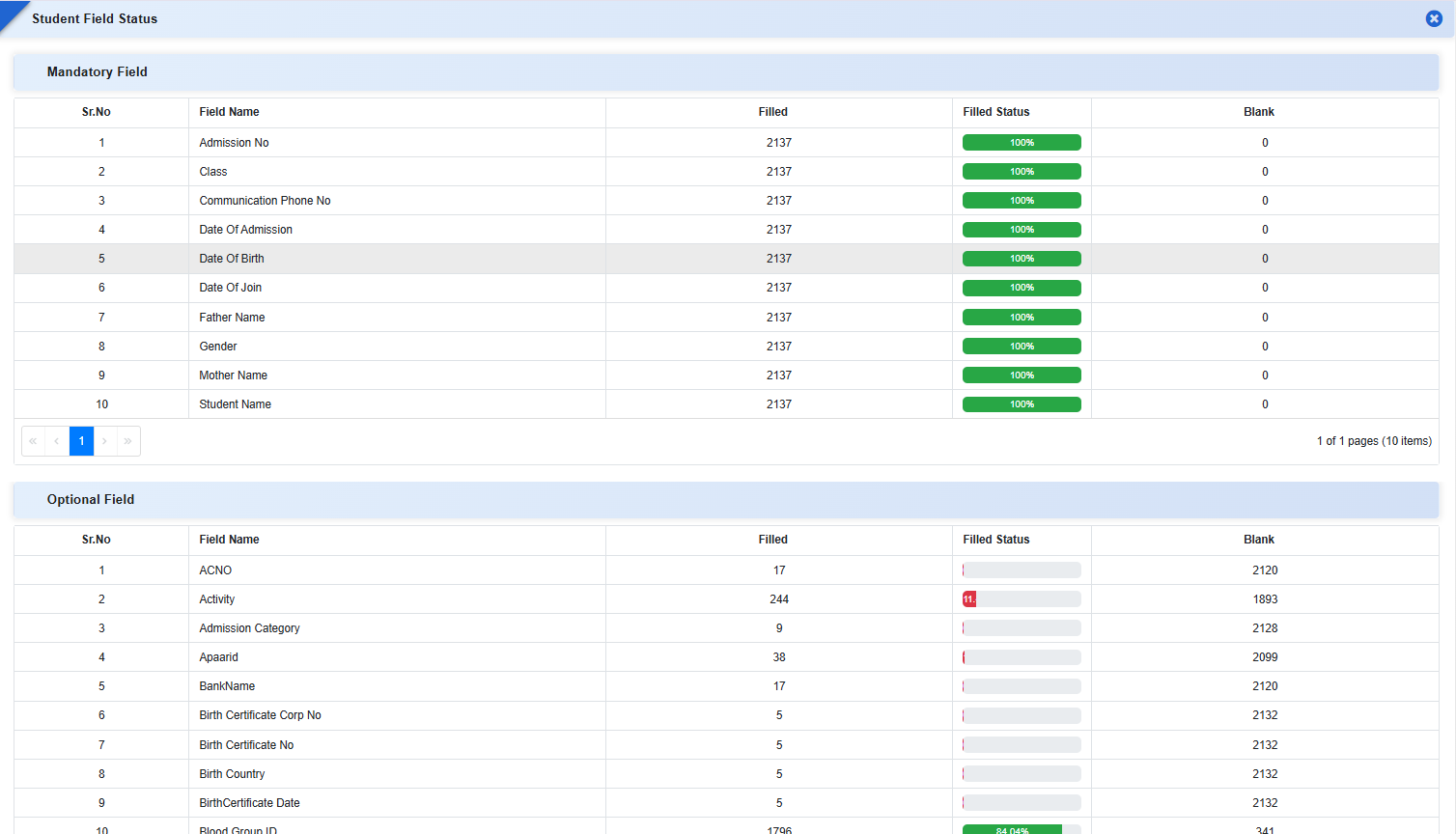
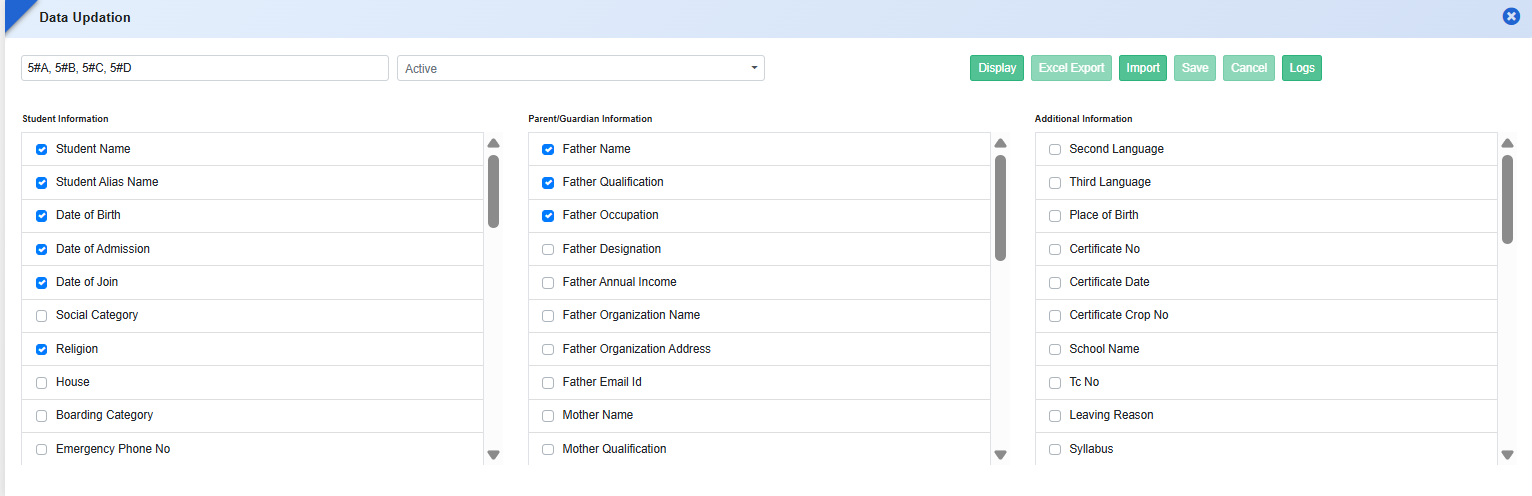
To help schools monitor data completeness and correct missing student information efficiently, a new Student Field Status form has been introduced. This enhancement provides field-wise visibility of filled and blank data, along with export and upload options, enabling schools to improve data accuracy and maintain compliance with reporting requirements.
Key Functionality
Student Field Status
Displays field-wise statistics for both:
Mandatory Fields
Optional Fields
For each field, the system shows:
Count of records filled
Count of blank records
Completion percentage (visual indicator)
Helps quickly identify data gaps across the student database.
Export of Blank Data
Provides an export option to download details of students where fields are blank.
Enables offline correction and review before re-uploading data.
Data Updation via Upload
Allows schools to upload corrected data directly using the Data Updation Form.
Supports bulk updates for faster correction of incomplete records.
Includes validation during upload to ensure data consistency.
Role-Based Access Control
Access to Student Field Status is permission-based.
Permissions must be assigned from Role Master to control visibility and usage.
Feature 5: Additional Staff Detail Tags in Report Templates
Staff Report Templates under
Student Information → Reports → Certificate Setting → Template
now include additional tags for comprehensive reporting.
Key Functionality
New tags include: Nationality, Mother Tongue, Religion, Marital Status, Aadhaar No., Caste, Place of Birth, Marriage Date, Spouse Name, Official Email ID, Identification Mark, Reporting Person, Highest Qualification, Social Category, Probation Upto, Date of Confirmation, Nature of Appointment.
Also includes complete datasets for:
Children Details
Qualification Details
Training Details
Enables dynamic retrieval of staff data in certificates and reports.
Key Benefits
Complete Data Visibility: Instantly identify incomplete student fields.
Improved Data Accuracy: Enables systematic correction of missing information.
Time-Saving: Reduces manual checking and individual record updates.
Compliance Ready: Ensures student data meets audit, statutory, and reporting standards.
Secure Access: Role-based permissions maintain data governance and control.
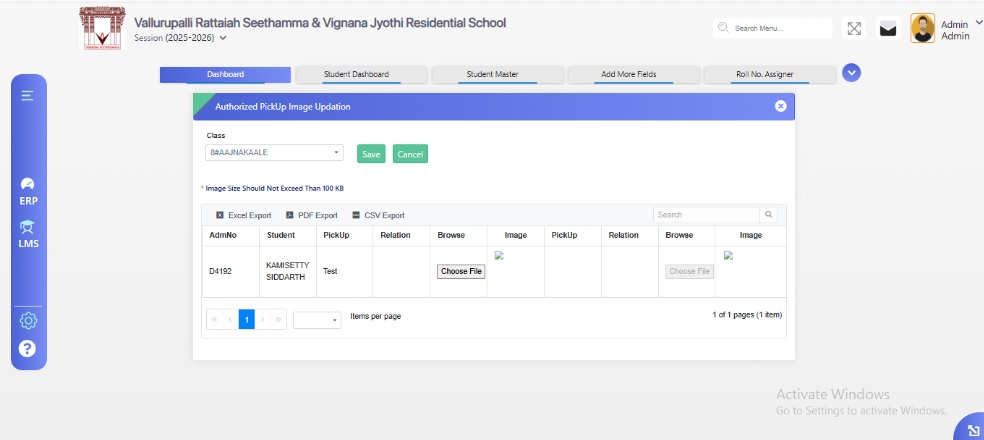
Feature 1: Authorized Pick-Up Person Image Updation
A new form,
Authorized Pick-Up Person Image Updation, has been
introduced to allow schools to maintain images of
individuals authorized to pick up students.
Key Functionality
Schools can upload or update the image of each
authorized person linked to a student.
Ensures that student pick-up records are accurately
associated with the correct authorized individual.
Navigation Path
Student Information → Authorized Pick-Up Person Image
Updation Form
Benefits
Enhances student safety and security during pick-up.
Simplifies identification of authorized persons for
school staff.
Reduces the risk of unauthorized pick-ups and improves
administrative control.
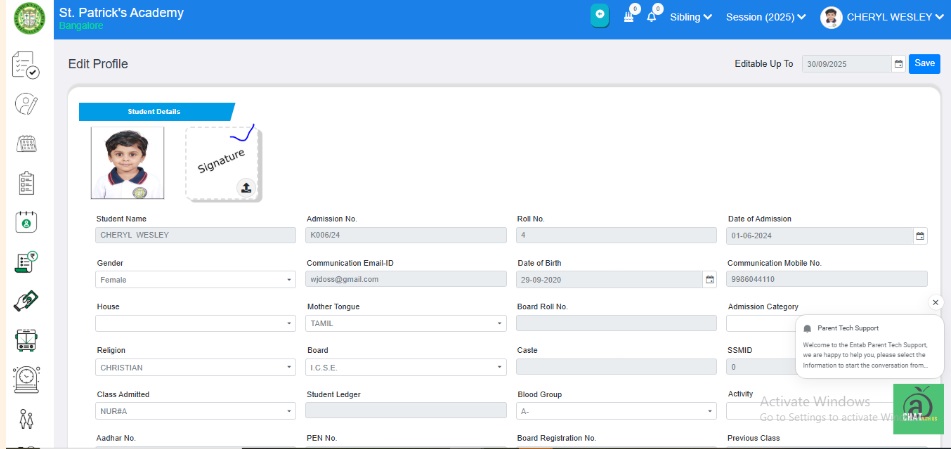
Feature 2: Student Signature Upload in Student Master
The Student Master module now supports uploading student
signatures in addition to student images.
Key Functionality
Schools can upload and update student signatures
directly from the Student Image Updation form.
Uploaded signatures are also accessible and visible
via the Parent Portal for verification and official
purposes.
Benefits
Enables schools to maintain authentic student
signatures for academic and administrative records.
Supports official documentation and report card
verification.
Simplifies administrative processes by centralizing
signature management.
Feature 3: Sibling Details Tags in Student ID Card
The Student ID Card generation module now supports
displaying sibling information through new tags:
Sibling Admission Number
Sibling Name
These tags will only display on the ID card if the student
has a sibling recorded in the system.
Benefits
Provides a quick reference to sibling details on the
student ID card.
Enhances administrative convenience and family record
visibility.
Ensures ID cards remain clean and relevant by showing
sibling information only when applicable.
Feature 4: Additional Staff Detail Tags in Report
Templates
The Staff Report Detail Templates under
Student Information → Reports → Certificate Setting →
Template
have been enhanced to include new staff-related tags for
more comprehensive reporting.
Key Functionality
Newly added tags include: Nationality, Mother Tongue,
Religion, Marital Status, Aadhar No, Caste, Place of
Birth, Marriage Date, Spouse Name, Official Email Id,
Identification Mark, Report Person, High
Qualification, Social Category, Probation Upto, Date
of Confirmation, Nature of Appointment, Children
Details (all fields), Qualification Details (all
fields), Training Details (all fields).
These tags allow dynamic retrieval of staff
information when generating certificates or reports.
Feature 1: Transport Information New Reports Added
New reports have been introduced in the Transport Module
to enhance tracking and management of student transport
data. The following reports are now available:
Bus Stop Group Detail – Displays comprehensive
details of all defined bus stop groups.
Transport Availed Students - Stop Group Wise –
Lists all students availing transport, categorized by
stop group.
Transport Availed Student Count - Stop Group
Wise
– Provides a summarized count of students availing
transport for each stop group.
Benefits
Improves visibility of transport utilization by stop
group.
Facilitates better planning and allocation of
transport resources.
Enables administrators to analyze student transport
data efficiently.
Feature 2: Improved Visibility for Installment Name in
Route Assigner
To enhance data readability and user experience, the
Installment Name column in the
Route Assigner screen has been adjusted for better
visibility. The column width has been increased by
optimizing the width of the Rate and
No. of Times columns, ensuring that full
installment names are clearly displayed.
Benefits
Improves clarity and readability of installment
details.
Enhances user experience while managing transport fee
installments.
Reduces confusion and minimizes the need for manual
scrolling or hovering to view complete information.
Feature 1: New Data Point - Attendance Percentage
We have added a new data point labeled
"AttendancePercentage" in the Excel sheet used for
template creation. This data point allows users to include
student attendance percentage through the mail merge process
while generating certificates and other documents.
The "AttendancePercentage" tag for fetching the
student's data in the certificate.
The ERP system calculates the attendance percentage
using the formula: (Present Days of Student / Total
Working Days) × 100
Navigation:
Student Information Module → Certificate Setting → Template
Button → Click on Student Template → Download Excel Sheet →
Navigate to GE Column
Benefits:
Automated attendance calculation for seamless document
generation.
Flexible template customization using mail merge.
Efficient student attendance tracking in reports and
certificates.
Feature 2: Additional Data Points for Mail Merge
We have added new data tags to enhance the mail merging
process for generating Student ID Cards and Certificates.
PresCity - Displays the Present City on the Student ID
Card (Available in the Student ID Card Template on the
Certificate Setting page).
StPincode - Displays the Pin Code of the student's
address on the Student ID Card (Available in the Student
ID Card Template on the Certificate Setting page).
WorkingDays - Displays the Total Working Days for a
particular class on the Student Certificate (Available
in the Student Template on the Certificate Setting
page).
This enhancement streamlines the mail merge process,
ensuring accurate and efficient certificate and ID card
generation. 🏫📜
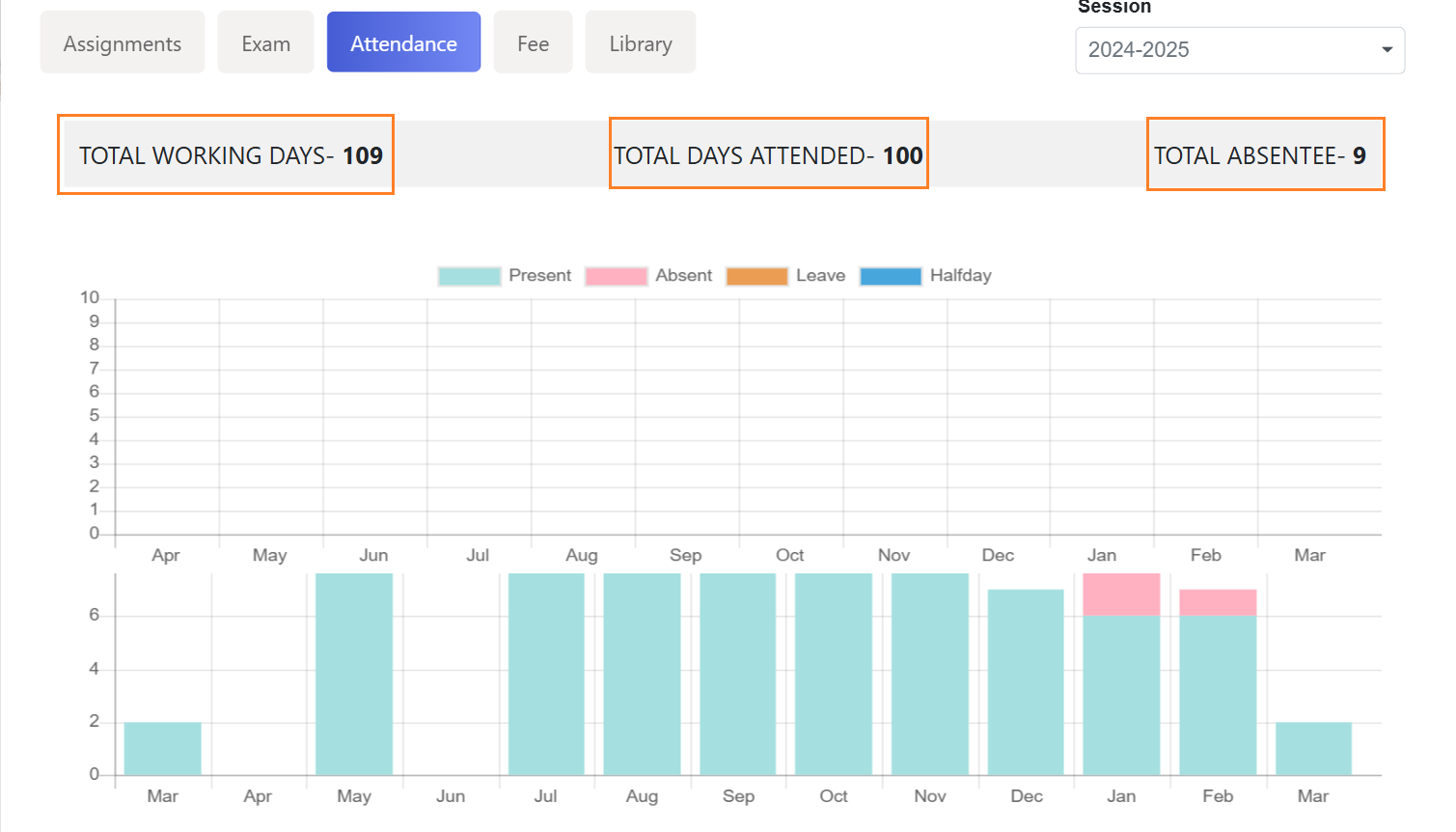
Feature 3: Attendance Summary Fields Added
We have enhanced the Attendance Tab by adding three new
read-only fields to provide a quick summary of a student's
attendance records.
Total Working Days - Displays the total number of
working days for the student.
Total Days Attended - Shows the total number of days
the student was present.
Total Absentee - Reflects the total number of days the
student was absent.
How to Access?
Navigation: Student Master → Select a Student → Click
Details Tab → Tap on Attendance Tab
This update helps administrators and staff quickly review
student attendance records at a glance. 📊✅
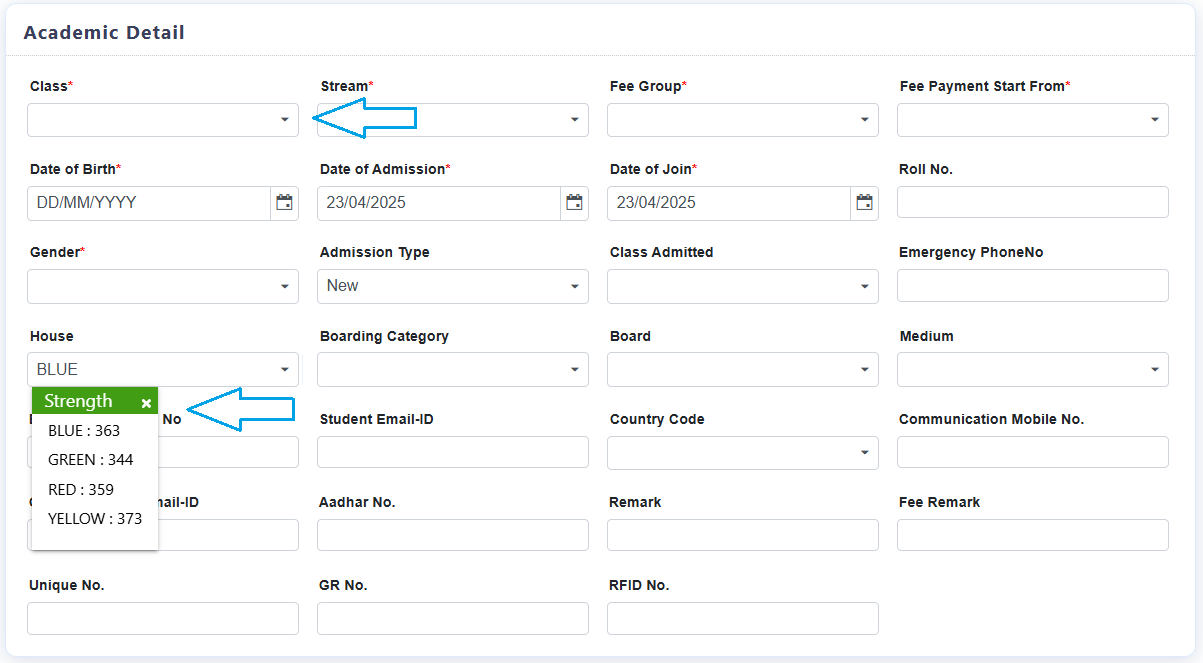
Feature 4: House Strength Visibility in Student Enrollment
Process
We have introduced a new feature that allows admins to view
the strength of each house while adding a new student to the
ERP system.
The "House" dropdown now displays the house names along
with their current strength when enrolling a student.
Upon selecting the class, the particular house list and
strength will populate, ensuring only relevant houses
linked to the selected Class & Section are shown.
If no class is selected above, then all the houses and
their strengths will be displayed.
How to Access?
Navigation: Student Master → Click (+) to add a student →
Student Details Form
This enhancement provides better visibility and control over
house allocations, ensuring balanced student distribution
across houses. 🏫📋
TRANSPORT MODULE
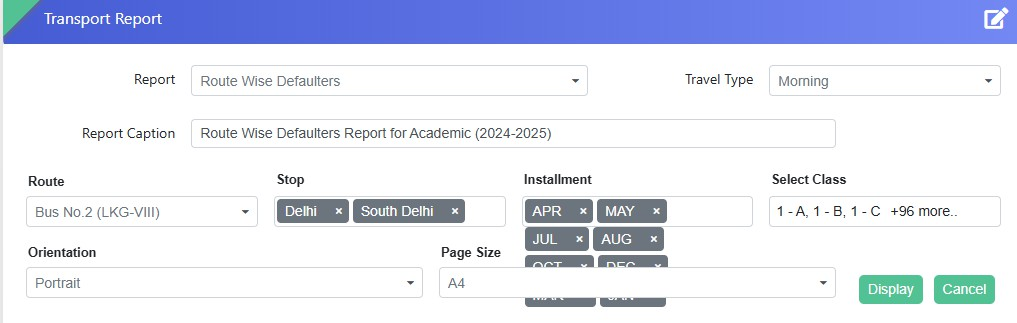
Feature 1: New Transport Report - Route Wise Defaulters
We are pleased to introduce a new transport report titled
"Route Wise Defaulters" in the system. This report helps
users identify students who have not paid their transport
fees for a selected installment.
How to Generate the Report?
Select the Travel Type
Choose the Route Name and Stop
Select the relevant Installment Names
Choose the Class or Multiple Classes
Click the Display button
The report will be displayed in a grid format, listing
students from the selected class(es) who are defaulters for
the chosen installment. Download the report in PDF or Excel
sheet as per your requirement.
This feature enhances fee tracking and helps administrators
take necessary follow-up actions efficiently.
For further details, please reach out to the support team.
🚀
FEE & BILLING MODULE - NEW FEATURE
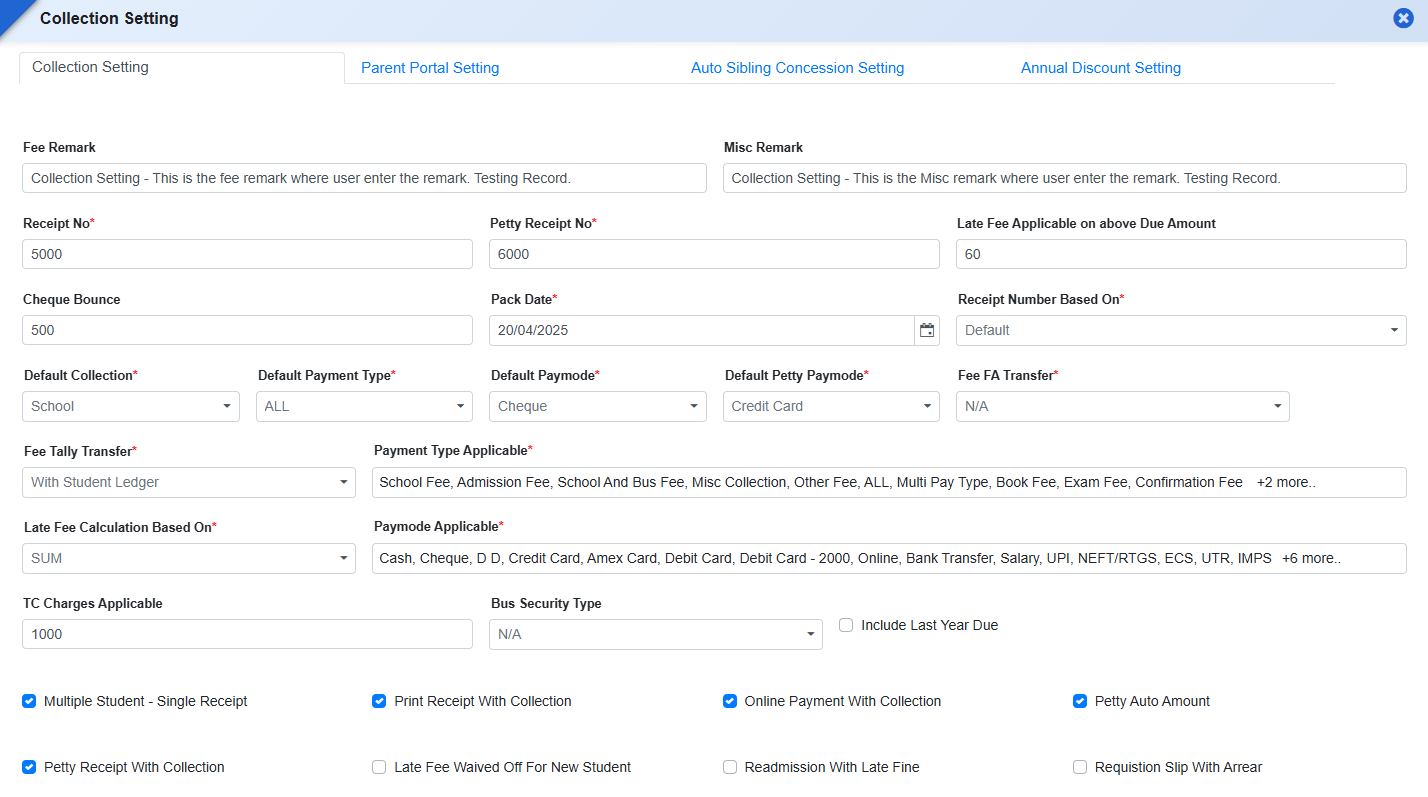
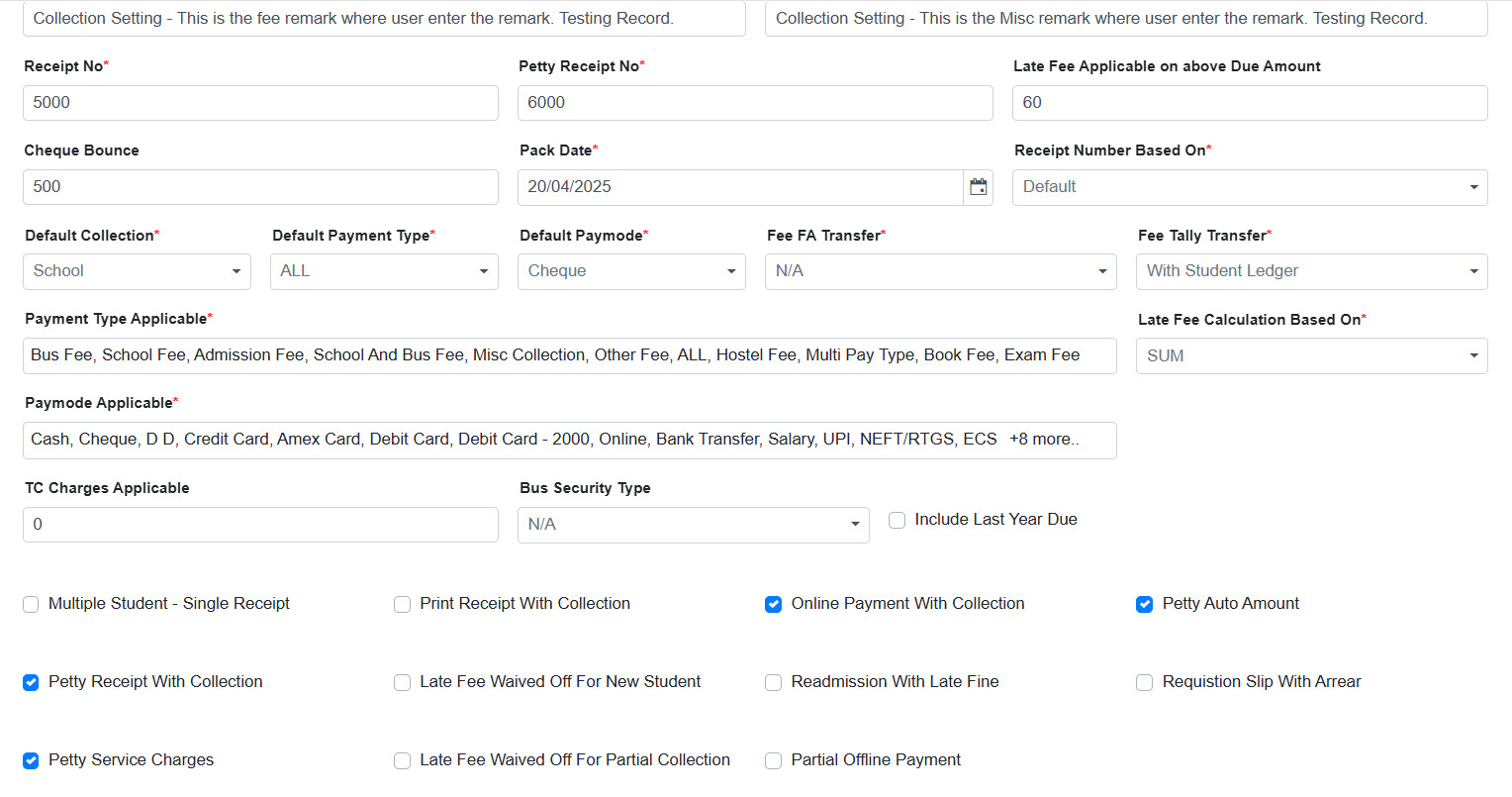
Feature 1: Default Pay Mode Configuration for Petty Collection
Purpose
To streamline petty cash transactions and reduce manual selection errors during collection, a provision has been added to configure a default payment mode specifically for petty collections.
Navigation
Fee & Billing → Collection Setting
Key Functionality
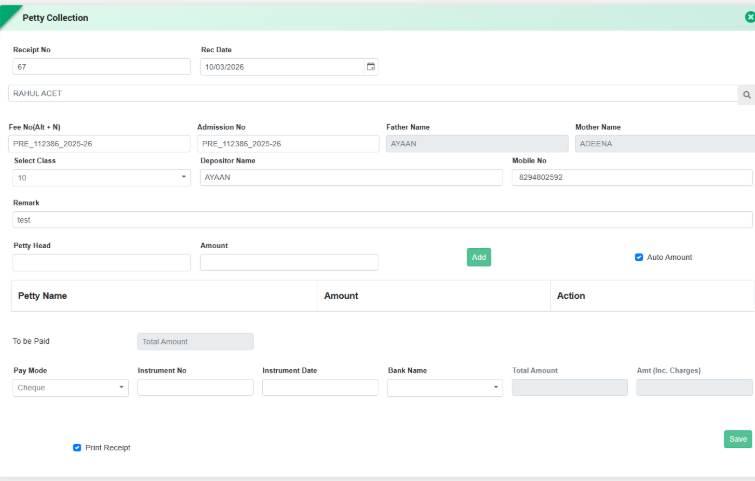
Introduced a Default Pay Mode setting for Petty Collection in Collection Settings.
Admin can configure the preferred default payment mode (e.g., Cash, Card, UPI, etc.).
The selected default mode will automatically appear in the Petty Collection entry form during transaction processing.
Key Benefits
Faster Data Entry: Reduces the need to select payment mode repeatedly.
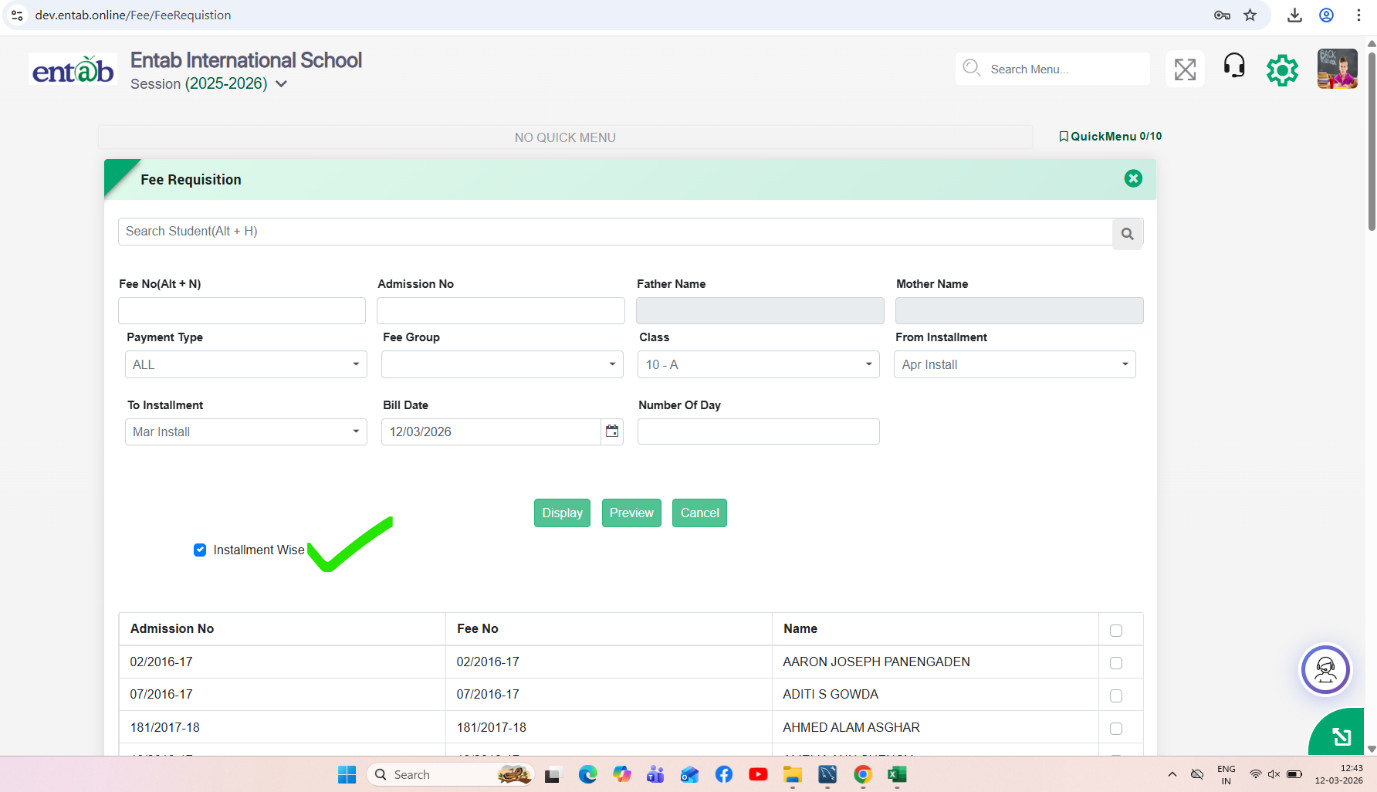
In Fee & Billing → Requisition Slip, an “Installment Wise” checkboxhas been introduced.
When this checkbox is selected:
The system generates separate requisition slips for each installment.
Each installment (e.g., Apr Install, May Install, etc.) appears on an individual requisition slipinstead of combining multiple instalments into a single slip.
When the checkbox is not selected:
The system generates a consolidated requisition slip containing all selected instalments together.
Key Benefits
Providesflexibility in fee slip generation based on school requirements.
Improvesclarity for parents by displaying installment-wise payment details.
Helps schools that issueseparate fee slips for each billing cycle.
Reduces confusion during installment-based fee payments.
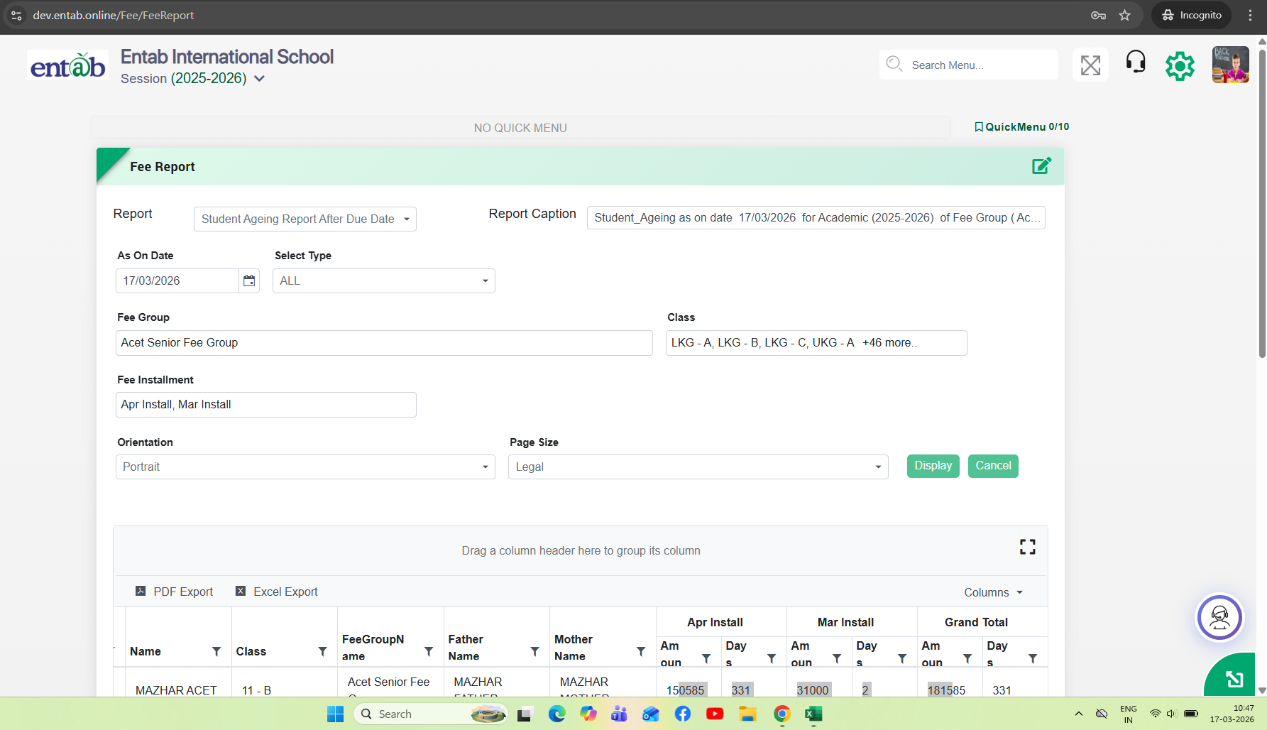
Feature 4: Student Ageing Report (After Due Date)
Purpose
To enable schools to track outstanding dues more effectively, a new report “Student Ageing Report (After Due Date)” has been introduced. This helps identify how long a fee has been pending after its due date, supporting better follow-up and financial monitoring.
Key Functionality
Added new report:Fee & Billing → Fee Reports → Student Ageing Report After Due Date
The report calculates pending days based on Due Date, not bill date or transaction date.
Ageing Logic
Pending Days = (As On Date – Due Date)
Only dues past the due date are considered.
If due date is not crossed, ageing is not calculated.
Report Filters
As On Date
Fee Group
Class
Fee Installment
Select Type (as applicable)
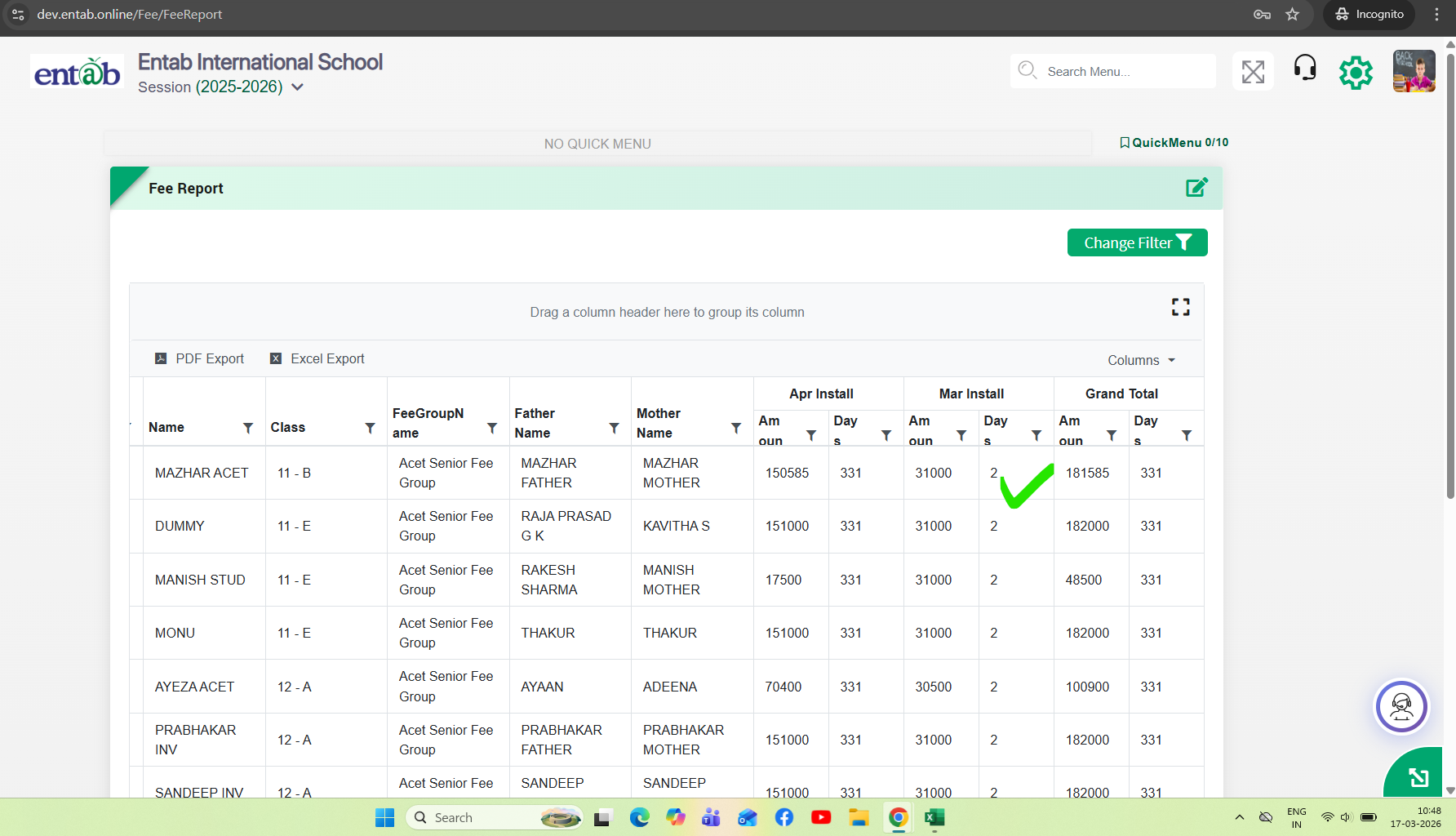
Report Output
Displays:
Student details (Name, Class, Parents info, etc.)
Installment-wise Due Amount
Pending Days (Ageing) per installment
Grand Total ageing and amount
Installment-wise Display
Shows separate columns for each installment:
Amount
Days (pending after due date)
Feature 5: Fee Certificate Transfer & Concession Report Enhancement
Purpose
To reduce repetitive setup efforts across academic sessions and provide better financial visibility, enhancements have been introduced for Fee Certificate transfer and Head-wise Concession reporting.
Key Functionality
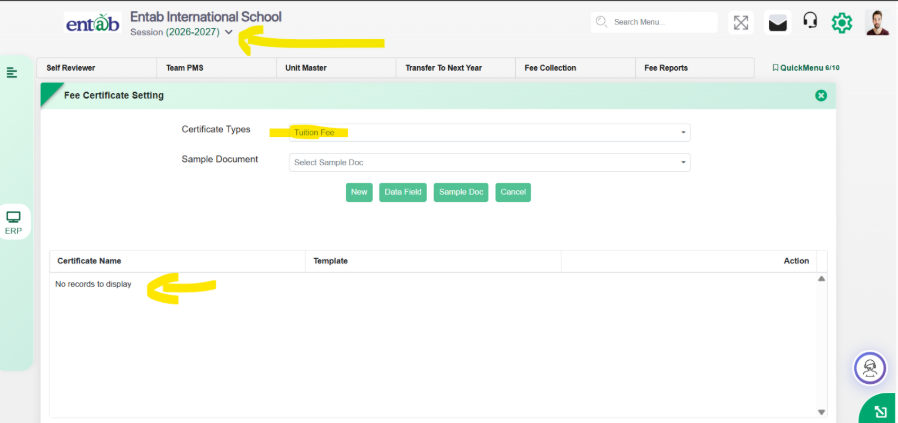
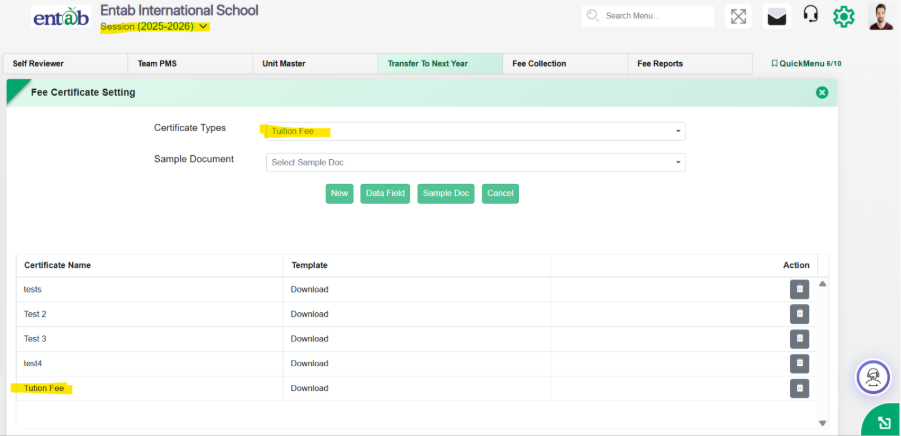
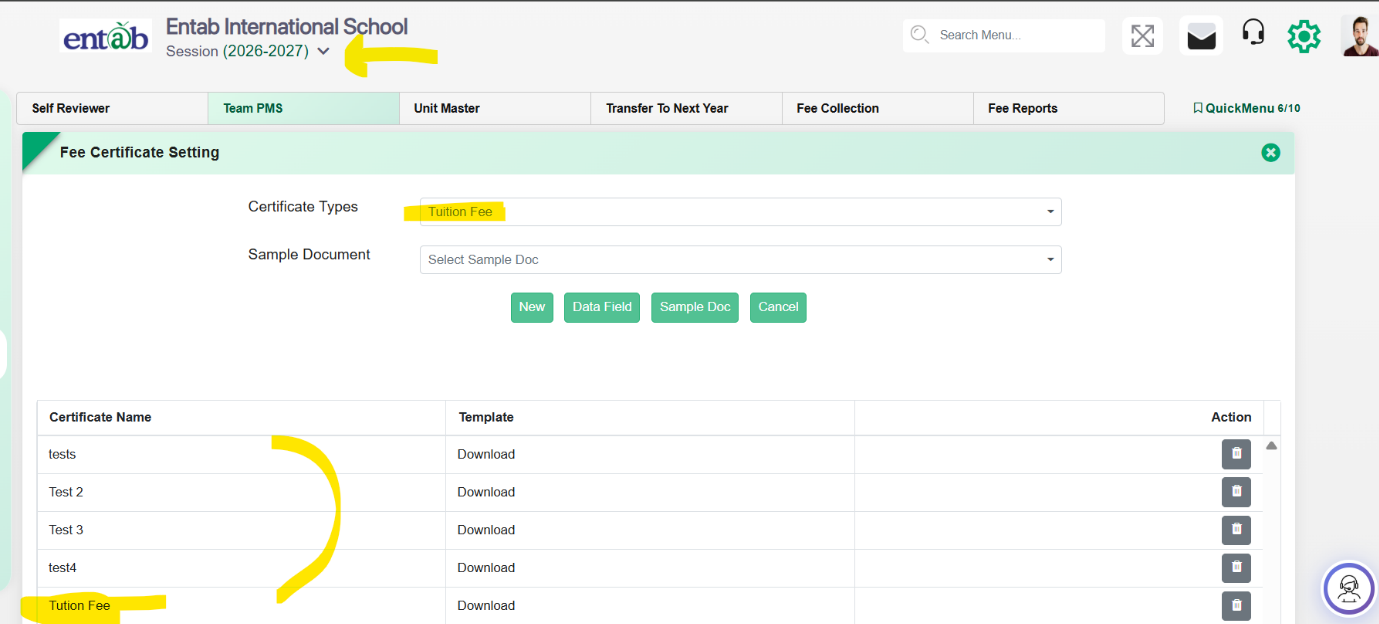
1. Fee Certificate Transfer to Next Session
Added provision in: Fee & Billing → Transfer to Next Year
Functionality:
Fee Certificates will now be automatically transferred to the next academic session.
Transferred certificates will be editable in the new session.
Any modifications made will be applicable only to that specific session (session-wise impact).
Eliminates the need to re-upload or recreate certificates every year.
Next Session (2026-2027) - Before Transfer to Next Year
- Current Session (2025-2026)
Next Session (2026-2027) - After Transfer to Next Year
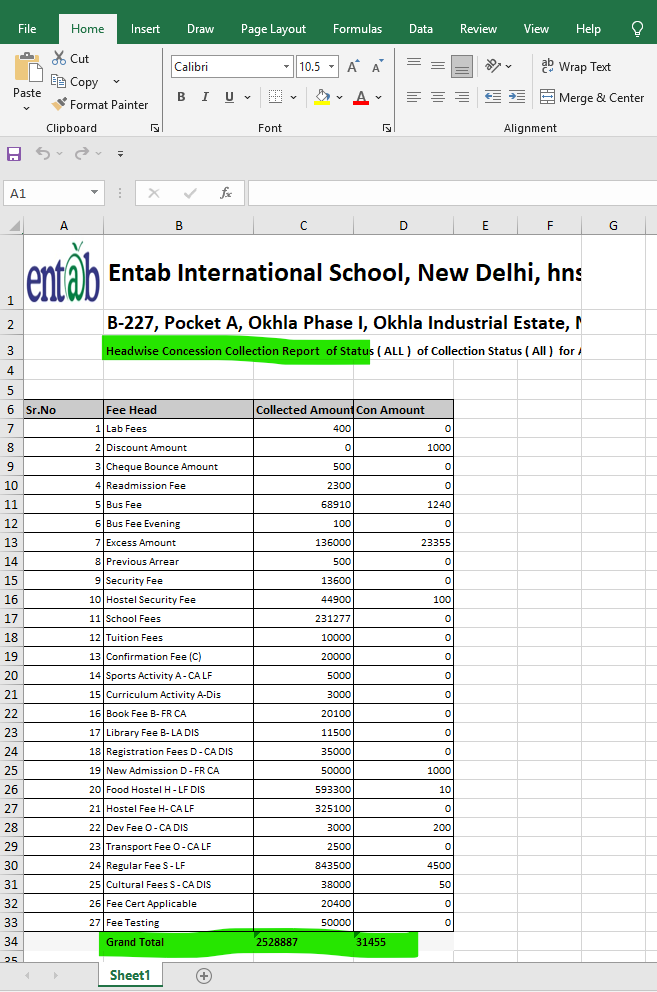
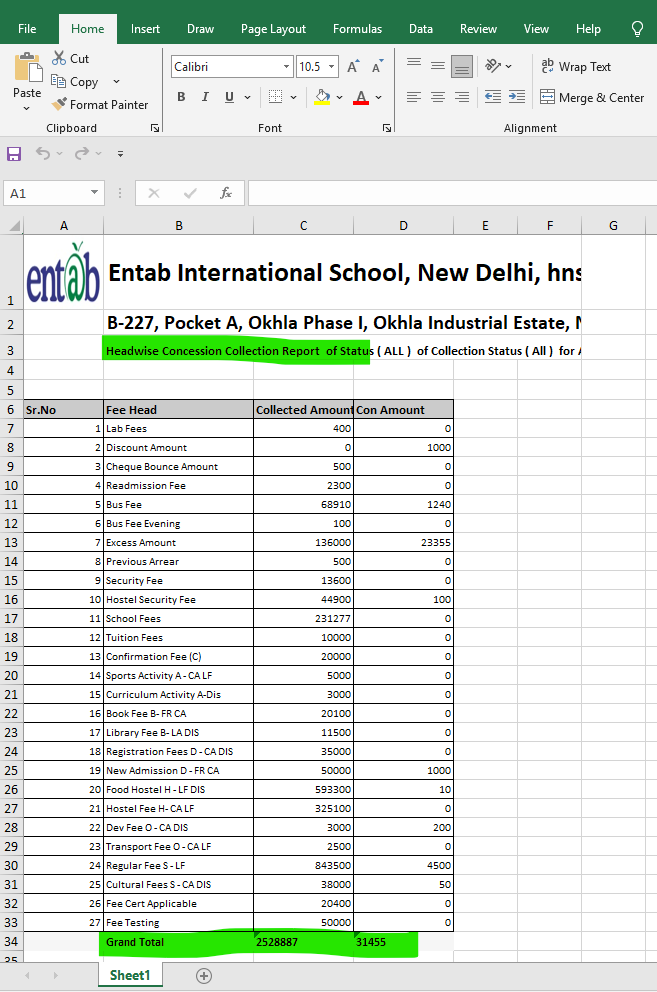
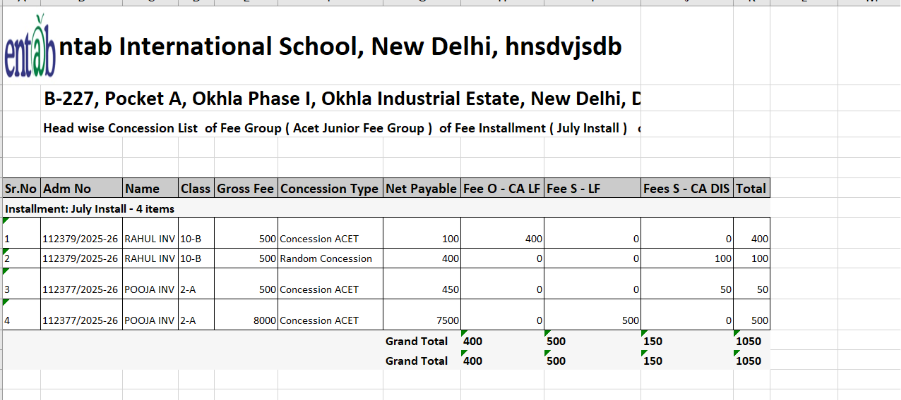
2. Head-wise Concession Report Enhancement
In: Fee → Reports → Head Wise Concession List
Added two new configurable columns in Report Setting:
Gross Fee
Displays total fee as per fee structure.
Calculated based on selected installment(s).
Net Payable
Displays fee after applying concession.
Columns can be enabled/disabled from frontend via report settings.
Key Benefits
Reduced Manual Effort: No need to upload fee certificates every session.
Session-wise Control:Changes in certificates do not affect previous sessions.
Improved Financial Transparency: Clear visibility of Gross vs Net payable fee.
Better Concession Analysis:Helps track how much concession is given overall.
Flexible Reporting:Users can customize report columns as per requirement.
Feature 6: Pay Mode Mapping Correction in Collection Setting
Updated the pay mode mapping in Collection Settings to ensure accurate classification, where ECS is mapped to Visa Card and UTR is mapped to Diners Club improving payment mode consistency in transactions and reports.
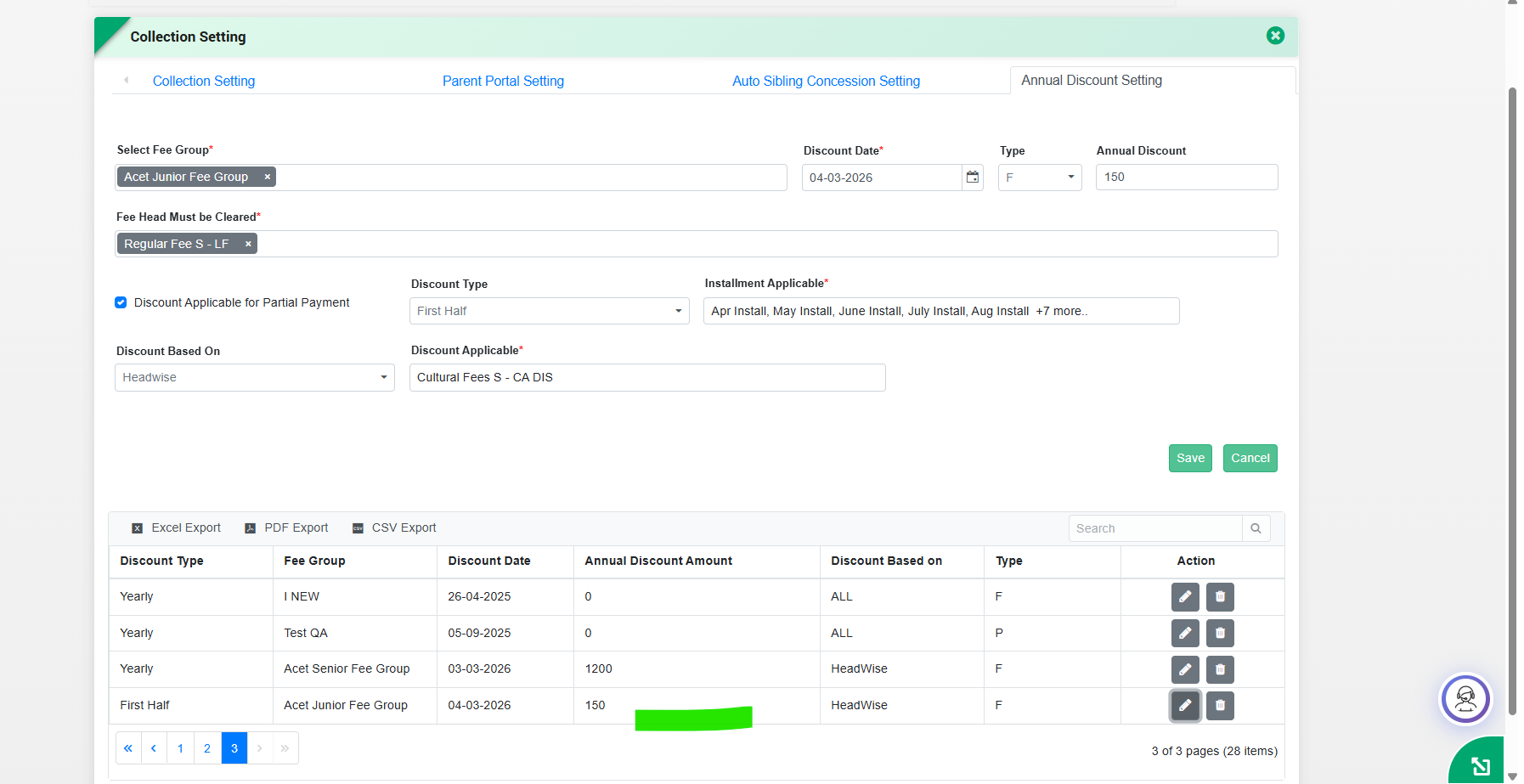
Feature 7: Discount Type in Annual Discount Setting (Fee Collection)
Key Functionality:
Introduced a new field “Discount Type” in Fee → Collection Setting → Annual Discount Setting
Allows users to define thetype of discount (e.g., First Half, Yearly, etc.) while configuring annual discounts.
The selected discount type is automatically considered during fee collection calculation.
Key Benefits:
Provides better control and classification of discounts
Ensures accurate discount application during fee collection
Improves flexibility in managing different discount structures
What's New in Fee & Billing
This release significantly strengthens financial transparency, reconciliation accuracy,
and collection efficiency across the Fee & Billing module. Schools now benefit from
clearer visibility of payable amounts—including cheque bounce charges—along with improved
online payment verification through Billdesk integration. The introduction of split settlement
for Ease buzz simplifies banking operations, while new reports and session corrections enhance
audit readiness. A completely redesigned Fee Dashboard delivers real-time, graphical insights
into collections, defaulters, and trends, enabling principals and management to make faster,
data-driven decisions with reduced manual effort.
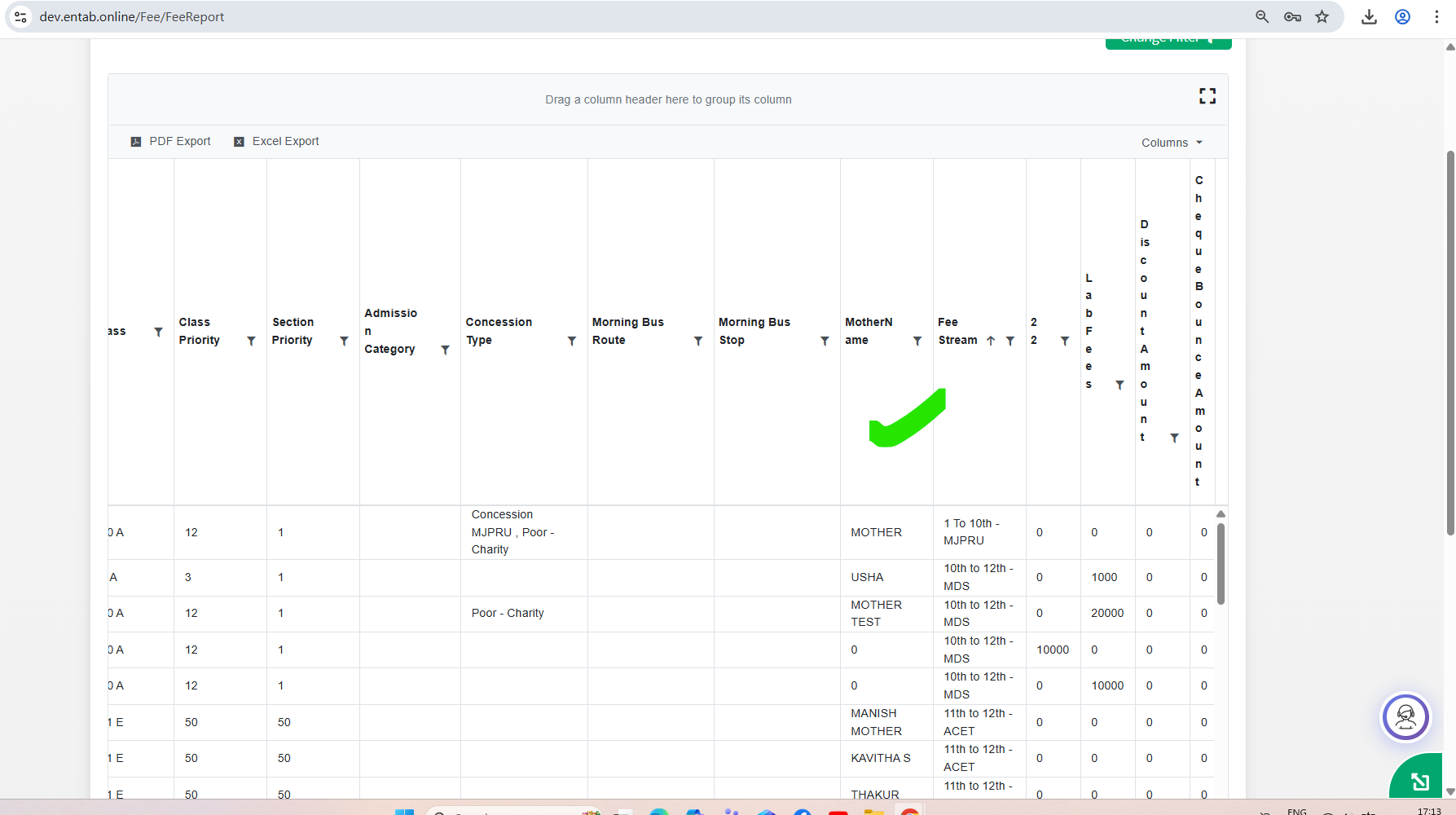
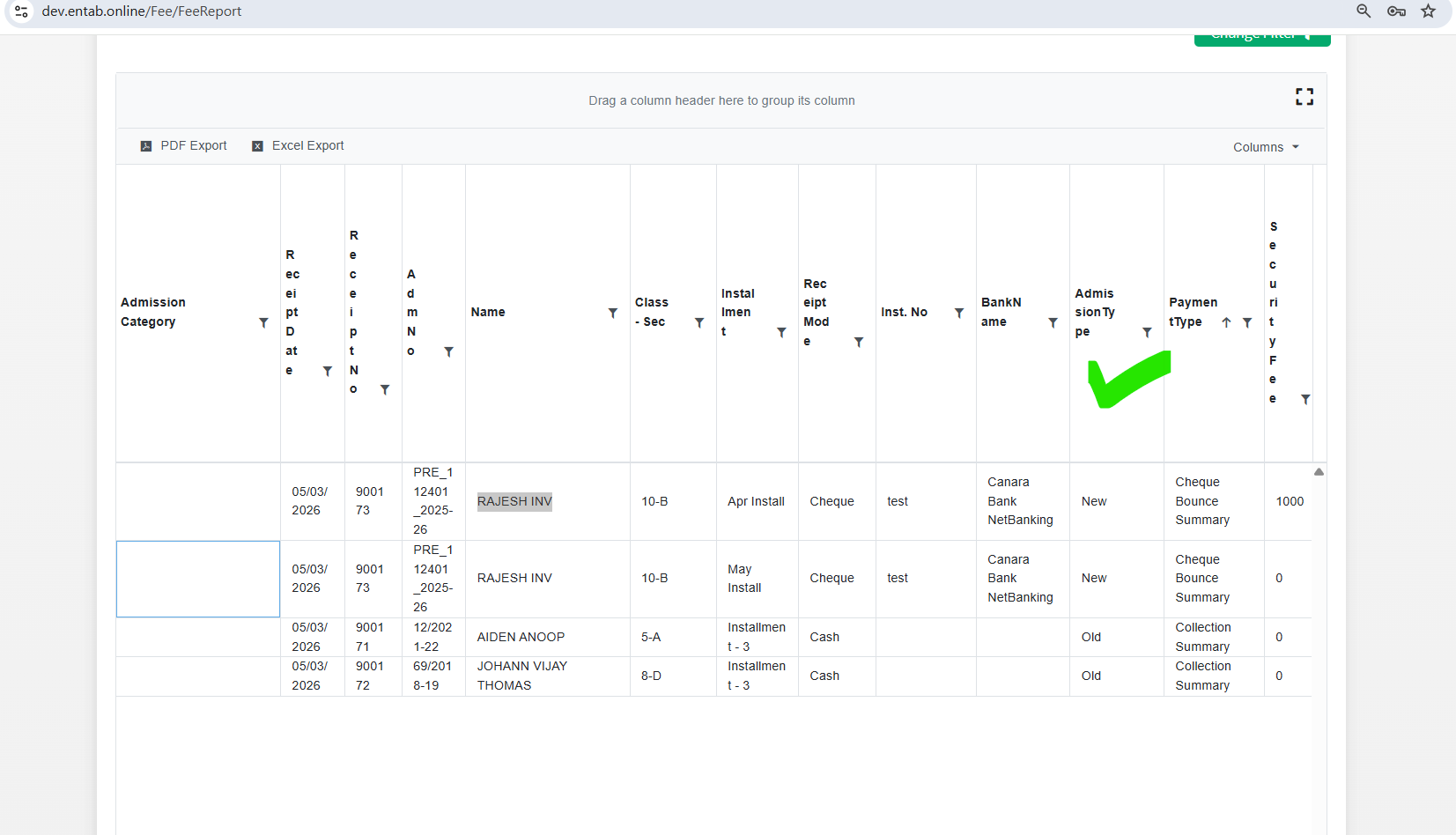
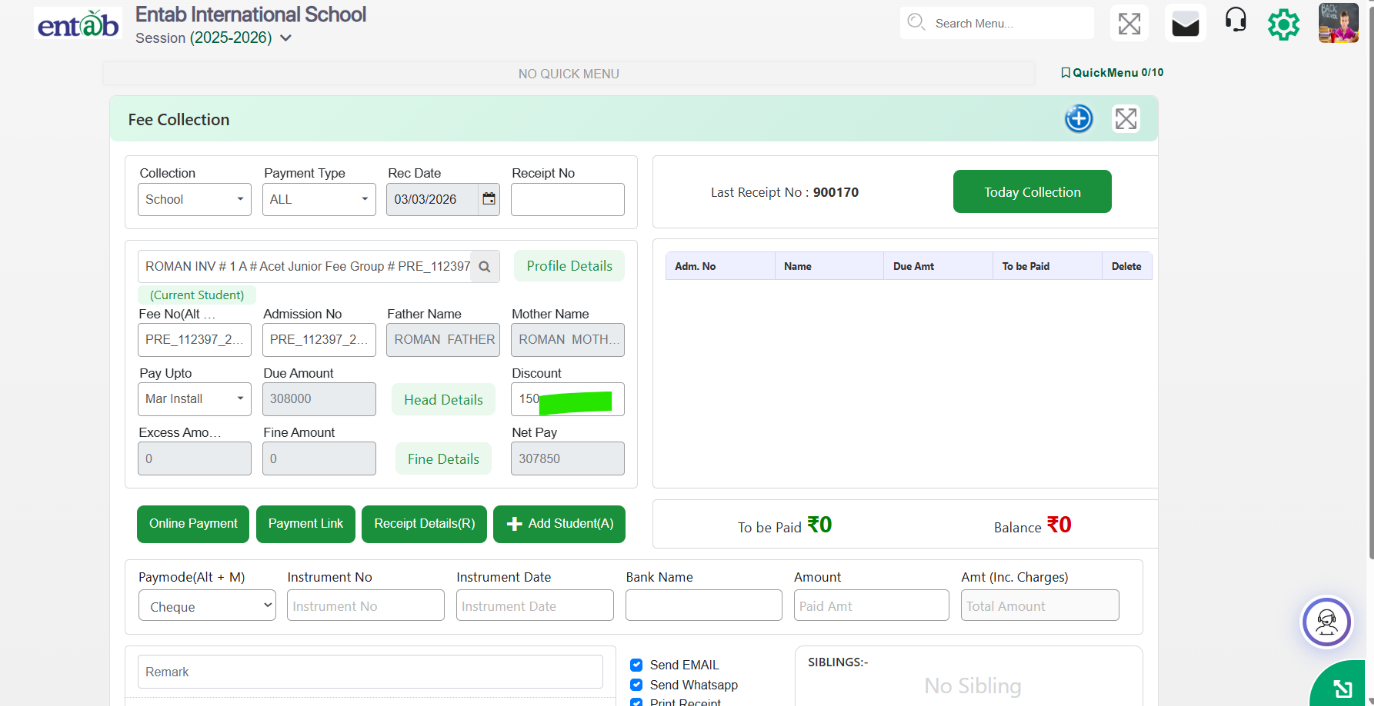
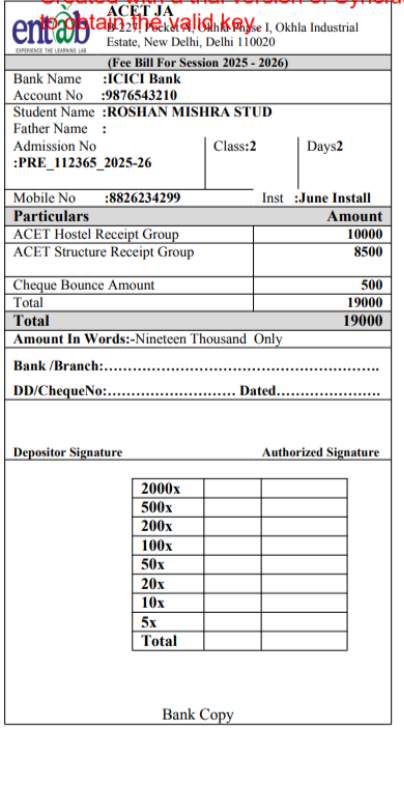
Feature 1: Cheque Bounce Amount Visibility in Requisition Slip
Purpose
To ensure accurate and transparent fee communication with parents, the Requisition
Slip has been enhanced to consistently display pending cheque bounce charges.
This change ensures that the actual payable amount is always reflected on the requisition
slip until the cheque bounce amount is fully collected, avoiding confusion and missed dues.
Key Functionality
When a cheque bounce charge is pending, it is automatically tagged to the Requisition Slip.
The cheque bounce amount will appear on the requisition slip for any installment generated (current or future).
The charge continues to be displayed until the cheque bounce amount is paid by the parent.
Once collected, the cheque bounce amount will no longer appear on subsequent requisition slips.
Ensures the requisition slip always shows the correct total payable amount from the parent's perspective.
Benefits
Accurate Fee Demand: Parents clearly see all pending charges, including cheque bounce amounts.
No Revenue Leakage: Prevents cheque bounce charges from being overlooked or missed.
Consistent Billing: Bounce charges are carried forward automatically across installments.
Reduced Disputes: Eliminates confusion regarding additional charges at the time of payment.
Improved Financial Control: Ensures complete and timely recovery of cheque bounce penalties.
Feature 2:Easebuzz Payment Gateway - Split Settlement Support
Purpose
To simplify reconciliation and auditing for schools using the Easebuzz payment gateway,
split settlement functionality has been introduced. This enhancement
allows schools to operate multiple bank accounts under a single MID,
eliminating the need to manage multiple MIDs and reducing operational complexity.
Key Functionality
Enables multiple bank accounts to be configured under one Easebuzz MID (similar to Atom split functionality).
Supports transaction-level mapping to route collections to the appropriate bank account.
Ensures automated settlement into respective bank accounts based on defined rules.
Maintains accurate transaction tracking for reporting, reconciliation, and audits.
Benefits
Simplified Reconciliation: Removes dependency on multiple MIDs, making reconciliation easier and cleaner.
Audit-Friendly: Centralized MID with split settlements improves traceability and audit readiness.
Operational Efficiency: Reduces payment gateway configuration and management overhead.
Flexible Banking Setup: Supports multiple bank accounts without changing the payment flow for parents.
Scalable for Large Schools: Ideal for institutions managing collections across different accounts or branches.
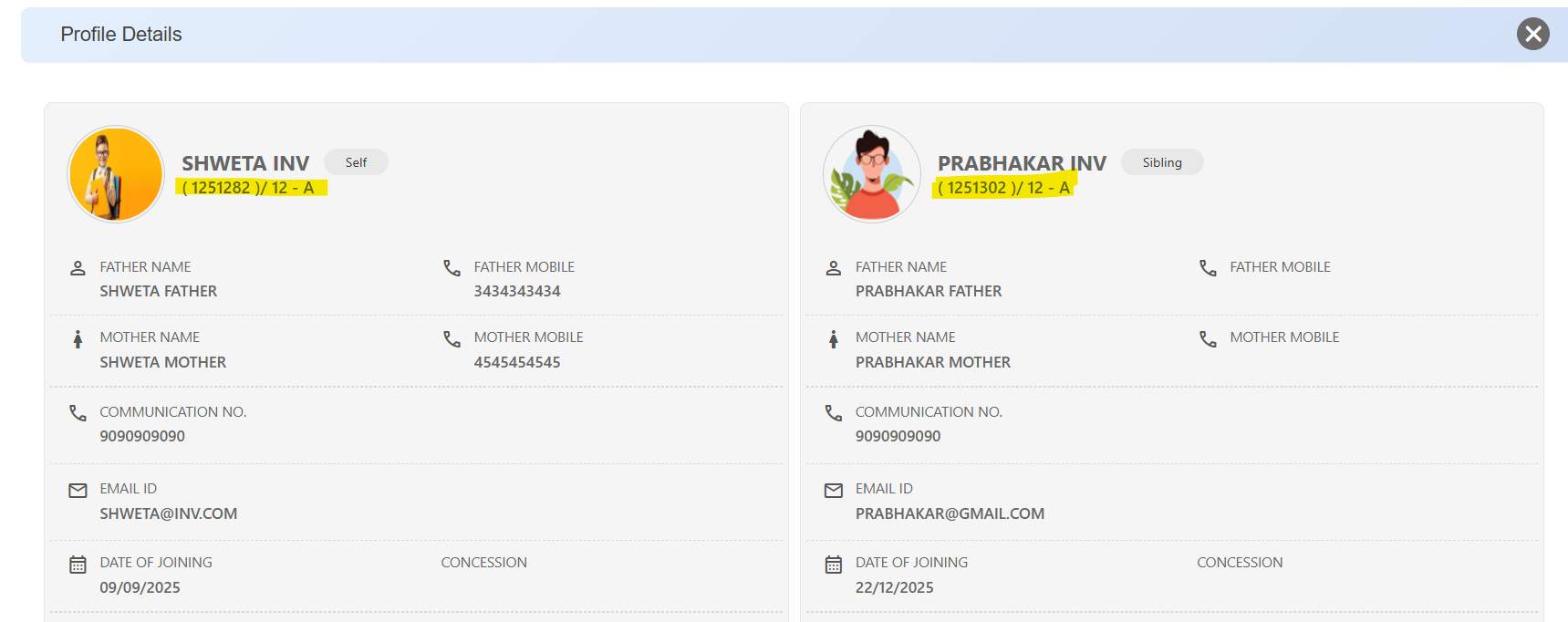
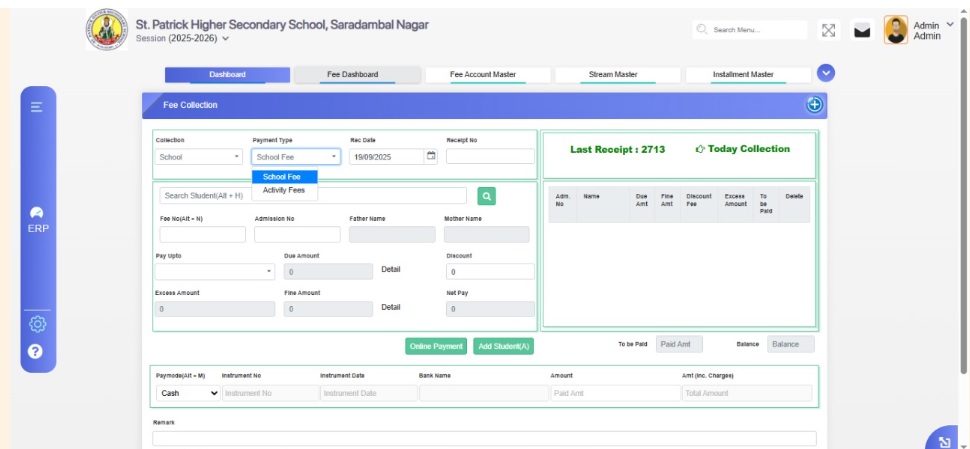
The Student Profile Details view in Fee Collection has been enhanced to display the Class and Section of each student. This ensures clearer
student identification—especially in sibling profiles—and helps users quickly verify academic context while performing fee-related activities.
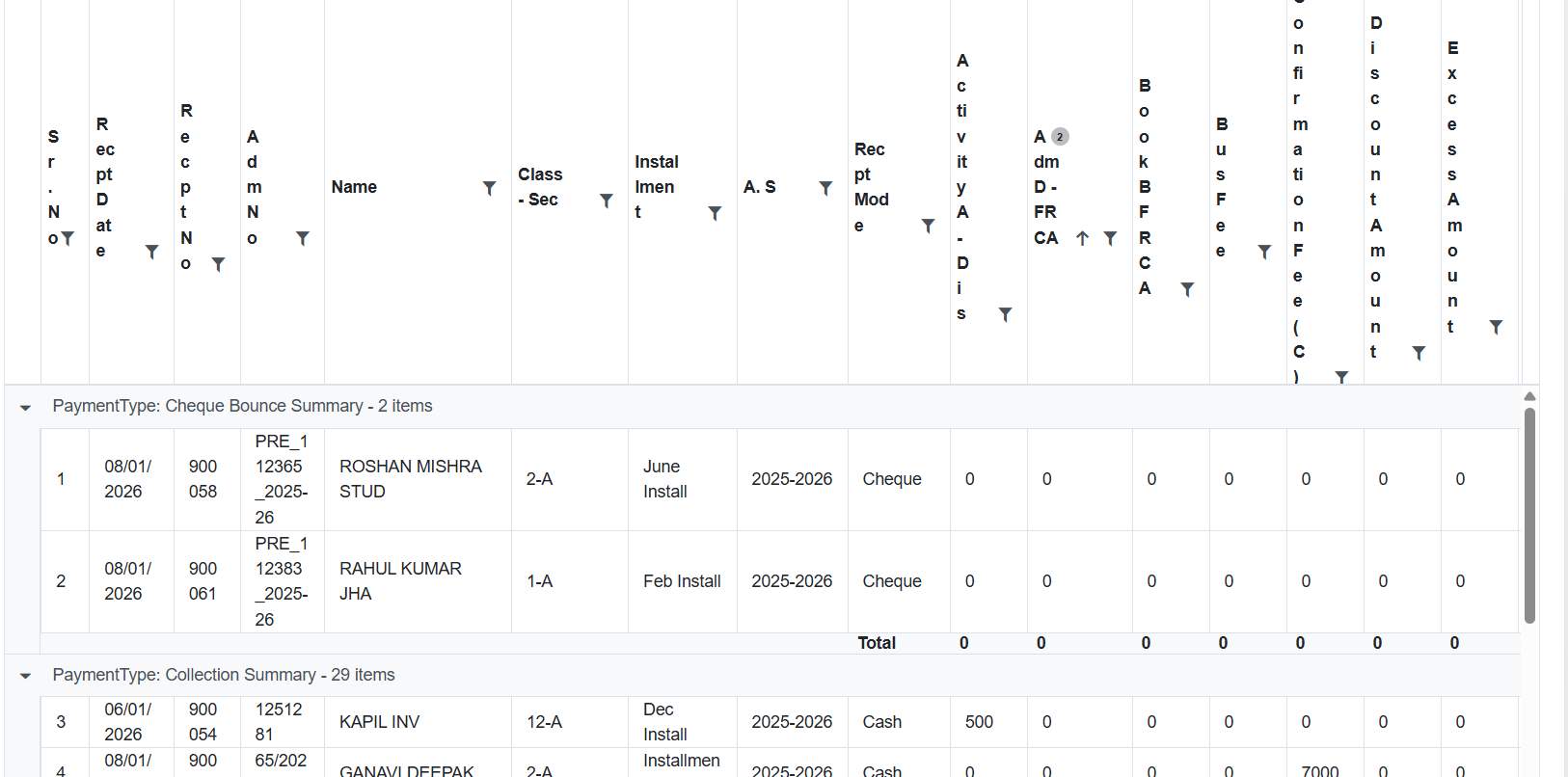
Feature 4: Fee Cancelled Report Added
A new Fee Cancelled Report has been introduced in the Fee & Billing module. This report follows the same format as the Fee Deleted Report
and displays all cancelled fee receipt records, enabling schools to track and review cancelled transactions accurately
for audit and reconciliation purposes.
Feature 5: Academic Session Format Correction in Multi-Year Collection with Registration Report
In the Multi-Year Collection with Registration report, the Academic Session column has been corrected to display
the full session format (e.g., 2025-2026) instead of only the starting year (2025).
This now aligns the display with the existing Multi-Year Collection Report, ensuring
consistency and clearer interpretation of academic year data.
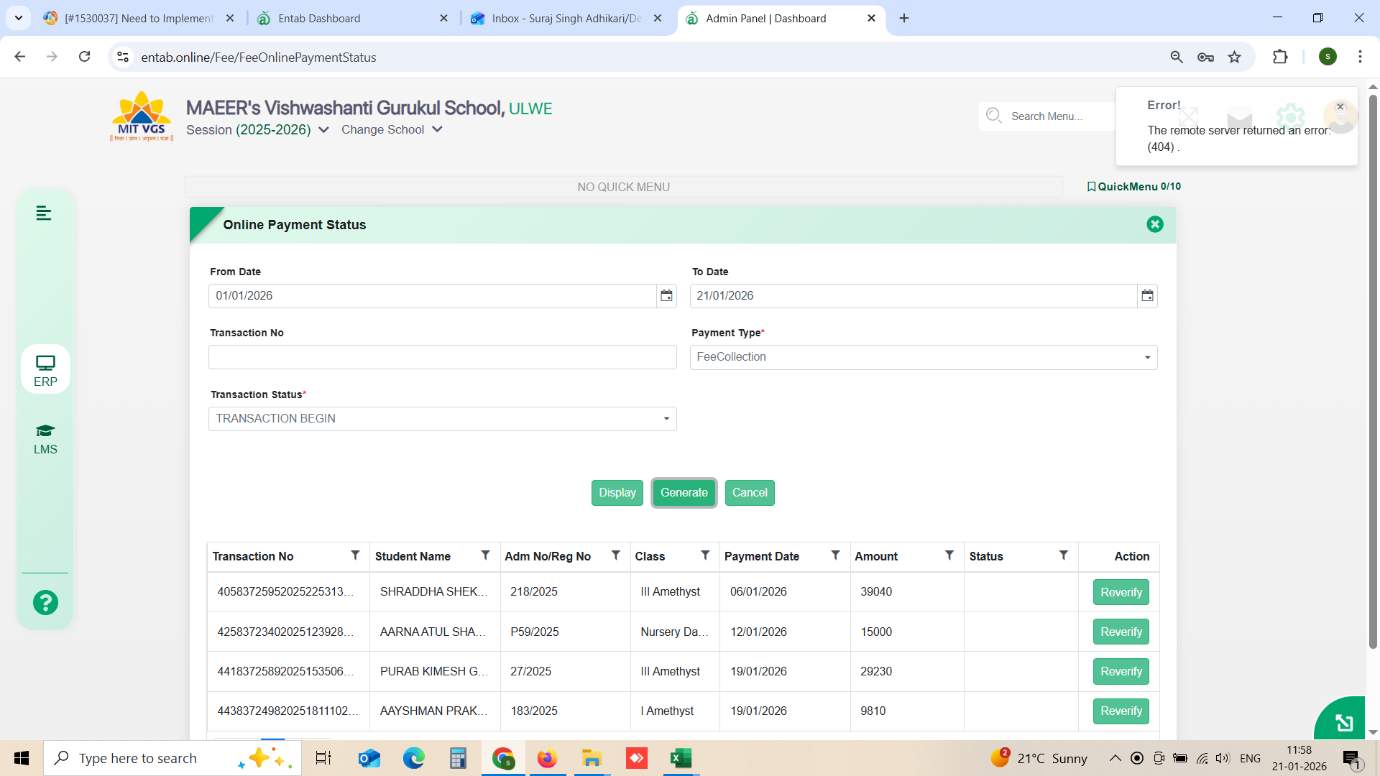
Feature 6: Integration of Billdesk Status API for Online Payment Verification
Purpose
To enhance reliability in online fee transactions, the Billdesk Status API has been implemented for real-time verification of payment status.
This ensures that pending or uncertain transactions can be re-verified directly with the payment gateway, reducing reconciliation gaps and manual follow-ups.
Key Functionality
Integrated Billdesk Status API in the Online Payment Status form.
Enables real-time fetching of the latest transaction status from Billdesk.
“Reverify” action validates transactions that are in Transaction Begin / Failed states.
Updates payment records automatically based on gateway response.
Supports verification using Transaction No., Date Range, and Payment Type filters.
Benefits
Accurate Reconciliation: Eliminates mismatches between ERP and gateway records.
Reduced Manual Effort: Instant verification without back-office intervention.
Improved Parent Experience: Faster confirmation of successful payments.
Operational Transparency: Clear visibility of actual gateway transaction status.
The Fee Dashboard has been completely redesigned to provide a faster, more intuitive, and data-driven view of fee collections.
The new interface delivers real-time financial insights through interactive graphs and tables, enabling schools to monitor
collections, dues, and trends more effectively without navigating multiple reports.
Key Functionality
The upgraded dashboard now includes:
Today Fee Collection (User-Wise): Track daily collections by individual users/counters.
Year-Wise Fee Summary:Overall collection overview for the academic year.
Collection Mode Analysis: Breakup by Cash / Online / Cheque / Other modes.
Installment-Wise Collection Data: Performance of each installment.
Day-Wise Collection for Month: Daily trend view for the selected month.
Post Due-Date Collection: Count of students who paid after due date.
Defaulter as on Date: Select any date to view pending students and amount.
Class-Wise Fee Summary: Collection and outstanding per class.
Visualization Options
Dual representation enabled:
Bar Graph / Pie Chart
Tabular View
Feature 1: Additional Student Details in Fee Concession
Report
This enhancement provides schools with better visibility of
concession-related student information by including key
contact and address details in the Fee Concession report.
This addition supports schools in planning house visits and
maintaining accurate communication records.
Key Functionality
In Fee & Billing → Fee Report → Fee Concession → Fee
Report Setting, additional fields have been introduced:
Concession Entry Date
Present Address
Mother’s Name
Contact Numbers
These details are now displayed alongside existing
concession information in the report.
Facilitates easy access to essential student details for
operational and follow-up purposes.
Benefits
Enables schools to plan and manage house visits
efficiently for concession students.
Improves accessibility of student contact and address
details in a single report.
Enhances administrative convenience and data completeness
within the Fee Concession report.
Feature 2: New Report Added
A new Fee Final Due List report has been introduced to
provide a comprehensive overview of students with
outstanding fee amounts, helping schools manage and track
pending dues more effectively.
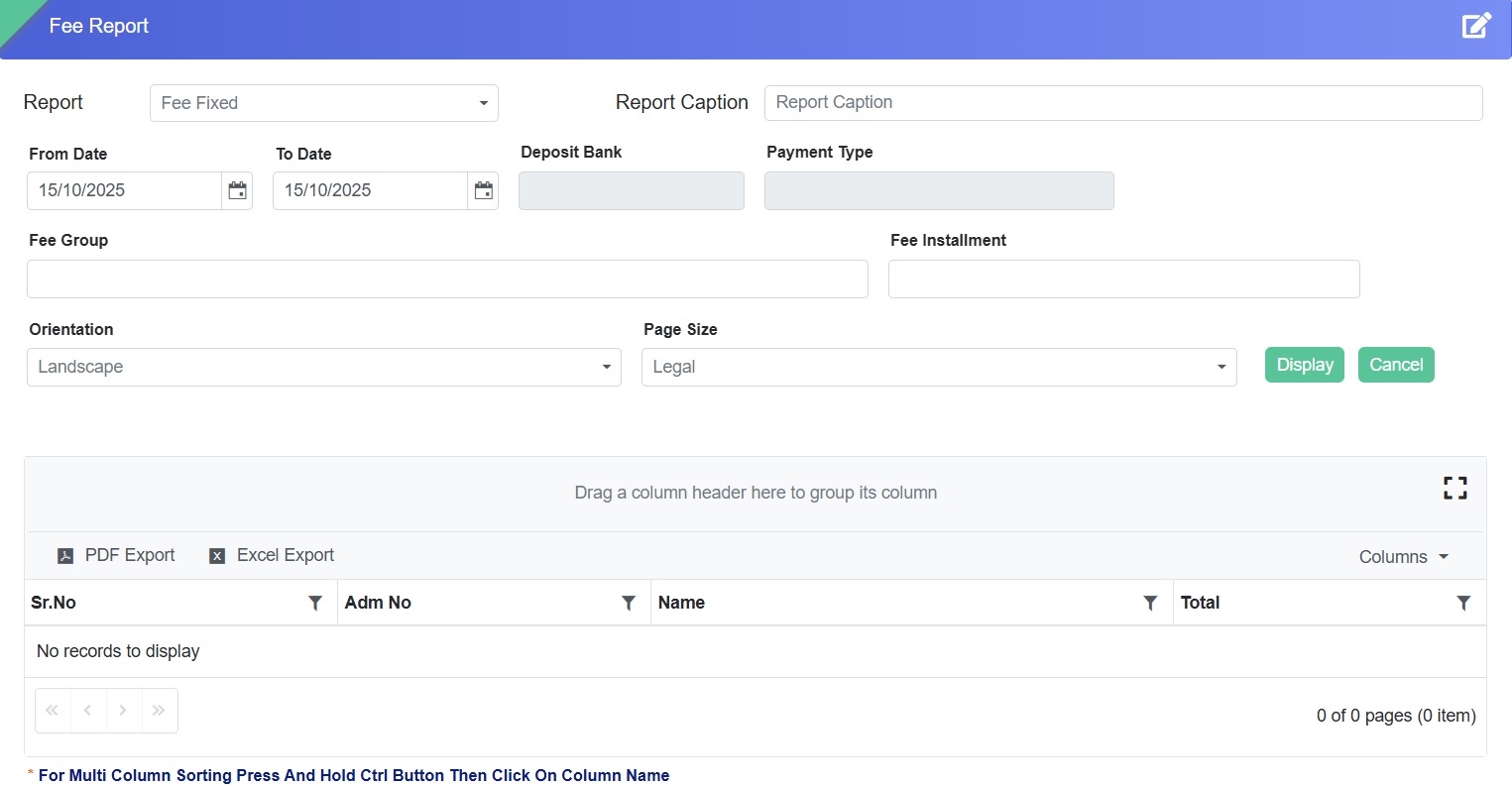
Feature 3: Date Filter and Validation in Fee Fixed Report
This enhancement improves accuracy and control in fee data
management by introducing mandatory date validation and
date-range filtering in the Fee Fixed Report.
Key Functionality
A From Date – To Date filter has been added for refined
data viewing.
Mandatory date entry for each fixed amount under fee heads
and installments.
Entries without dates will not be accepted.
From Date defaults to academic session start.
To Date defaults to current system date.
Bulk entry functionality enabled.
Benefits
Ensures completeness and accuracy of fee records.
Facilitates better tracking and reporting through
date-wise filtering.
Reduces data entry errors and improves administrative
efficiency.
Supports faster bulk updates with enhanced validation
control.
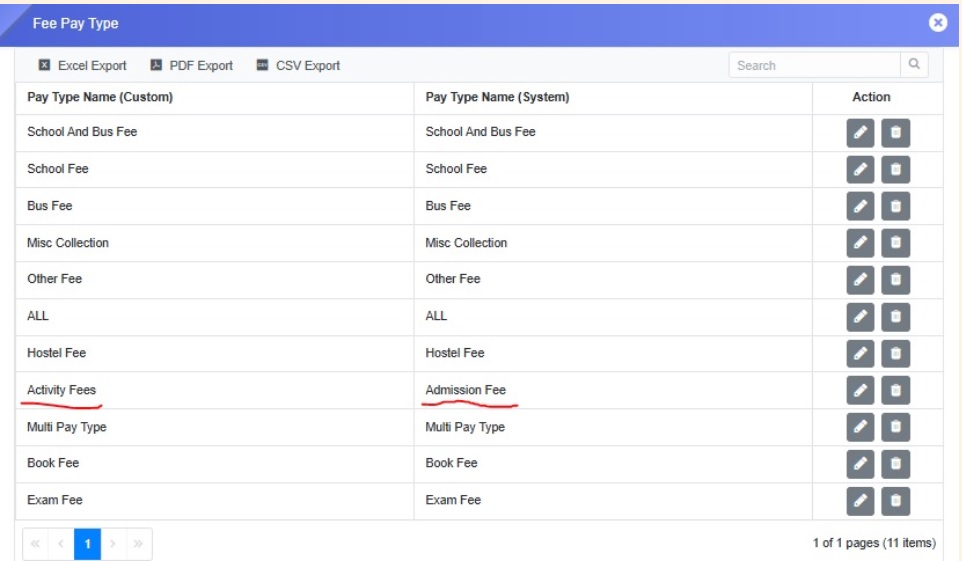
Feature 4: Editable Payment Type Configuration
This enhancement allows schools to customize and manage
payment type names (e.g., School Fee, Admission Fee, Hostel
Fee) to align with internal terminology.
Functionality
A new form – Payment Type has been introduced.
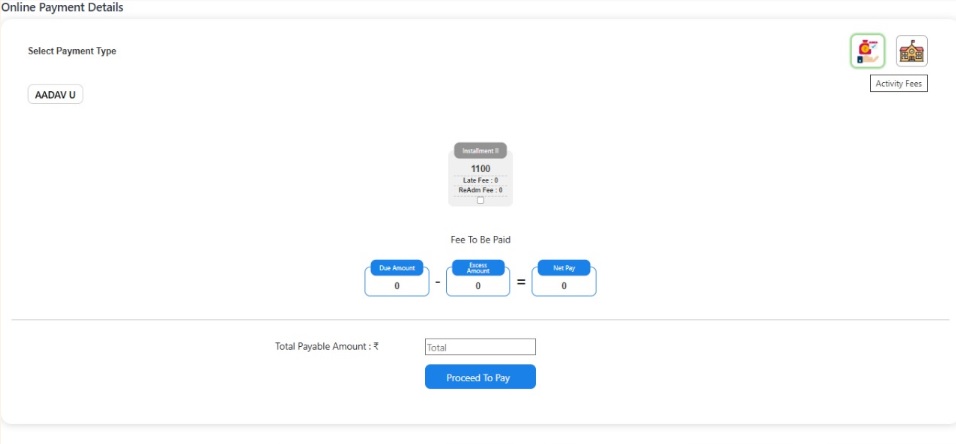
Schools can edit existing payment type names.
Updated names reflect across Receipt Details, Fee
Collection Form, and Online Fee Portal.
Benefits
Provides flexibility to align terminology with school
needs.
Ensures consistency across all fee-related interfaces.
Simplifies administration and improves clarity in fee
records.
Feature 5: Fee Installment Tag in No Due Certificate
A new “FeeInstallment” tag can now be used within the
certificate template to automatically fetch and display
installment information in the No Due Certificate.
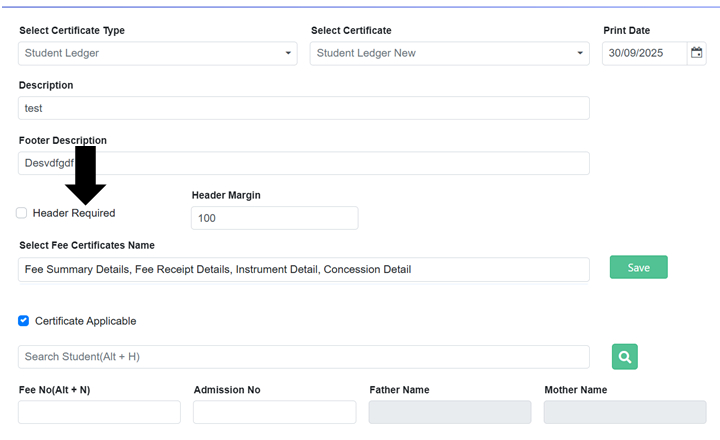
Feature 1: Option to Print Student Ledger with/without
Header
A new enhancement while printing Student Ledger allows users
to print the ledger with or without the header section,
providing flexibility in document presentation.
Key Benefits
Customizable Printing: Choose whether to include the
header in printed ledgers.
Professional Presentation: Tailor the output to meet
school or parent requirements.
Improved Convenience: Streamlines printing options for
staff and administration.
Customizable Footers: Tailor footer content for official
or internal use.
Professional Presentation: Ensures ledgers meet school
formatting standards.
Flexible Reporting: Adjust footers without affecting the
main ledger content.
Feature 3: Display Username and Print Date on All Fee
Reports
All fee reports now display the username of the person
generating the report and the print date, improving
traceability and record-keeping.
Key Benefits
Better Accountability: Know who generated each report.
Improved Tracking: Easily reference the print date for
records.
Enhanced Transparency: Supports accurate audit and
reporting processes.
Feature 4: Bill Desk Payment Gateway Integration
A new Bill Desk payment gateway has been integrated,
allowing seamless and secure online fee payments for
parents. Bill Desk is one of India’s most trusted digital
payment platforms, widely used by banks, businesses, and
institutions to process online transactions securely and
efficiently.
A new percentage-based tuition fee generation option has
been added, using the Certificate Percentage field provided
to the school to calculate fees automatically.
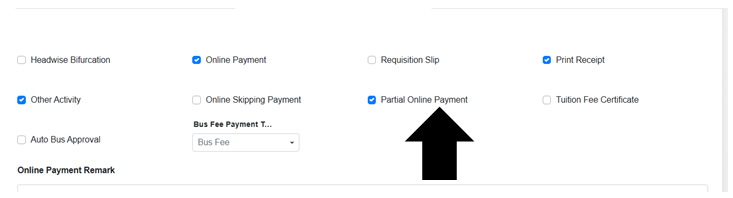
A new enhancement allows schools to disable partial payment
collection from the Fee Collection form via the Collection
Settings page. Two options are available:
Partial Offline Payment: Enabled by the school for
in-person fee collection.
Partial Online Payment: Enabled on the parent portal for
online fee submissions.
Flexible Payment Control: Schools can manage how partial
payments are collected.
Improved Accuracy: Reduces confusion by clearly separating
offline and online partial payments.
Enhanced Convenience: Provides clarity for both staff and
parents on payment options.
Feature 8: Automatic Quarterly Selection for Online Payments
A new enhancement provides flexibility to configure the core
fee structure into quarterly or half yearly for parents to
pay online fee through parent portal or mobile app.
Key Functionality
If the installment name is April and installment group is
Installment, selecting April will automatically include
May and June with their respective installment names and
groups.
Supports seamless quarterly collection while keeping the
monthly fee structure intact.
Reduces manual selection for parents and ensures all
relevant installments are included in online payments.
Key Benefits
Convenient Payments: Parents can pay quarterly without
missing any month.
Accurate Fee Collection: Automatically includes all
installments within the quarter.
Time-Saving: Minimizes errors and reduces administrative
follow-up.
Feature 9: Excess Fee Handling and Adjustment
A new enhancement allows schools to manage extra payments
made by parents, even when the full academic year fee has
been paid. The system intelligently allocates the excess
amount to adjust against the last installment, other due
installments, or carries it forward to the next academic
year.
Key Functionality
Automatically allocates extra payments to the last or
pending installment of the same academic year.
Allows carrying forward excess amounts to the next
academic year if not fully adjusted.
Ensures accurate classification of collected amounts as
excess fees for proper accounting.
Handles multiple scenarios: fully paid academic year,
pending dues in any installment, or partial adjustment
across years.
Key Benefits
Accurate Accounting: Extra payments are properly tracked
and adjusted.
Flexible Management: Supports adjustments within the same
year or across academic years.
Simplified Workflow: Reduces manual calculations and
follow-up for school staff.
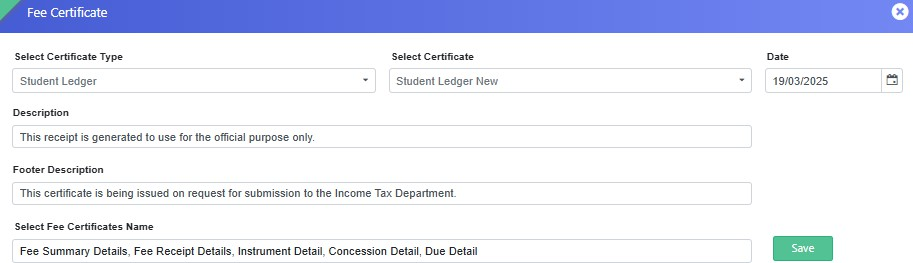
Feature 1: Footer Description on Student Ledger Certificate
Overview
We have introduced two new enhancements to improve the
Student Ledger Certificate, making it more presentable and
effective for school administration.
Key Enhancements
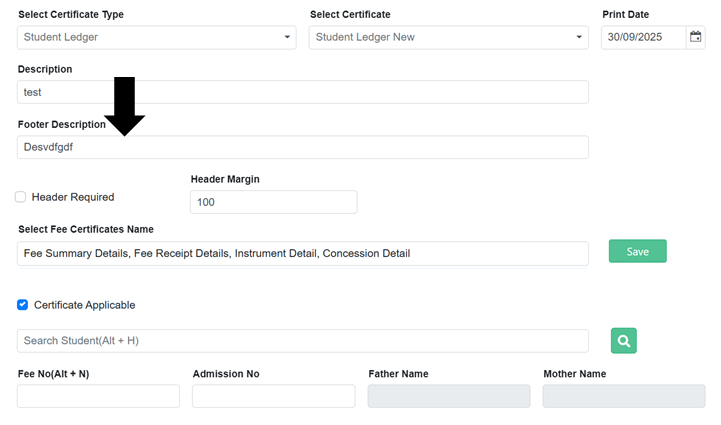
New "Footer Description" Field
A new textbox labeled "Footer Description" has been
added to the Fee Certificate page while generating the
Student Ledger certificate.
The content entered in this field will appear in the
footer of the generated certificate.
Use Case: Schools can now include specific statements
like “This certificate is being issued on request for
submission to the Income Tax Department.”
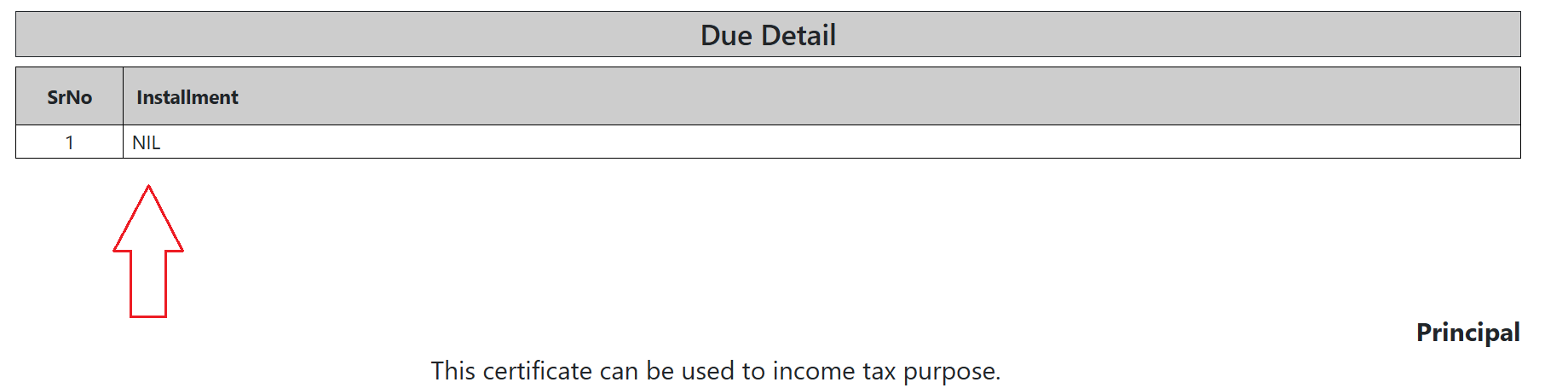
Improved Due Details Representation
If a student has no outstanding dues, the due details
table on the certificate will display "Nil" instead of
being left blank.
This ensures clarity in the certificate's financial
summary.
Benefits:
Enhanced presentation of the Student Ledger Certificate.
Greater flexibility for schools to include necessary
disclaimers.
Improved clarity in due amount representation.
Feature 2: New Fee Reports are Added
We have introduced the following reports to the Fee Reports
page to enhance financial tracking and analysis:
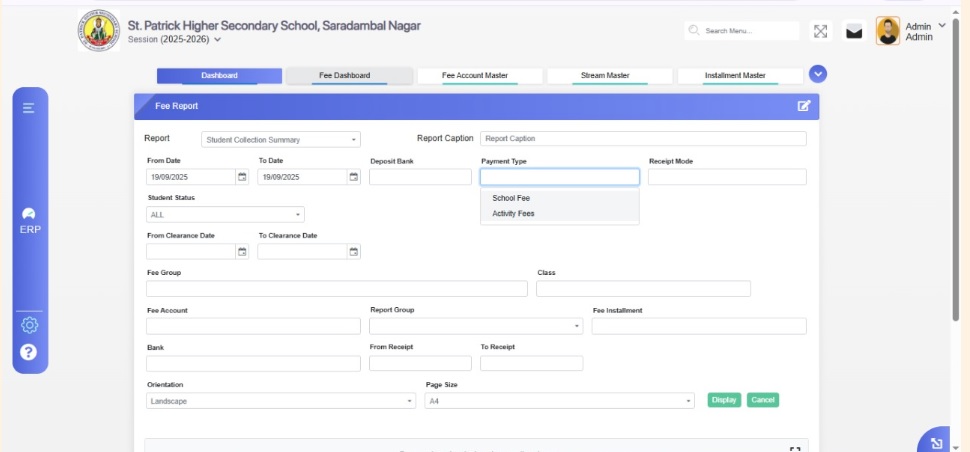
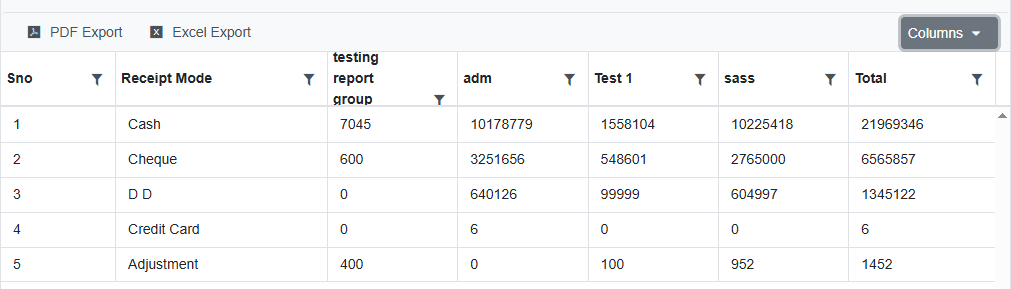
Paymode Wise Report Group
Admins can now view the total amount collected within
a specific Fee Report Group.
The report aggregates amounts collected from all fee
heads belonging to the selected report group.
The total amount is displayed based on the receipt
mode (e.g., Cash, Bank, Online, etc.) in a row-wise
format for better clarity.
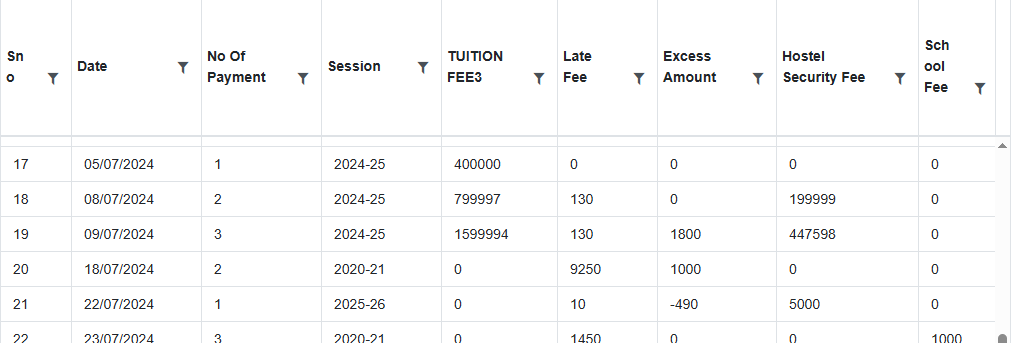
Monthly Day Wise Collection II
This report introduces the session year in which the
collection occurred.
It supports multi-year data, allowing analysis of
payments across different academic sessions.
Displays the count of total payments made on a
particular date within a specific session.
Shows the total amount collected per fee head on each
date.
Example: If 10 payments were made on 02/04/2024 in the
session 2024-25, the report will capture this.
These additions provide enhanced visibility into fee
collections, helping administrators manage finances
efficiently.
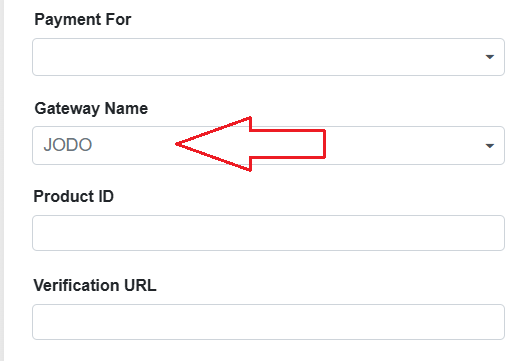
Feature 3: JODO Payment Gateway Integration
We have successfully integrated the
JODO Payment Gateway into the system, providing
schools with an additional payment processing option.
Schools can now select JODO in the Gateway Name dropdown
on the Online Payment Setting page.
Once enabled, JODO will be available on the online
payment interface in the Parent Portal and payment links
shared for online fee collection.
This integration enhances flexibility and provides a
seamless online payment experience for parents. 🚀
Feature 4: New Page Added – Excess Fee Remittance
We have introduced a new page titled
"Excess Fee Remittance" to facilitate the refund of
excess fee amounts collected from parents.
Purpose: Schools can now return excess amounts that were
credited due to duplicate or failed transactions.
Use Case: If a parent makes a duplicate payment due to a
failed transaction that later succeeds, the school can
process the refund using this page.
This enhancement ensures transparent and efficient handling
of excess fee refunds, improving the payment reconciliation
process. 🚀
For further assistance, please contact the support team. 🚀
LIBRARY MODULE
Feature 1: Auto Display of Book Details on Scanning
This enhancement streamlines the book issue and return
process by automatically displaying book details as soon
as the barcode is scanned, eliminating the need to
manually press the Enter key.
Key Functionality
Book details are now fetched and displayed
automatically upon scanning the barcode.
Removes the need for additional manual action (Enter
key press) after scanning.
Ensures a faster and smoother book issue/return
workflow.
Benefits
Saves time and reduces manual effort during book
transactions.
Improves operational efficiency and user experience
for library staff.
Minimizes chances of input delays or scanning errors.
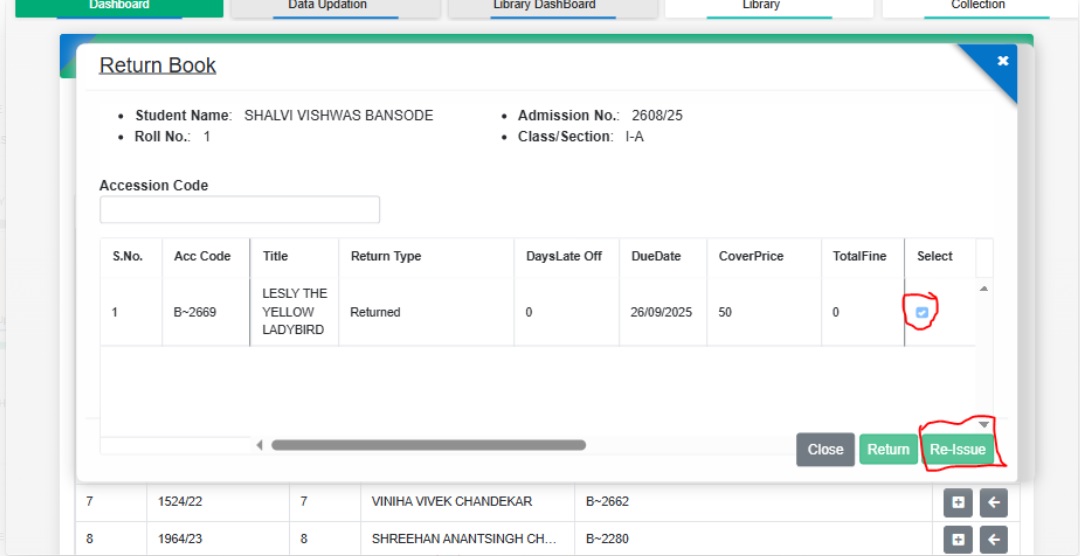
Feature 2: Re-Issue Button in Class-Wise Issue/Return
Collection
A new enhancement allows library staff to conveniently
re-issue books to students directly from the class-wise
issue/return collection, streamlining the book management
process.
Enables staff to quickly re-issue books without
navigating to a separate workflow or module.
Reduces manual effort and saves time in managing
re-issues.
Benefits
Improves efficiency in handling book re-issues for
entire classes.
Minimizes errors and duplicate entries during
re-issuance.
Enhances user experience for library staff by
providing a single-click re-issue option.
Feature 1: New Reports Added
We have introduced several new reports in the Library
Module to give deeper insights and better control over
school operations:
Stock Verification Details: Provides a detailed record
of verified stock items.
Stock Verification Not Done Report: Highlights items
pending verification for timely action.
Reservation Detail: Provides a comprehensive view of
all reservations, enabling efficient tracking,
management, and planning of school resources.
Maintenance Detail: Gives insights into maintenance
activities, schedules, and status for better upkeep of
library assets.
Feature 2: Return Collection – Auto-Selection Disabled for
Multiple Books
The return process has been enhanced for multiple issued
books by removing the auto-selection of the first book
during barcode scanning. This saves time and ensures the
correct book is returned every time.
Benefits
Accurate Returns: No more accidental selections—scan
and return the exact book.
Efficient Workflow: Saves time and reduces mistakes
when handling multiple returns.
Better Experience: Makes the return process smoother
for staff and students.
Feature 3: Auto-Permission Grant for New Students
A new enhancement has been added to automatically grant
library permissions to newly admitted students, ensuring
they can access library resources without any manual
setup.
Key Functionality
Select a student or choose a class to view newly
admitted members from the dropdown.
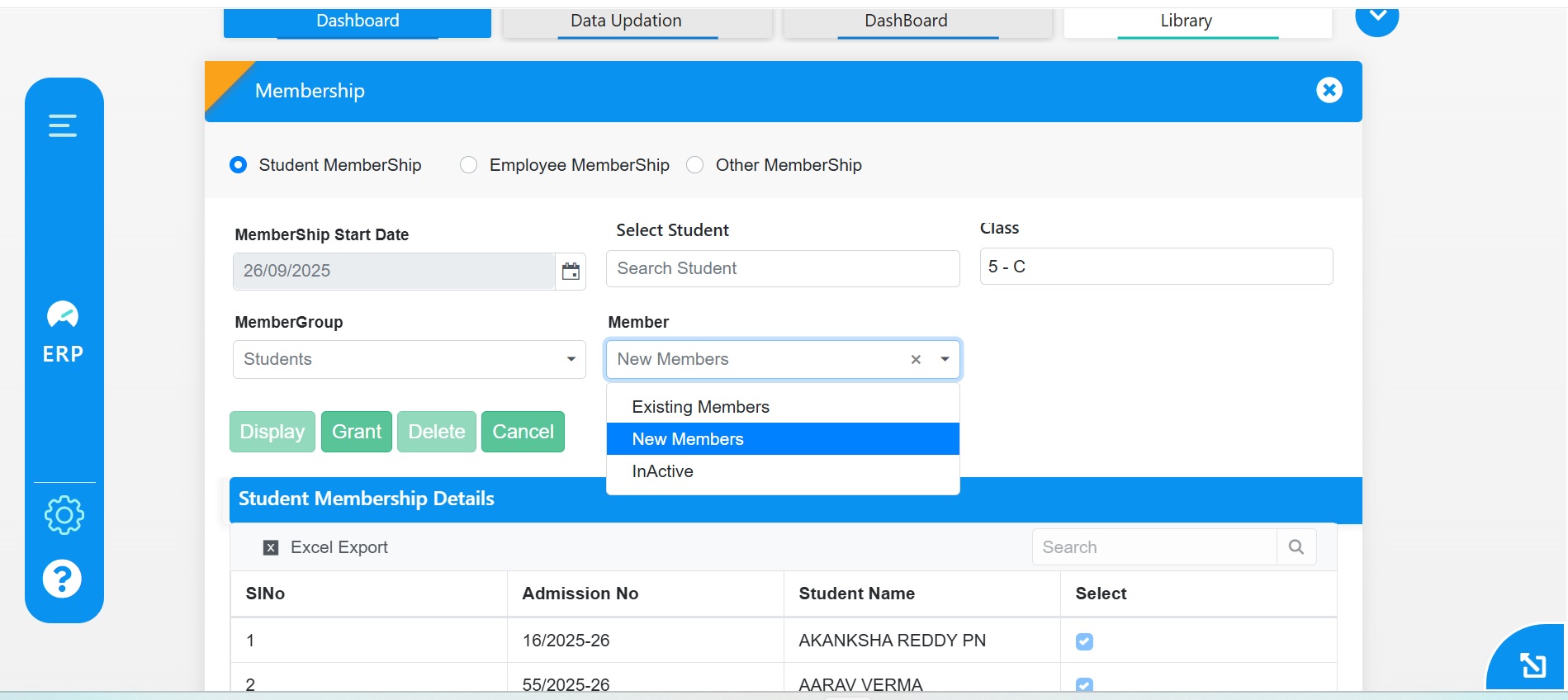
Click the Grant button to automatically assign library
permissions.
Newly admitted students can now access library
resources immediately without manual setup.
Navigation
Library → Membership Management → Select New Members →
Click Grant button
Feature 4: Class-Wise Issue/Return Using Old Accession
Code
On the Class-wise Issue/Return form, books will now be
issued and returned using the old accession code, ensuring
consistency and accuracy in tracking library items.
Benefits
Accurate Tracking: Maintains proper records using
existing accession codes.
Consistency: Aligns issue/return process with
established library practices.
Reliability: Reduces errors in managing class-wise
transactions.
Feature 5: Enhanced Barcode with Book Title and Accession
Code
Barcodes have been improved to display the Book Title at
the top and the Accession Code at the bottom, making it
easier to identify and manage books at a glance.
Feature 6: ISBN Field Added in Bulk Entry Template
The Bulk Entry Excel template in the Library Module has
been enhanced with a new ISBN field, making it easier to
capture and manage standard book identifiers during bulk
uploads.
Benefits
Standardized Records: Ensures books are cataloged with
their official ISBNs.
Improved Accuracy: Reduces errors in book
identification and entry.
Simplified Management: Enhances efficiency when
uploading multiple books at once.
Feature 7: Dewey Decimal Classification Form Added
A new Dewey Decimal Classification (DDC) Form has been
added to the Library Module, enabling structured and
systematic classification of books based on standard DDC
categories.
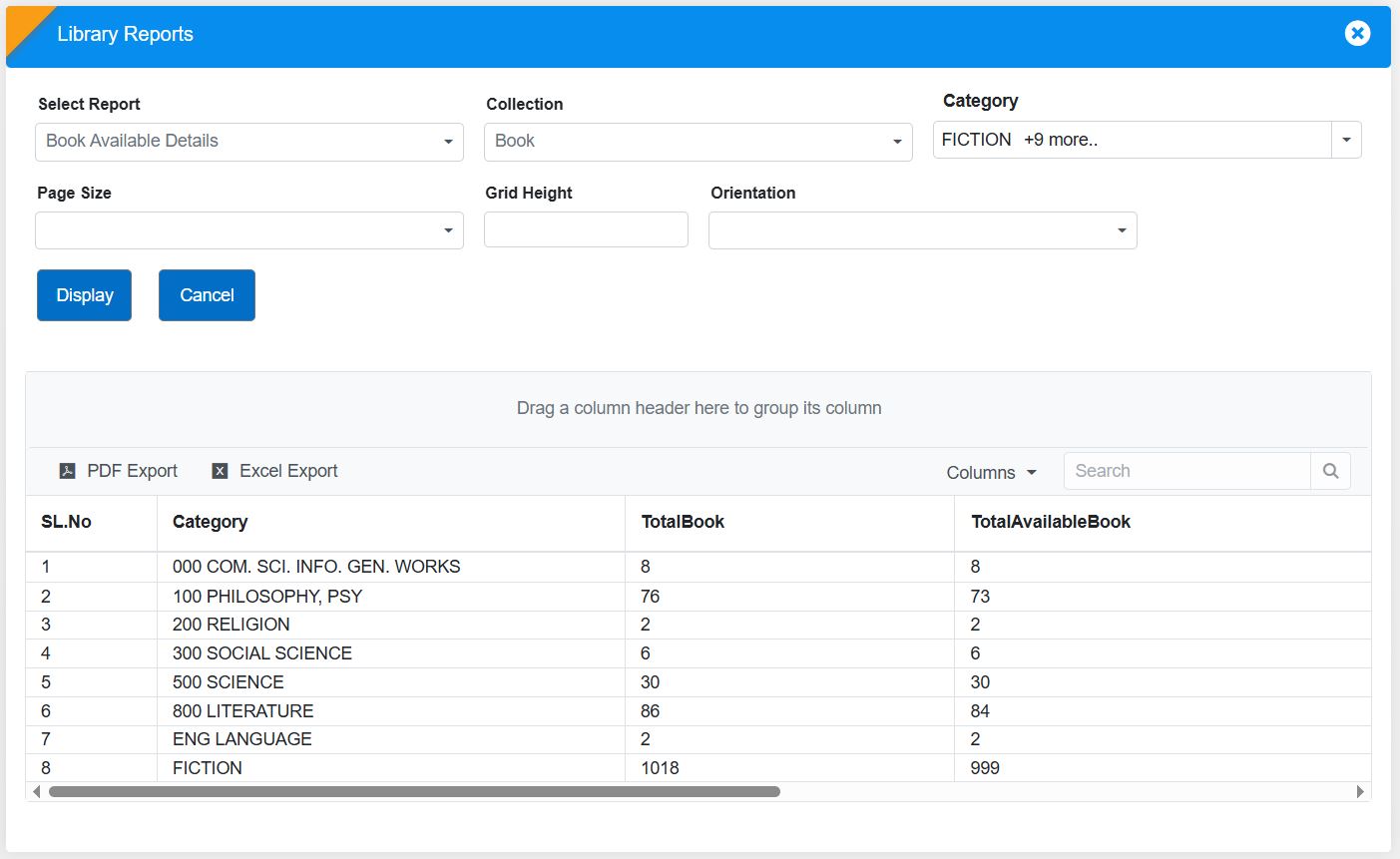
Feature 1: New Report Added- Book Available Details
We have introduced a new report in the Library Module
titled "Book Available Details" to help librarians and
administrators efficiently track book availability.
How It Works:
The "AttendancePercentage" tag for fetching the
student’s data in the certificate.
Choose the Category (e.g., Autobiography, Fiction,
Art, Political, etc.).
Click Display, and the report will be populated in the
grid section:
Category Name
Total {collection}
Total Available {collection}
Benefits for Librarians & Admins:
📚 Efficient Inventory Tracking :
Easily monitor stock levels for different collection types
and categories
📖 Better Resource Planning:
Helps librarians manage book availability and procurement
decisions.
Check out the "Book Available Details" report now for a
streamlined library experience! 📖
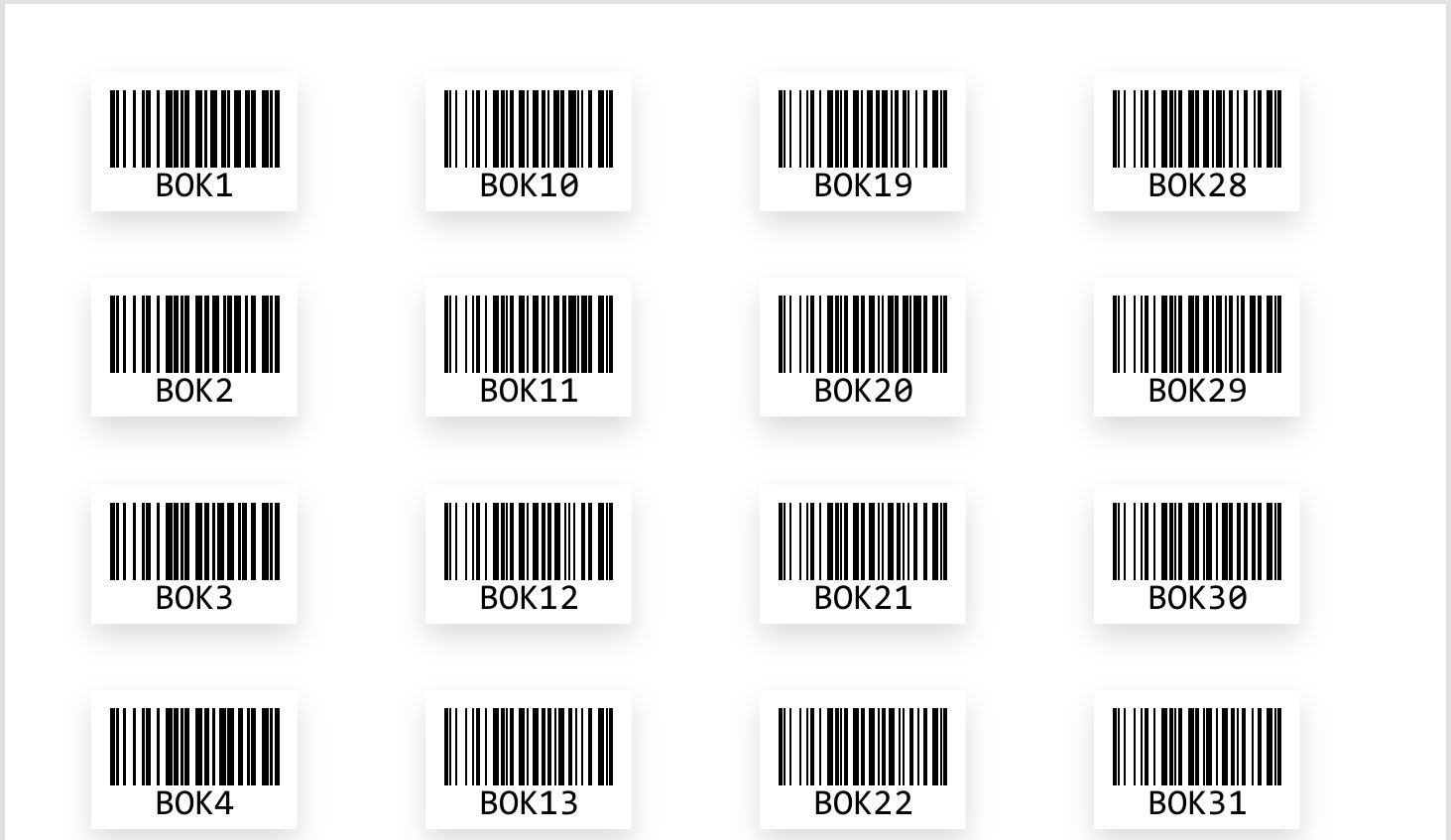
Feature 2: Print Multiple Bar Code on One Page
We have introduced the feature of barcode generation in
bulk in the Library Module, making it easier to create and
print barcodes for library collections.
How to Use It:
Navigate to Library Module > Library Reports.
Click on "Generate Barcode" to open a new interface.
Select the Collection Type (Books, Magazines,
Journals, etc.).
Choose the Prefix and click Display to generate
barcodes.
Set the Orientation and Page Size as needed.
Click Print, and the barcode will open in a new tab
with the print option
Benefits:
Quick Barcode Generation : Simplifies cataloging and
tracking of library items.
Customizable Printing Options : Adjust orientation and
page size as per requirements.
Start generating barcodes today for a more organized
library system! 📖📊
Feature 3: New Page- "Stock Verification" in Library
Module
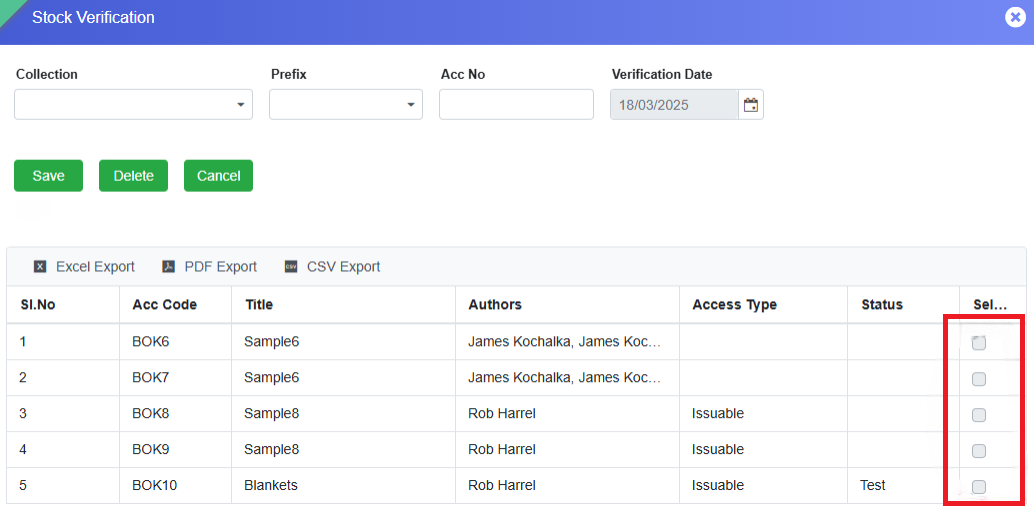
We have added a new "Stock Verification" page in the
Library Module to help administrators efficiently verify
library stock and maintain accurate records.
Navigation:
Go to Library Module > Task Menus > Stock Verification
How It Works:
✅Select type of Collection and Choose Prefix.
✅The grid will display all items row-wise based on
the selected filters.
✅Navigate to the Select column.
Double-click on the checkbox to activate selection.
Single-click to mark items for verification.
To select an entire row, click on the Select Header.
Click Save – The selected items will be instantly
verified, and the corresponding rows will be removed
from the grid.
Impact:
The Stock Verification Date is captured in the ERP system.
All verified items will appear in the Stock Verification
Detail report.
Users can generate this report from the Library Reports
page using relevant filters.
This feature enhances library inventory management by
ensuring an accurate and up-to-date stock record. Check it
out now! 📚✅
This update helps administrators and staff quickly review
student attendance records at a glance. 📊✅
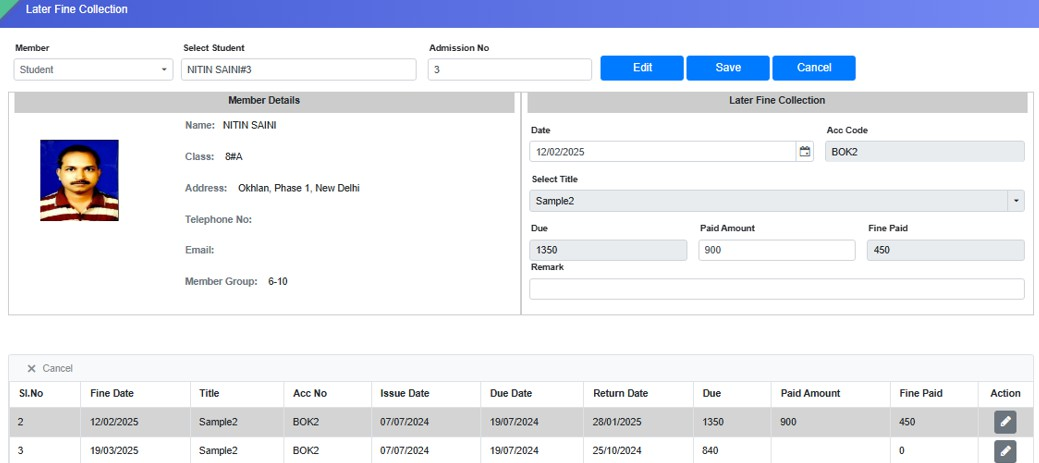
Feature 4: New Page- Late Fine Collection
A new page, Late Fine Collection, has been added to the
Library Module. This page enables librarians to verify the
due amount and paid amount of a student and to collect or
relieve fines for overdue library items. It functions as a
centralized interface to manage fines for all items issued
to a student.
Additionally, any fine paid by the student through the
Issue/Return Collection page is reflected on this page.
The primary objective of this feature is to verify if a
student has already paid the fine while returning a book;
if not, the librarian can collect the pending fine based
on the item’s return date.
Navigation Path
Library Module → Task Menus → Late Fine Collection
Key Features
Allows librarians to verify and collect late fines for
issued and returned library items.
Displays all issued items for a student along with
their due date and fine details.
Workflow
Search the Member:
Select Member Type (e.g., Student).
Enter Admission Number and press Enter.
All the issued items will be displayed in a grid
view, along with Due date, Return Date, Fine date,
Fine Paid, and Fine to be Paid (Paid Amount).
Two sections appear - Member Details and the Late
Fine Collection.
Edit Fine Collection Details:
In the grid, navigate to the Action column and click
the pencil icon >>> The data from the grid will be
populated in the "Late Fine Collection" section.
Click on “Edit” button >>> Within "Late Fine
Collection" section, Date, Paid Amount, and Remark
fields will be enabled for editing.
Update Fine Payment:
Enter the Date of Fine Collection (defaults to
today’s date).
Enter the Paid Amount in the respective field.
Add any Remark if needed.
The Fine Paid (read-only field) will automatically
update based on the total due amount.
Calculation: Fine paid = Existing Amount + Paid
Amount
Save the Changes:
Click the Save button to confirm the payment.
The fine amount will be updated in the ERP system
and reflected in the “Fine Paid” column in the
grid section of the student upon whom the
operation is performed.
For any assistance, please contact the support team.
SMS MODULE
What's New in SMS
The SMS module has been enhanced to support structured health-related communication with parents through a dedicated Health Care category. Schools can now send standardized messages using key medical fields such as allergy, medication, measurements, and nursing details directly from the system. This ensures timely, accurate, and consistent sharing of student health information, strengthening parent awareness, improving response to medical needs, and enabling better utilization of health records for proactive care.
Feature 1: Health Care SMS Category & Communication Settings
Purpose
To strengthen health-related communication with parents, a new Health Care SMS category has been introduced. This enhancement enables schools to send structured, accurate health updates directly from the system, ensuring timely awareness of student health information and improving parent–school communication.
Key Functionality
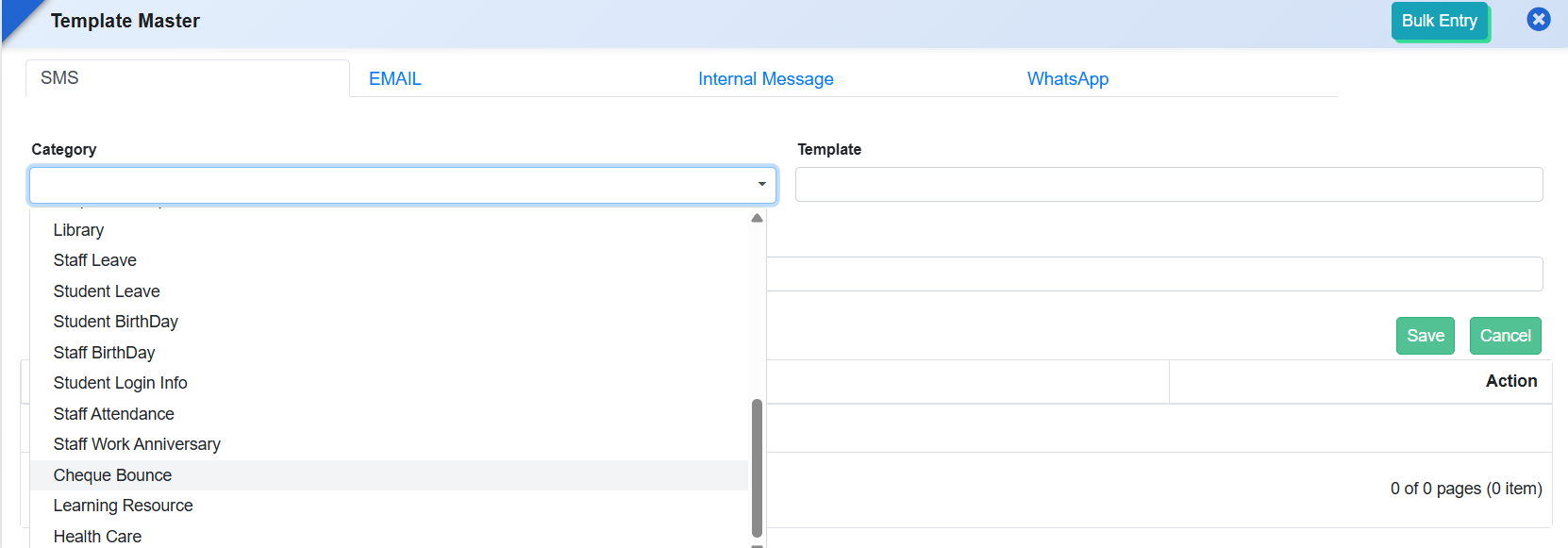
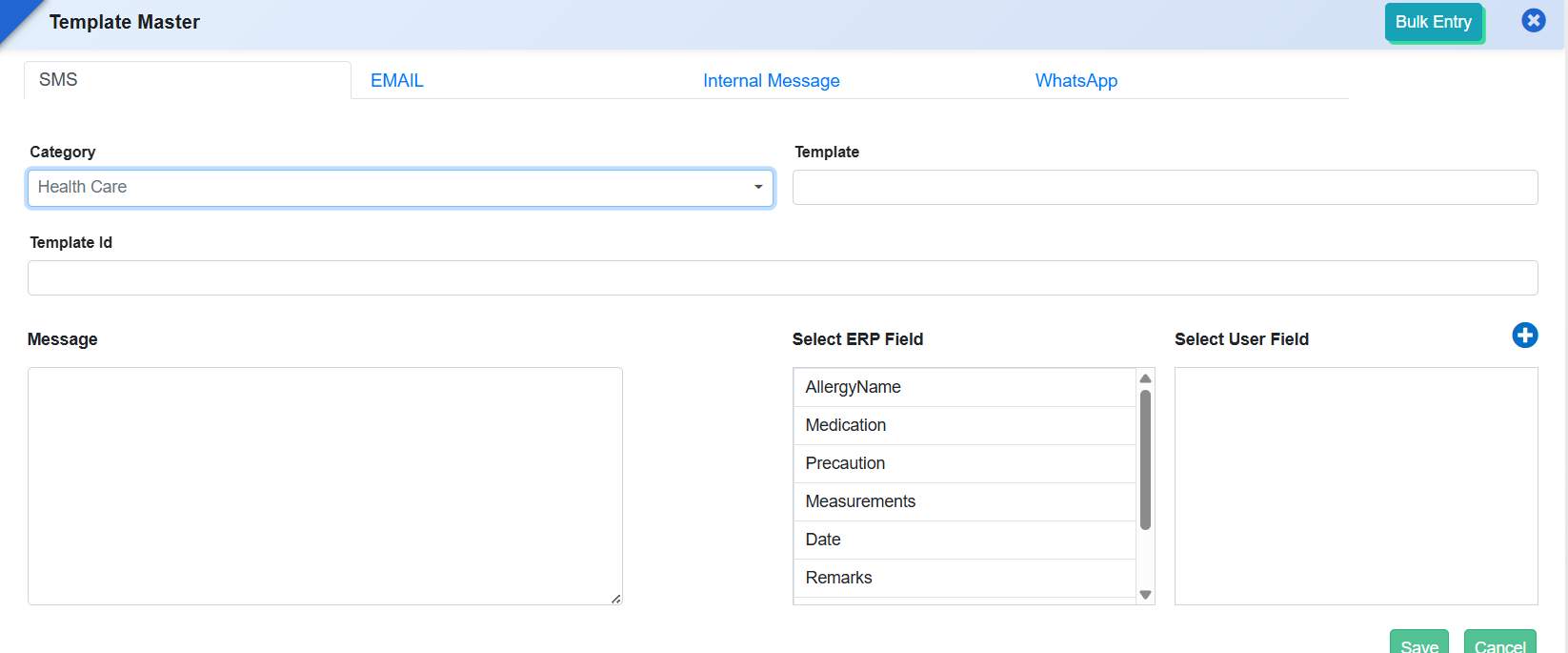
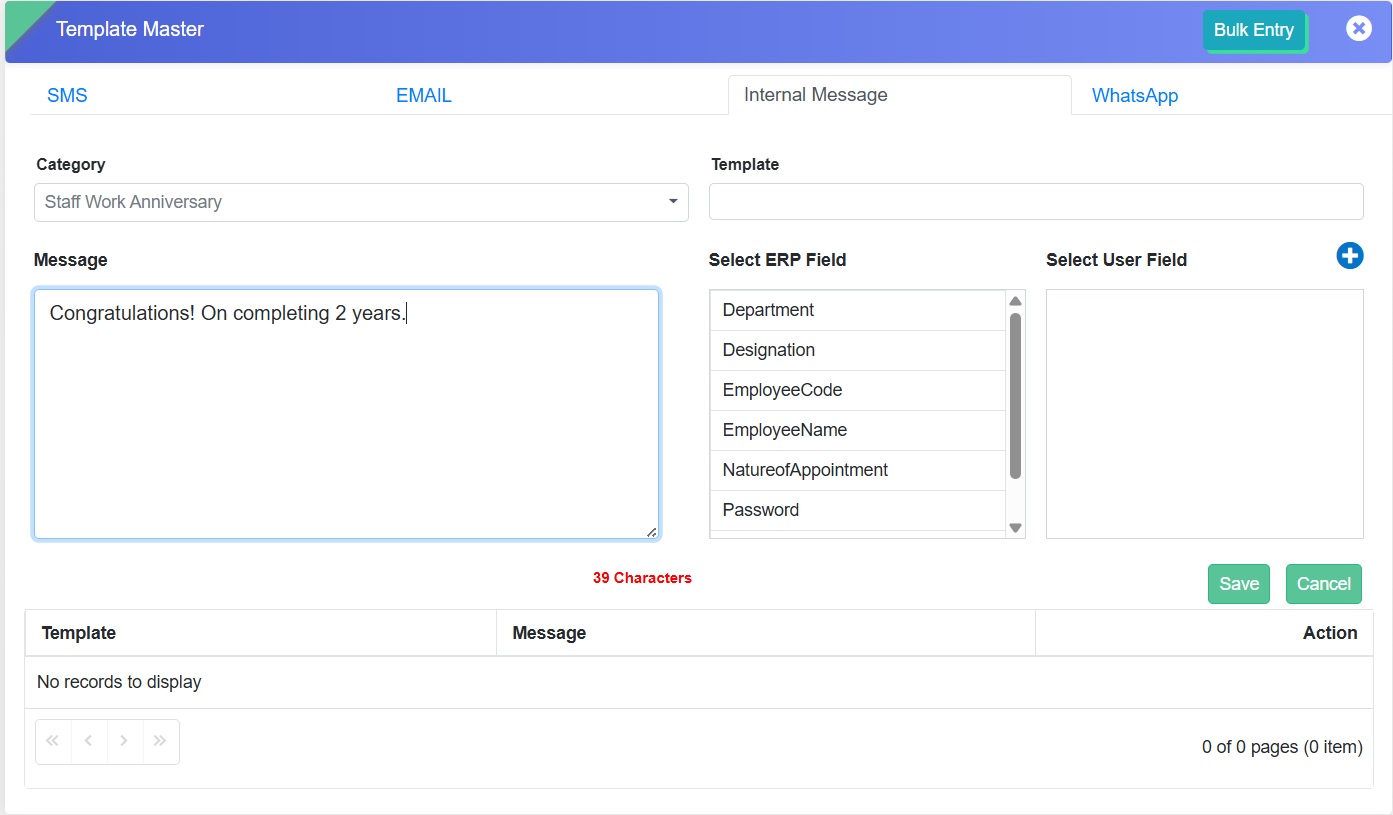
1. Health Care Category in SMS Template Master
Added a new Health Care category in SMS → Template Master.
New ERP fields available for template configuration:
Allergy
Medication
Precaution
Measurement
Date
Remarks
Present Illness
Prescribed Medicine
Suggestion
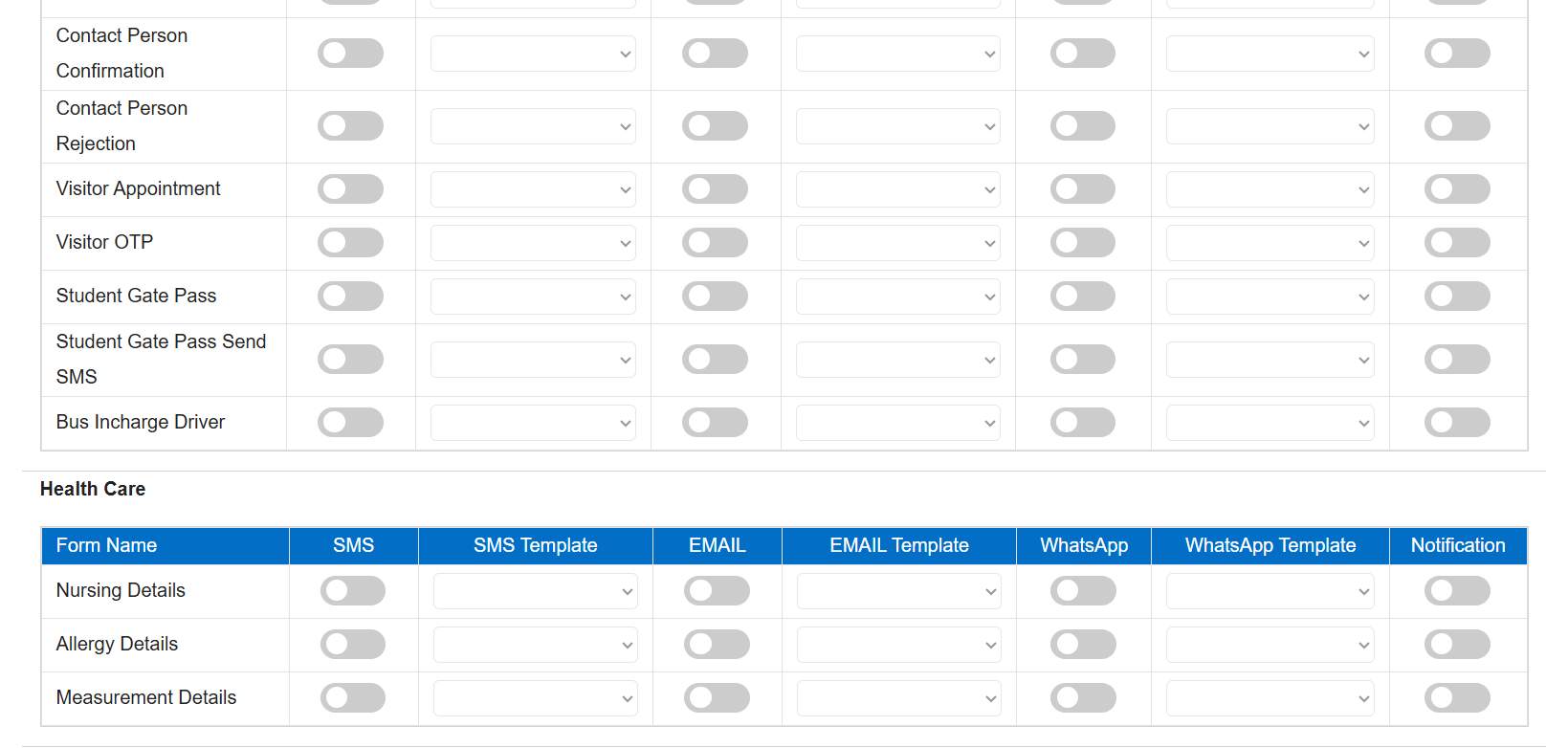
2. Health Care Module in Communication Settings
Added Health Care module in SMS → Setting Master → Communication Setting.
Enables SMS communication for:
Allergy Details
Measurement Details
Nursing Details
Benefits
Improved Parent Awareness: Keeps parents informed about important health-related updates.
Accurate & Structured Messaging: Standardized fields ensure correct and consistent information sharing.
Timely Communication: Enables quick notifications for health observations or treatments.
Better Health Record Utilization: Integrates health data seamlessly with SMS communication.
Enhanced Trust & Transparency: Strengthens confidence through proactive health communication.
Feature 1: Work Anniversary Communication Templates
This enhancement enables schools to celebrate and
acknowledge staff work anniversaries through automated
communication, improving staff engagement and fostering a
positive institutional culture.
Only recipients having birthdays on selected date
appear.
Ensures accurate and automatic filtering.
For any queries, contact support.
FRONT OFFICE MODULE
Feature 1: Automated Visitor Pass & Out Pass Generation with QR Sharing
Purpose
To streamline visitor management and enhance security and communication, the system now enables automatic generation and sharing of visitor passes and out passes upon approval and visit completion.
Key Functionality
Visitor Pass Generation on Approval
Once a visitor request is approved:
System automatically generates a Visitor Pass.
Pass includes a QR Code and relevant visitor details.
The pass is shared with the visitor via:
Email
WhatsApp (based on configuration)
Supports sending:
Soft copy (PDF/Image)
QR-based pass for quick entry validation
Out Pass Generation on Visit Completion
When Out Time is updated in Visitor Details:
System automatically generates an Out Pass.
Out Pass is shared via:
Email
WhatsApp (optional)
Includes:
Exit confirmation details
QR code / digital pass for record and verification
Communication & Configuration
Sharing via Email/WhatsApp can be enabled/disabled as per school preference.
QR code ensures quick scanning and validation at entry/exit points.
Key Benefits
Enhanced Security: QR-based passes ensure controlled entry and exit.
Automation: Eliminates manual pass creation and sharing.
Improved Visitor Experience: Visitors receive passes instantly on their device.
Better Tracking: Digital records for both entry and exit maintained.
Efficient Front Office Operations: Reduces workload and speeds up visitor handling.
Feature 2: Visitor Transport Master & Gate Pass Transport Integration
Purpose
To standardize and capture the mode of transport details for visitors, students, and employees, improving tracking and reporting within the Front Office module.
Key Functionality
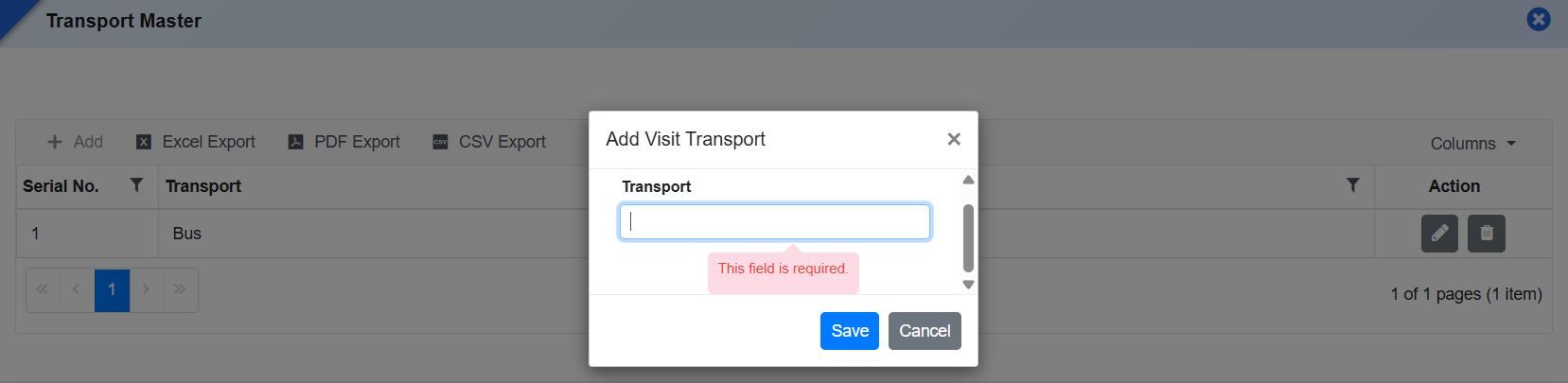
Introduced a new Visitor Transport Master form to allow schools to define transport modes such as Bus, Car, Cycle, Van, Auto, Self, etc.
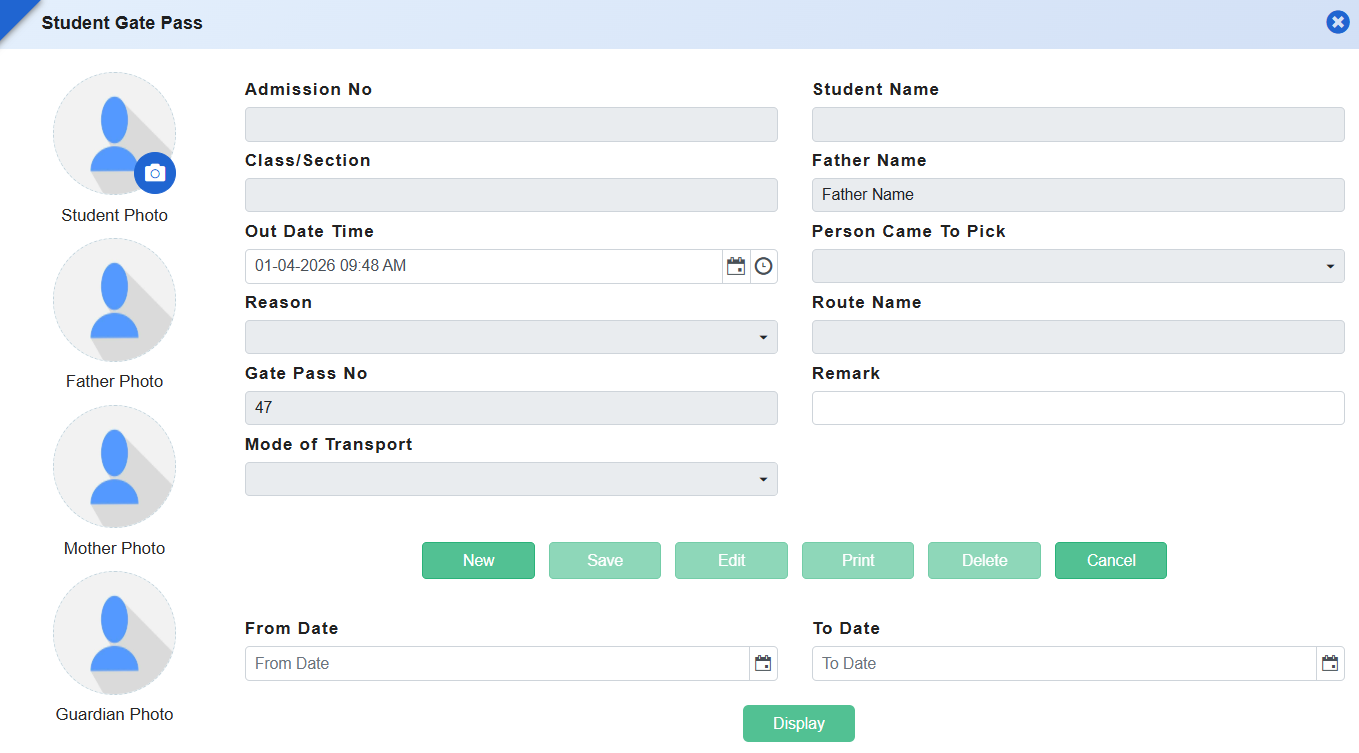
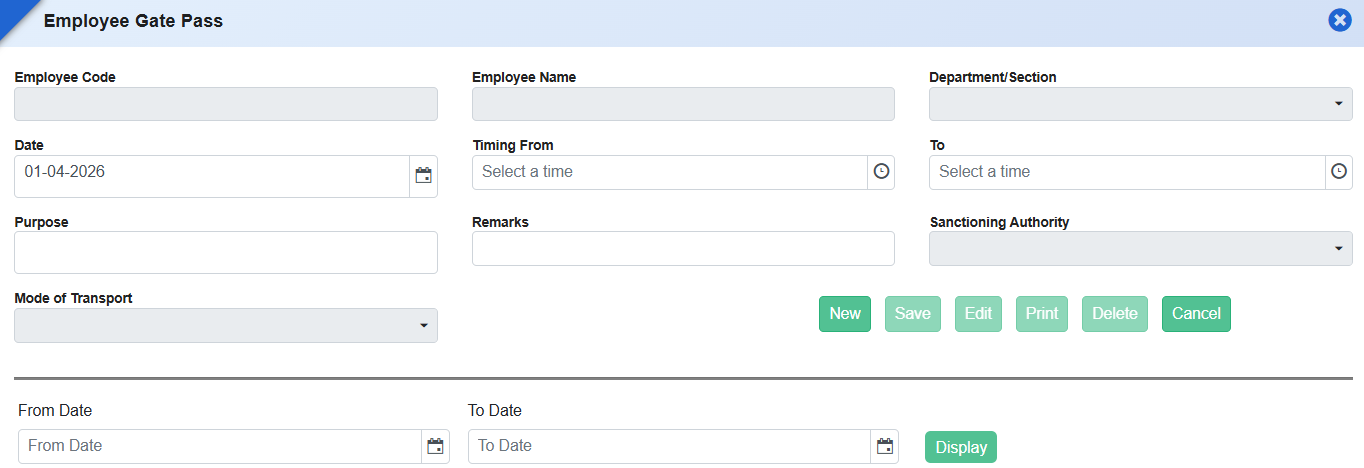
Added a “Mode of Transport” dropdown field in both Student Gate Pass and Employee Gate Pass forms.
Dropdown values are dynamically populated from the Visitor Transport Master.
The field is optional (non-mandatory) to ensure flexibility during entry.
What's New in Front Office
This release modernizes Front Office operations by improving appointment management,
visitor tracking, and reporting flexibility. Schools can now capture richer appointment
details, convert appointments to visitor check-ins with a single click, and maintain a
reliable audit trail of all campus visitors. Enhanced report configurability further
allows front office teams to tailor outputs to their needs, strengthening security,
transparency, and day-to-day coordination at the reception.
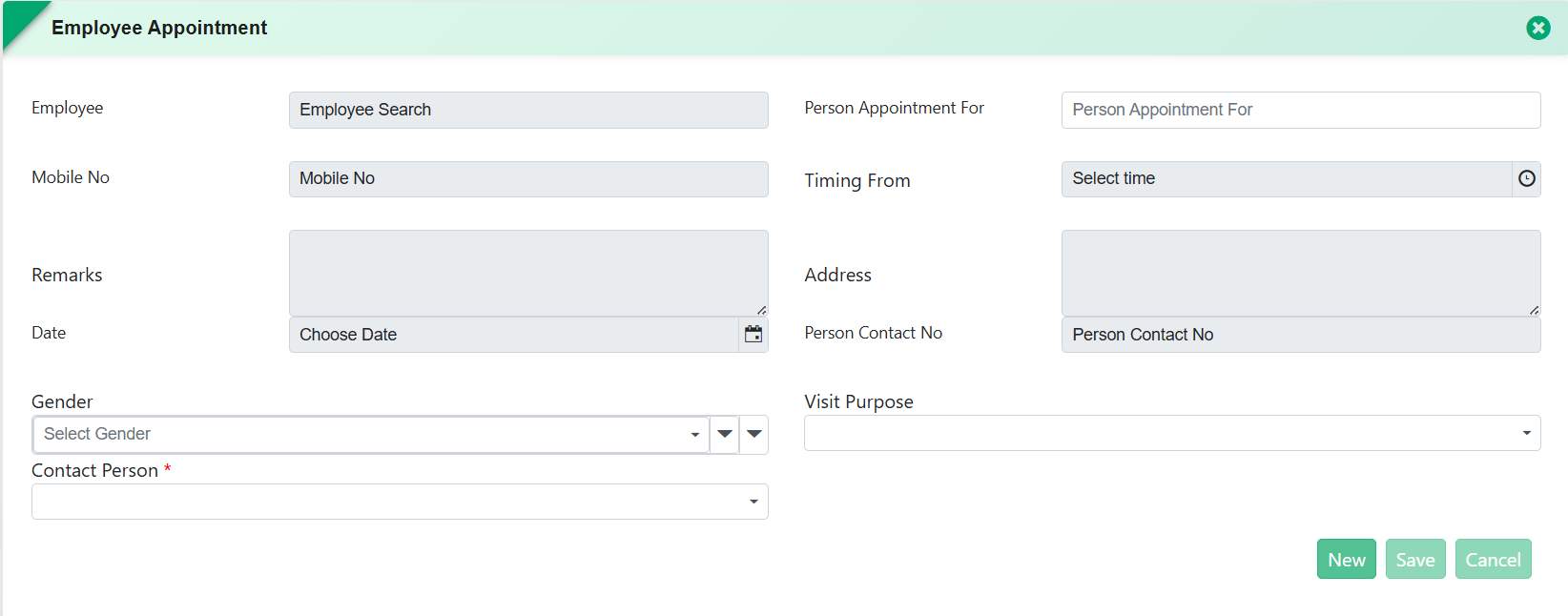
To capture complete and accurate appointment information and improve clarity during
scheduling, the Employee Appointment form has been enhanced with additional
personal and visit-related details. These changes ensure better preparation
for meetings and improve front office coordination.
Front Office → Employee Appointment
Key Functionality:
Added new fields in Employee Appointment:
Person Contact No.
Gender
Address
Visit Purpose (values sourced from Visit Purpose master)
Reason field renamed to Remarks for clearer and more flexible usage.
Ensures all appointment-related information is captured in a structured manner.
Benefits:
Improved Data Completeness: Ensures all visitor and appointment details are available upfront.
Better Meeting Preparedness: Helps staff and employees prepare for scheduled visits.
Standardized Visit Purpose: Master-based selection ensures consistency in reporting.
Clearer Communication: “Remarks” field supports more descriptive notes.
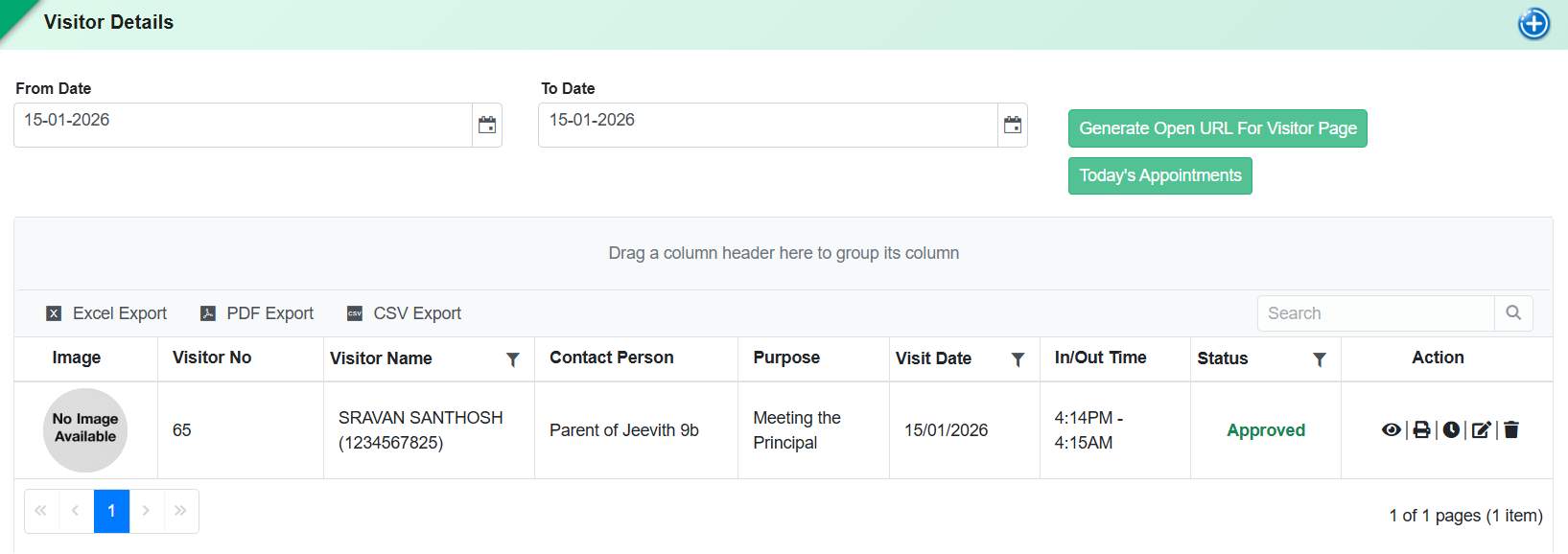
To streamline visitor handling and strengthen security, the Visitor Details
process has been enhanced to support appointment-based check-ins and tracking.
This allows the front office team to manage visitor entry efficiently while
maintaining accurate records for audit and compliance.
Front Office → Visitor Details
Key Functionality:
Visitor Details form now includes:
Today's Appointments view
Date-wise appointment filter for checking upcoming or past appointments.
Front Office staff can Check In visitors directly from the appointment list.
On Check In, the appointment is automatically recorded as a Visitor entry.
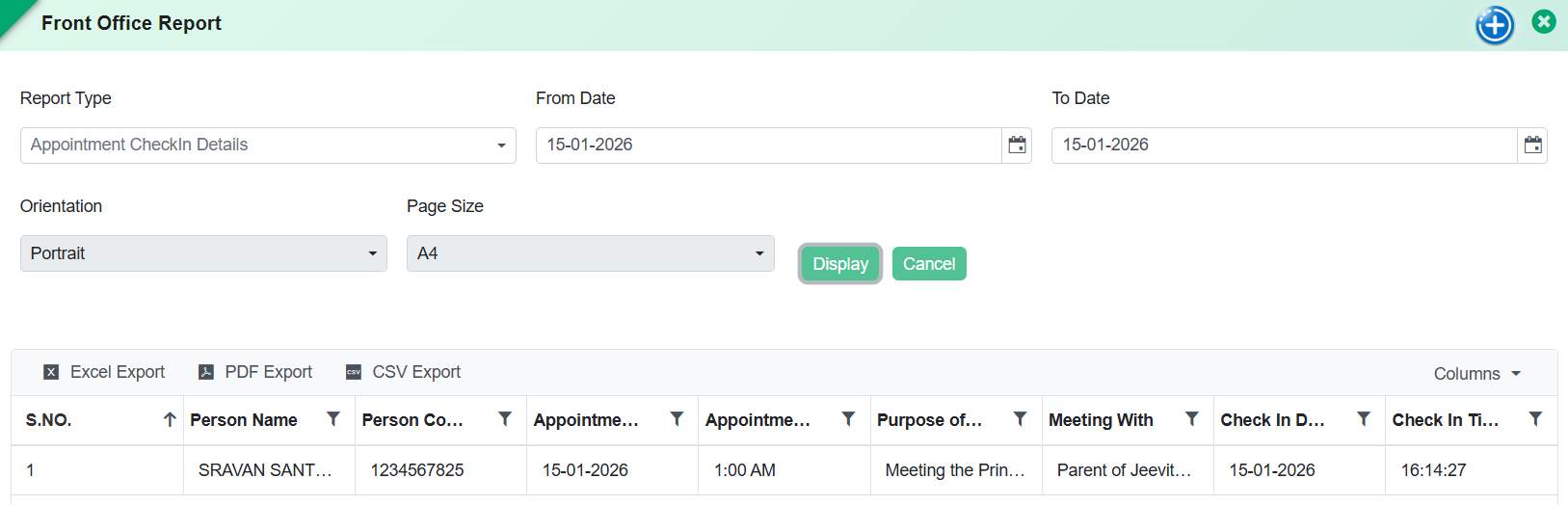
Introduced a new Checked-In Appointments Report displaying:
Person Name
Person Contact No.
Appointment Date & Time
Purpose of Visit
Meeting With
Check-In Date & Time
Benefits:
Faster Visitor Handling: Eliminates manual searching and duplicate entry at reception.
Improved Security & Traceability: Maintains a clear log of who entered the school and when.
Operational Efficiency: Seamless transition from appointment to visitor entry.
Audit-Ready Reporting: Provides structured data for security reviews and compliance.
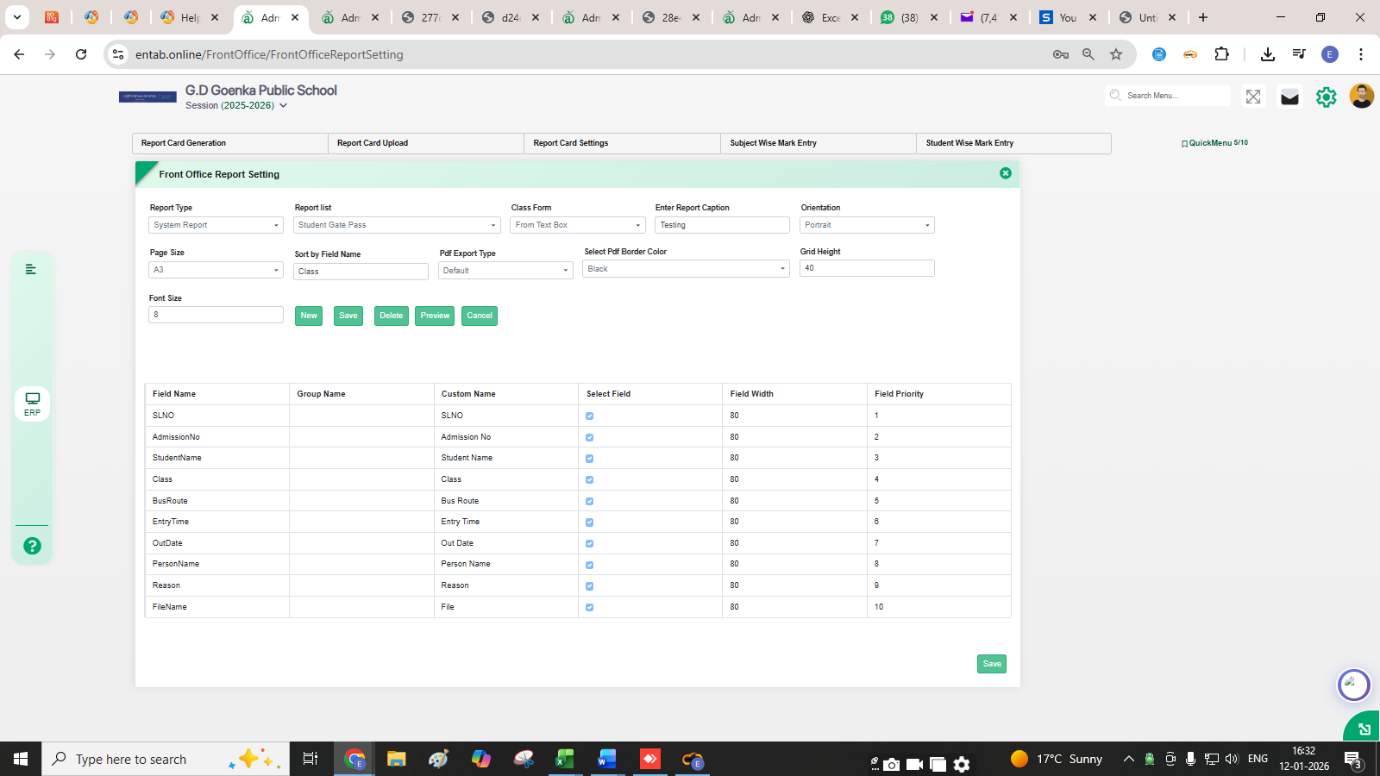
Feature 3: Configurable Report Settings for Front Office Reports
Front Office Reports now support configurable report settings. Schools can define visible columns, field order,
grouping, sorting, page size, orientation, and formatting as per their requirements, ensuring flexible and
standardized report generation for Front Office operations such as Student Gate Pass reports.
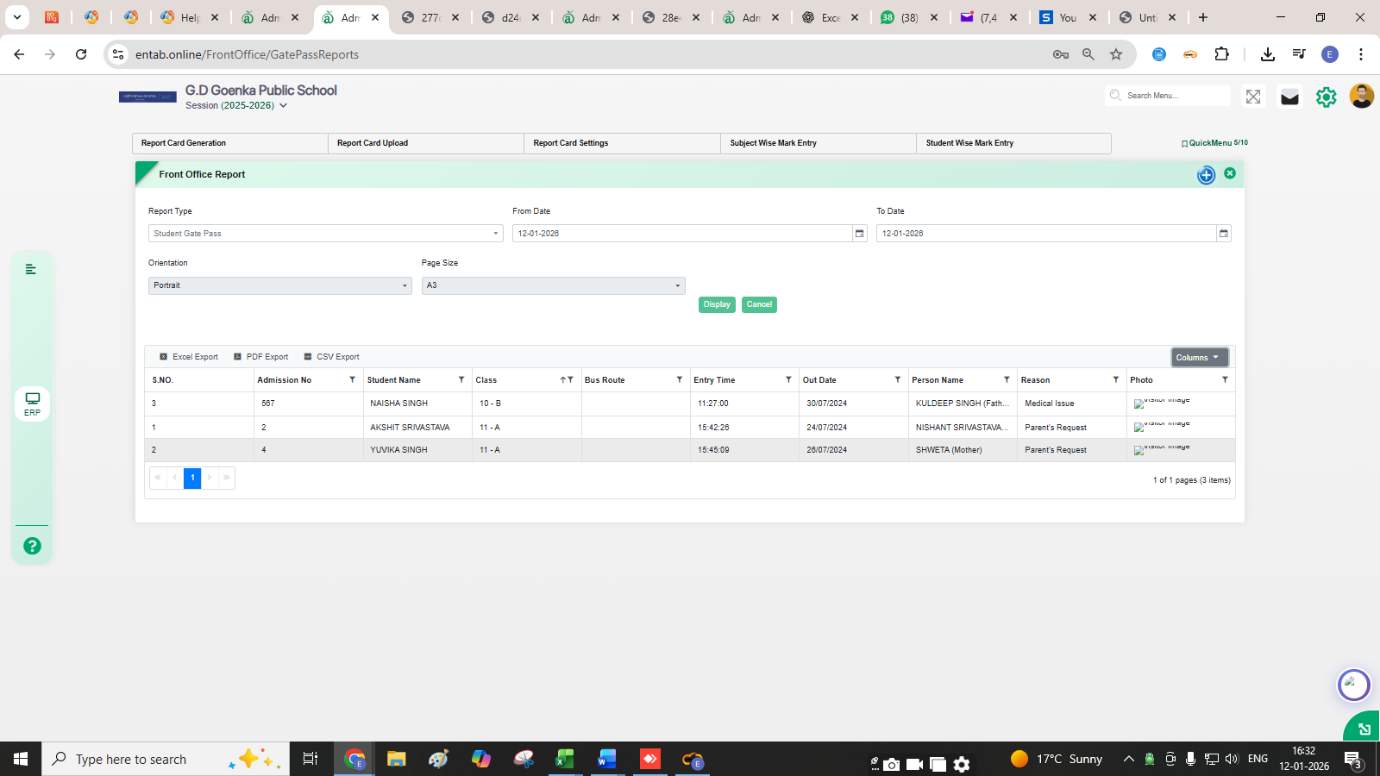
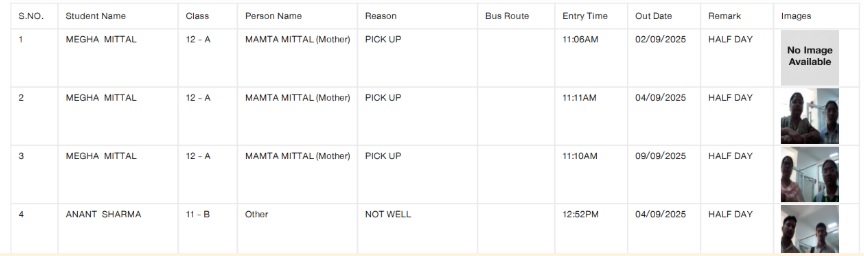
Feature 1: Enhanced Student Gate Pass Reporting and Layout
Configuration
This enhancement improves the visibility, accuracy, and
layout flexibility of the Student Gate Pass report,
ensuring all key information, including guardian and
pickup details, is displayed clearly within a single
report page.
Functionality:
Pickup Person Photo Column:
Front Office → Reports → Student Gate Pass
Added a new column to display the pickup person’s
photo for easy identification.
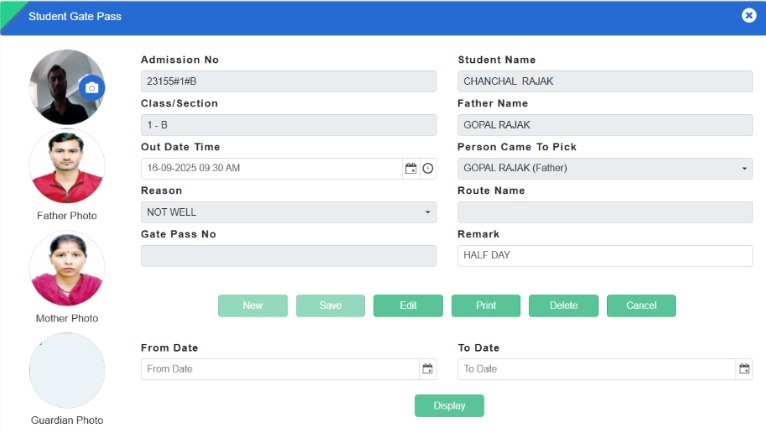
Guardian Photo Display:
Front Office → Student Gate Pass
A guardian photo box has been introduced to visually
verify the guardian at the time of student release.
Report Modification Provision:
Added capability to customize report layouts,
including field width and field priority, ensuring
data fits neatly on a single A4 landscape page.
Benefits:
Enhances student security and identification accuracy at
the time of exit.
Improves report readability by fitting all gate pass
data on one page.
Provides flexibility to tailor report layout as per
school-specific needs.
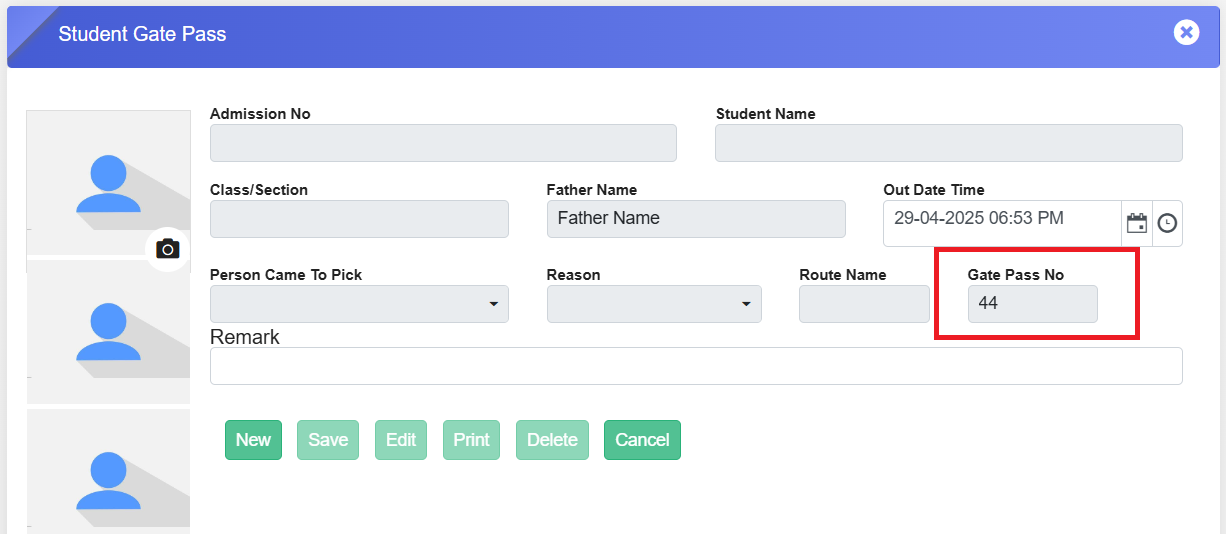
Feature 1: Gate Pass Number Field Added
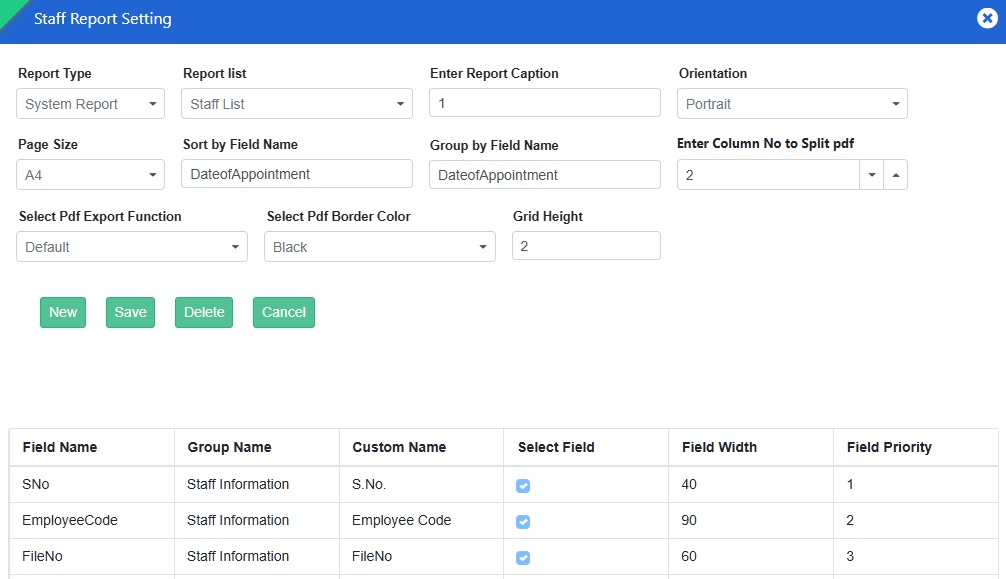
We have enhanced the Student Gate Pass page by adding a
new field: Gate Pass No.
Key Updates:
The Gate Pass No. field is automatically populated
with a series number starting from 1 when the first
gate pass is created.
This helps the admin track the total number of gate
passes generated so far.
The Student Gate Pass page is part of the Front
Office Management module, ensuring better
record-keeping and organization.
This enhancement improves efficiency and tracking in
managing student gate passes. 🚪📋
HOLISTIC PROGRESS CARD - A STEP TOWARDS INCLUSIVE EDUCATION
UNDER NEP AND NCF
The introduction of the new Holistic Progress Card (HPC), as
envisioned by the National Education Policy (NEP) 2020 and
guided by the National Curriculum Framework (NCF) 2023, has
been embraced wholeheartedly by most schools.
As the new session begins, many schools have shared the HPC
approach with parents during their introductory
Parent-Teacher Meetings (PTMs). It has been an overwhelming
and positive initiative, as parents feel more included in
their child's progress throughout the academic year.
While the overall response to HPC has been encouraging, some
parents may take a little more time to adjust to this new
approach. Busy schedules may make it difficult for some to
engage with feedback processes, while others, especially
those less familiar with formal education systems, might
feel unsure about how to share their input.
Schools can overcome these challenges by conducting more
frequent PTMs and orientations, and by teachers making
courtesy calls to parents. Schools can also invite parents
to share their opinions, struggles, and strengths through
life experiences in a supportive environment. The more
inclusive a school is in involving parents in a child's
progress, the more parents will gain confidence in sharing
their feedback over time.
Organising exhibitions, webinars, and other interactive
sessions can further encourage parents to engage positively
with the HPC approach. With consistent efforts, schools can
build a strong partnership with parents, making holistic
progress a shared journey for the betterment of every child.
To help parents connect with this new approach to tracking
student development, here’s a clear overview of what the
Holistic Progress Card offers:
Whole-Child Development
Tracks not just academic growth but also social,
emotional, and creative skills.
Skill-Based Reporting
Focuses on essential 21st-century skills like
communication, problem-solving, and collaboration.
Individual Insights
Provides a personalised report that reflects each
child’s strengths, areas for improvement, and
interests.
Student Self-Reflection
Encourages students to assess their own learning and
set personal goals.
Feedback from Multiple Sources
Includes input from teachers, peers, and
self-assessments for a complete view.
Beyond Academics
Acknowledges achievements in arts, sports, values
education, and well-being.
Parent Involvement
Offers actionable suggestions for parents to support
their child’s learning at home.
The HPC provides a holistic approach to education, focusing
on the child’s overall growth rather than just academic
performance, fostering a more inclusive and supportive
learning environment.
DASHBOARD
What’s New in Utilisation Dashboard
A new Utilisation Dashboard (Beta) has been introduced to provide schools with early visibility into system usage and key operational metrics. Positioned for quick access, the dashboard offers preliminary analytics to support data-driven reviews while clearly indicating its beta status. This enables management to explore insights with appropriate caution as the module continues to evolve.
Purpose:
To provide early access to system usage insights, a new module “Utilisation Dashboard (Beta)” has been introduced. This dashboard offers preliminary analytics while remaining under development, enabling schools to explore key metrics with appropriate caution.
Key Functionality:
Added a new moduleUtilisation Dashboard (Beta).
The module is displayed at the top of the menu, before Master Setting for quick access.
A mandatory disclaimer is shown on the dashboard:
Disclaimer:
“Note: The module is under development and may contain discrepancies. Please validate the data with the actual report before relying on it.”
Feature 1: Integration of FreshDesk – Ticket Management
System
We have introduced a "Question Mark" icon on the
vertical menu bar (below the settings icon) that
opens the "All Tickets" page. This page allows school
staff and employees to
create, manage, and track support tickets, which are
integrated with the CampusCare FreshDesk portal.
Key Features & Purpose
Seamless Ticket Creation: Staff can create support
tickets directly from the ERP system
Integration with FreshDesk: Tickets are sent to the
CampusCare service provider, where the support team
resolves them and provides updates.
Efficient Communication: The ticket creator and
support team can interact through the ticket interface
until the issue is resolved.
Ticket Status Filters: Users can filter tickets
based on status
(All, Closed, Open, Pending, Resolved).
Administrator Access: The admin, assigned on the
FreshDesk Assign page, can view tickets created by
all staff under their assignment.
Email-Based Ticket Filtering: Admins can filter
tickets based on email ID.
How to View a Ticket?
Click on the Question Mark icon → The All Tickets page
will open.
Click on any ticket from the list → The ticket details
will open.
View messages from the support team.
Use the Reply button (located at the bottom) to
communicate with the support team.
Even for closed tickets, the Reply button remains
active, allowing users to reopen the ticket if the issue
persists.
How to Create a Ticket?
Click on the Question Mark icon → The All Tickets page
opens.
Click on the plus (+) icon (top-right corner) → A
Create Ticket pop-up appears.
Fill in the required details:
Subject: Mention the page or module where you are
facing an issue.
Email ID: Auto-filled based on the user creating
the ticket.
CC Emails: Add other recipients if needed.
Description: Explain the issue (max 2000
characters).
Faster query resolution through direct ERP-FreshDesk
integration.
Easy ticket tracking & communication between users and
the support team.
Enhanced accessibility with permission-based ticket
management.
MASTER SETTING MODULE
Feature 1: Enhanced Email Control for Attendance
We have implemented a new enhancement on the “Automated
Status Mail” page to prevent automated attendance status
emails from being sent on holidays and weekly offs.
Key Updates:
Added an "Email Not Needed" dropdown to the form.
The dropdown lists all weekdays with a checkbox
functionality.
Admins can select specific days to disable attendance
status emails for staff and students on those days.
This update ensures that no unnecessary emails are sent on
non-working days, improving email accuracy and reducing
clutter.
STUDENT ATTENDANCE MODULE
What’s New in Student Attendance
This release improves student attendance monitoring and parent engagement through
targeted communication and richer attendance reporting.
Feature 1: Attendance Percentage–Based Parent Communication
Schools can now send SMS/internal messages based on attendance percentage.
Filter by attendance %
Select date range
Send alerts to specific parents
Feature 2: Leave Count in Summary Report
New Leave row added
Visible with Present/Absent/Total
Available in exports
STAFF INFORMATION MODULE
Feature 1: Designation & Department Wise Bulk Holiday Assignment
Purpose
To simplify holiday configuration and reduce manual effort, the Bulk Holiday Assign feature has been enhanced to support Designation-wise and Department-wise holiday assignment.This allows schools to efficiently apply holidays to specific staff groups instead of assigning them individually.
Choose Holiday Type (Public Holiday / Restricted Holiday)
Apply holidays to:
Selected Departments
Selected Designations
Specific Staff (optional override)
System will:
Apply holidays to all staff matching the selected Department/Designation.
Override existing holiday entries for the selected date range (as per current logic).
Existing Working Staff exclusion logic remains applicable.
Key Benefits
Bulk Efficiency: Assign holidays to large groups in a single action.
Reduced Manual Effort: Eliminates need for individual staff-level updates.
Flexible Configuration: Supports department-based and role-based holiday policies.
Improved Accuracy: Ensures consistent holiday application across similar staff groups.
Better HR Control: Useful for scenarios where holidays differ across departments (e.g., Admin vs Teaching staff).
Feature 2: Staff Attendance Regularization Form
Staff Information -> Staff Attendance -> Staff Attendance Regularization Form
Key Functionality
Introduced a new Staff Attendance Regularization form with filters for Leave Category, Employee, From Date, and To Date to fetch attendance data.
Displays employee-wise attendance in a horizontal date-wise grid, covering all selected dates in a single view.
Each date includes editable fields:
Leave Type
Attendance Status (Present, Absent, Leave, Half-Day, Late Arrival, Early Departure, On-Duty, Holiday)
In Time & Out Time
Remarks
Implemented color-coded UI for each attendance status for easy identification.
Added Attendance Status Legend at the top for reference.
Displays Employee Details (Name, Emp Code, Designation) alongside attendance records.
Shows Balance Leave details at the top section (SL, ODL, MEDL, MATL, LWP, HSL, etc. with total).
DisplaysAvailed Leave summary and Late Coming count within the form.
Provides Closing Leave balance calculation after regularization.
Supports bulk update and save functionality for multiple dates and employees in one go.
Key Benefits
Enables efficient bulk attendance correction and regularization
Provides complete monthly visibility in a single screen
Improves accuracy with real-time leave tracking and calculations
Reduces dependency on multiple screens and manual processes
Enhances usability with visual indicators and structured layout
Feature 3: Perk Letter Report
Introduced a new Perk Letter Report under Staff Information → Staff Reports, enabling users to generate and download staff-specific perk letters as per defined formats.
What’s New in Staff Information
This release improves flexibility and control across staff
operations by enabling smarter leave handling and fully
customizable staff reporting. Employees can now apply
different leave types on the same day in separate halves
as per configured clubbing rules, reflecting real
workplace scenarios without manual intervention. At the
same time, dynamic report settings empower schools to
design staff reports using system, custom, and dynamic
fields, ensuring outputs match institutional needs and
improve administrative efficiency.
Feature 1: Half-Day Leave Clubbing Support for Different
Leave Types
Purpose
To provide greater flexibility in leave management, the
system has been enhanced to support
different leave types on the same day when applied
for separate halves. This ensures that leave applications
align correctly with configured leave rules and reflects
real-world scenarios without unnecessary system
restrictions.
Key Functionality:
Allows employees to apply
two different leave types on the same date, one
for First Half and another for
Second Half (e.g., CL + LWP).
Validates applications against the
Leave Clubbing rules defined in Leave Rules
configuration.
Ensures accurate leave balance calculation and correct
leave status recording.
Key Benefits
Improved Flexibility: Employees can apply
appropriate leave types for different halves of the same
day.
Feature 2: Enhanced Report Settings for Staff Information
Key Benefits
Introduced Report Settings in
Staff Information, aligned with the functionality
available in Student Information.
Enabled report configuration for
both System Fields and Custom Fields.
Added support to display dynamic fields in the
report settings.
Included all staff-related fields in report
settings, including Qualification, to support
comprehensive report printing.
Feature 3: Dynamic Field Configuration in Staff Reports
Staff Reports now support
dynamic field creation and configuration, allowing
schools to add or remove report fields as needed. This
flexibility enables schools to customize staff reports
based on their specific requirements and ensures only
relevant information is displayed and generated in
reports.
Feature 1: New Report added- “Staff Leave Details Month
Wise”
The “Staff Leave Details Month-Wise” Report has been
introduced to provide a detailed view of an employee’s
leave usage across all months of a selected year. This
report enables HR and administrators to easily track leave
distribution, identify usage trends, and ensure better
leave management and planning.
Key Functionality:
Enables selection of key parameters — Employee Name,
Leave Year, and Leave Category.
Displays month-wise details with Employee Code, Leave
Name, monthly leave count/status, and total leaves
taken.
Provides a clear, structured report summarizing employee
leave utilization for the selected period.
Provides a clear month-wise breakdown of leave usage.
Helps HR and management monitor employee leave patterns
and plan workforce availability.
Reduces manual effort in compiling leave summaries from
multiple sources.
Enhances transparency and accuracy in leave tracking and
reporting.
Feature 1: New Form Added - Health Card Upload
A new form “Health Card Upload” in the Staff
Information module allows quick and secure upload of
employee health cards, keeping all health documents
organized, safe, and easily accessible whenever needed.
Key Functionality
Select the relevant category for the employee health
card.
Click Edit to enable the upload option.
Upload the health card file for organized and secure
storage within the system.
Navigation
Staff Information → Health Card Updation → Select Category
→ Edit → Add File
Feature 2: Staff Attendance Auto-Sync
A scheduler has been implemented to automatically sync
staff attendance from the database, replacing the manual
upload process. The scheduler runs three times daily at
08:30 AM, 11:00 AM, and 11:30 PM, ensuring
attendance data is consistently updated without manual
intervention.
Benefits
Automates staff attendance updates, reducing manual
effort and errors.
Ensures attendance data is refreshed consistently
three times a day.
Improves accuracy and reliability of payroll and
attendance reporting.
Feature 3: Upload Staff Signatures in Bulk
A new enhancement allows schools to upload staff
signatures in bulk, simplifying setup and saving time.
Time-Saving: Speeds up staff profile setup and
updates.
Streamlined Management: Ensures signatures are readily
available for reports, documents, and official
communications.
Feature 4: Leave Application Restriction After 3 Days
To help schools manage staffing efficiently, we’ve added a
smart update where staff can now apply for a maximum of
3 consecutive days of leave. This ensures smooth
operations while keeping leave planning transparent and
organized.
Feature 5: Leave Period Configuration by Staff Category
We’ve enhanced the Staff Leave Period page to provide more
flexibility in leave management. Now, schools can define
separate leave periods for different staff categories,
such as Teaching and Administrative staff.
This allows tailored leave policies for each category,
making leave planning more accurate and efficient.
Feature 1: New Page- Staff Report Setting
We have introduced a "Staff Report Setting" page under the
Staff Reports menu. This page allows administrators to
customize staff report formats efficiently. The features
and functionalities are similar to the Student Report
Setting page.
Navigation
Go to Staff Reports menu.
Click on the plus (+) icon located on the top right of
the title bar.
A new interface titled "Staff Report Setting" will
open.
Navigation
Student Information Module → Certificate Setting →
Template Button → Click on Student Template → Download
Excel Sheet → Navigate to GE Column
Key Features:
Set column headers for specific reports.
Define cell width and height for better readability
Prioritize columns as per reporting needs.
Split PDFs when columns exceed the page limit.
This feature enhances flexibility in generating staff
reports. Explore it now!
Feature 2: Staff Attendance Entry- New Excel Template
Added
We have provided "Excel Template 2" button on the
Attendance Excel Import page to enhance flexibility in
bulk attendance entry for the attendance manager.
Navigation:
Staff Information Module >>> Staff Attendance >>> Staff
Attendance Entry >>> Click on “Bulk Upload” button.
Key Updates:
Clicking "Excel Template 2" downloads an Excel sheet
where Punch Date and Punch Time are placed in separate
columns for better clarity.
The earlier format is still available via "Excel
Template 1".
Use either template for efficient attendance management!
🏫📜
Feature 3: "Training Details" Form Added to Staff Portal
We have introduced a new form titled "Training Details" in
the Staff Portal, allowing staff members to record their
training information efficiently.
Total Working Days – Displays the total working
days.
Total Days Attended – Days present.
Total Absentee – Days absent.
How to Access?
Click on the "Training Details" card on the Staff Portal
Dashboard.
Purpose:
Staff can enter details of their online, offline, and
specialized training directly from their portal.
Workflow:
Select Training and Training Type.
Enter all required details including dates and
organizer info.
Click Save to populate the details in the grid.
Use Delete to remove training records.
Edit option available for modifications.
The Action column allows modifications as needed.
TIME TABLE MODULE
Feature 1: New Page – Time Table Substitute Permission
A new page allows admins to manage staff category
permissions for assigning substitute teachers efficiently.
Key Features
Grid shows staff categories.
ISEnable column allows selection of categories.
Save button applies permissions.
Workflow
Navigate to the page.
Select staff category in ISEnable.
Click Save.
Impact
Selected categories appear in the “Assigned To”
dropdown when assigning substitutes.
For further details, reach out to the support team.
STUDENT TRANSPORT
Feature 1: New Reports added
New Reports in Transport Module: Bus Stop Group Detail,
Transport Availed Students Stop Group wise, Transport
Availed Student Count Stop Group wise
Bus Stop Group Detail – Displays comprehensive
details of all defined bus stop groups.
Transport Availed Students - Stop Group Wise –
Lists all students availing transport, categorized by stop
group.
Transport Availed Student Count – Stop Group Wise –
Provides a summarized count of students availing transport
for each stop group.
Feature 2: Improved Visibility for Installment Name in Route
Assigner
To enhance data readability and user experience, the
Installment Name column in the Route Assigner screen has
been adjusted for better visibility. The column width has
been increased by optimizing the width of the Rate and No.
of Times columns, ensuring that full installment names are
clearly displayed.
Benefits
Improves clarity and readability of installment details.
Enhances user experience while managing transport fee
installments.
Reduces confusion and the need for manual scrolling or
hovering to view complete information.
Exam and Assessment
Feature1: Assessment Mark Entry Visibility in Parent Portal
Provided a provision to displayAssessment Mark Entry detailsin the Parent Portal, allowing parents to view their child’s assessment marks directly.
What’s New in Exam & Assessments
This release enhances transparency and parent engagement in academic reporting by introducing
visual attendance alerts and unified result access Report cards now automatically highlight attendance percentages falling below the school-defined threshold, enabling parents and teachers to instantly identify eligibility concerns. Additionally, the Parent Portal offers a newConsolidated Report Card, providing a single, comprehensive view of student performance across exams—reducing navigation effort and improving understanding of overall academic progress.
Feature 1: Attendance Percentage Highlighting in Report Card
Purpose
To improve visibility and draw attention to low attendance cases, the Report Card has been enhanced tovisually highlight attendance percentagesthat fall below the mandatory threshold defined by the school. This helps parents, teachers, and management quickly identify students who do not meet attendance requirements.
Attendance details (Attendance Count and Attendance Percentage) are displayed on the Report Card.
The system compares the student’s attendance percentage with the minimum required attendance configured under Classification Grade.
If the attendance percentage falls within the configured low-attendance range:
attendance percentage is highlighted in red colour.
Both Background Colour and Font field are applied (as per settings).
If the attendance percentage meets or exceeds the required threshold, no highlighting is applied.
Works automatically during Report Card Generation for the selected exam.
Key Benefits
Instant Visibility: Low attendance cases are immediately noticeable on the report card.
Clear Communication: Parents can easily understand attendance shortfalls without manual interpretation.
Policy Alignment: Attendance display follows school-defined classification and threshold rules.
Reduced Follow-Ups: Minimizes confusion and repeated explanations regarding attendance eligibility.
Professional Presentation: Makes report cards more informative and action-oriented.
Feature 2: Consolidated Report Card in Parent Portal
A Consolidated Report Card has been added to the Parent Portal, allowing parents to view their child’s academic performance across exams in a single, unified view. This provides easier access to overall results without navigating multiple individual report cards.
Feature 1: New Report Added
New Reports in Exam Module:
Consolidate Range Wise Subject Count Report – This
report provides a consolidated view of student performance
across defined score ranges, helping schools analyze
subject-wise achievement patterns and overall class
performance distribution.
Feature 2: Class-Wise Attendance Sync for Report Card
Display
This enhancement streamlines attendance data management by
allowing schools to select all classes and save attendance
records directly from the Attendance Module for report card
integration.
Key Functionality
A new tab has been added under the Exam Attendance page.
Provides an option to select all classes and save
attendance data collectively.
The saved attendance information is automatically synced
for Report Card display.
Benefits
Simplifies the process of updating and managing exam
attendance records.
Ensures accurate and up-to-date attendance data on report
cards.
Saves time by enabling bulk class selection and data
saving in a single step.
Feature 3: New Consolidated Reports and Graphs for
Performance Analysis
Two new analytical tools have been introduced to enhance
result evaluation and performance tracking:
Consolidate Class-Wise Range Count Report added in
Consolidate Report Form to provide class-level performance
summary.
Class-Wise Grade/Range Analysis Graph added in
Graph Analysis Form for visual performance trends.
Feature 4: Subject Teacher Column Added in Result Summary II
Report
This enhancement introduces a Subject Teacher column in the
Result Summary II report, allowing teacher-wise performance
analysis.
Exam & Assessments → Exam Reports & Analysis → New
Consolidated Reports → Result Summary II
Key Functionality
The Result Summary II report now includes a Subject
Teacher column.
Enables mapping of subjects with respective teachers for
detailed analysis.
Supports teacher-wise review and performance comparison.
Benefits
Helps schools analyze results based on subject teachers.
Enhances transparency and accountability.
Useful for academic planning and teacher review.
Feature 5: Student Name Tags in Report Card
This enhancement introduces separate name tags for cleaner
formatting.
Key Functionality
Supports:
First Name – first word
Middle Name – second word (if available)
Last Name – last word
Automatically identifies and separates name parts.
Ensures consistent name representation.
Benefits
Improves clarity and personalization.
Ensures uniform name formatting.
Helps in accurate data mapping.
Feature 6: Enhancements in Report Card
Enhanced Student Name Format
Introduced a new <<StudentName1>> tag.
Key Functionality
Displays names in format:
First Name + Middle Initial + Last Name
Example: ADHYANSH VIJAYKUMAR PADDALWAR →
ADHYANSH V. PADDALWAR
Auto formatting without manual editing.
Benefits
Consistent professional formatting.
Improved readability.
Reduces manual effort.
Additional Enhancements
<<ClassStrength>> tag to display total
class strength.
<<RollNoGender>> tag: B1, B2, B3… for
boys / G1, G2, G3… for girls.
Support for 60 subject groups using
«TableStart:markSubjects60».
Age calculation tags:
<<AgeDuration>>
<<MonthsDuration>>
<<DaysDuration>>
Option to display an image for bottom grade.
Feature 7: Option to Display Header Only on First Page in
Consolidated Reports
A new Teacher-wise Attendance Not Done Report has been added.
Shows pending attendance dates
Displays responsible teacher for each class & section
Benefit
Helps identify gaps in attendance marking
What’s New in Staff Attendance
This release improves accuracy and clarity in staff attendance and leave management by supporting flexible time-slot configurations and category-based leave year visibility. Schools can now define different working hours by day or date to ensure correct attendance marking without manual corrections, while staff see only their applicable leave year on the portal. These enhancements reduce administrative effort, prevent errors, and ensure attendance and leave processes align with actual school policies.
Feature 1: Flexible Time Slot Configuration for Staff Attendance
Purpose
To ensure accurate staff attendance marking and eliminate manual corrections, the Attendance Time Slot Master has been enhanced to support flexible working hour configurations. Schools can now define different attendance time slots based on regular days, specific weekdays, or special dates, ensuring attendance is calculated correctly for varying schedules.
Key Functionality
General Time Slot
Defines a common attendance time slot applicable to regular working days (e.g., Monday to Friday standard hours).
Day-Wise Time Slot
Allows configuration of different working hours for specific days of the week (e.g., shorter working hours on Saturdays).
Prevents incorrect Half-Day (HD) marking when schedules differ by weekday.
Date-Wise Time Slot
Enables special time slots for specific dates such as exams, events, or special academic schedules.
Overrides regular schedules for the selected date where required.
Benefits
Accurate Attendance Marking: Prevents incorrect Half-Day or Absent marking due to schedule variations.
Reduced Manual Intervention: Eliminates the need for manual attendance corrections by admins.
Operational Flexibility: Supports diverse school schedules, including weekends and special days.
Improved Payroll & Leave Accuracy: Ensures correct attendance data flows into payroll and leave calculations.
Feature 2: Role-Based Applicable Leave Year Display
Purpose
To avoid confusion and ensure accurate leave planning, the Staff Portal has been enhanced to display only the applicable leave year for each staff member based on their staff category. This ensures staff view and apply leaves strictly within their valid leave cycle.
Payroll Module
What’s New in Payroll
The Form 16 reporting process has been improved with a Staff Category filter, enabling schools to generate statutory documents for specific employee groups in a single step. This enhancement simplifies compliance, reduces manual segregation, and ensures consistent, accurate preparation of Form 16 records aligned with existing payroll reporting practices.
Feature 1: Staff Category Filter in Form 16 Report
Purpose
To provide better control and flexibility in statutory reporting, a Staff Category filterhas been added to the Form 16report. This enhancement allows schools to generate Form 16 specifically for selected staff categories, similar to the filtering available in the Acquaintance Roll report.
Payroll Reports → Form 16
Key Functionality
Enables users to generate Form 16 for a specific staff category (e.g., Teaching Staff, Administrative Staff).
Aligns Form 16 report filters with those available in other payroll reports for consistency.
Applies the selected staff category during report generation to include only relevant employees.
Key Benefits
Targeted Report Generation: Allows category-wise Form 16 generation.
Improved Compliance Handling: Simplifies statutory document preparation for large staff groups.
Operational Efficiency:Reduces manual segregation of Form 16 documents.
Consistent User Experience:Maintains uniform filtering behaviour across payroll reports.
To provide structured and transparent tracking of Provident Fund (PF) transactions, a dedicated PF Ledger has been introduced. This ledger maintains complete records of opening balances, monthly contributions, cumulative totals, and withdrawals, ensuring accurate PF accounting and easy reference for payroll and compliance.
Feature 1: Multi Acquittance Roll Configuration and
Customization
This enhancement provides flexibility for schools to
generate, modify, and customize multiple Acquittance Rolls
within the Payroll module, supporting diverse reporting
and signature requirements.
Feature 1: New Form Added - Payroll Document Sender
We are excited to introduce a new form
Payroll Document Sender. This feature lets schools
send payslips directly to employees via email, automating
the distribution process and ensuring secure and timely
everyone informed effortlessly.
Navigation
Payroll → Payroll Document Sender → Send
Feature 2: New Reports Added in Payroll
Two new reports have been added to enhance payroll
transparency and accuracy:
TDS Deduction Report: Displays employee-wise details
of tax deducted at source, ensuring clear and precise
individual payroll records.
TDS Summary Report: Provides a consolidated view of
TDS along with employee-wise details for a selected
time period, helping track and manage tax deductions
efficiently.
Feature 3: Multiple Document Upload
A new provision on the
Payroll Report Print Setting page allows uploading
multiple documents at once, such as certificates. This
feature simplifies document management and ensures all
required files can be attached in a single step, saving
time and effort.
To enable schools to record, track, and share student
behavior, achievements, and observations in a structured and
transparent manner, promoting holistic student development
and teacher-parent collaboration.
Key Functionality
A new Anecdote Module has been introduced with the following
key components:
Anecdote Entry – Allows Class Teachers and Subject
Teachers to record student observations and behavioural
notes.
Observation Master – Enables the creation and management
of predefined observation categories for consistency in
reporting.
Observation Type – Defines and classifies the types of
anecdotes (e.g., Positive, Negative, Neutral) for better
tracking and analysis.
Parent Portal – Anecdote Details – Displays anecdotal
records for parents to view their child’s progress and
teacher feedback.
Principal Portal – Anecdote Details – Allows the principal
to monitor all anecdotal entries for performance review
and behavioural oversight.
Benefits
Encourages transparent communication between teachers,
parents, and school administration.
Provides a structured way to document and analyze student
behavior and achievements.
Helps in early identification of behavioural trends for
timely intervention.
Strengthens the collaboration between academic and
non-academic teams for student development.
Master Setting
Feature 1: Verify Student Portal
The Verify Student Portal feature has been introduced to
help administrators quickly verify and access student or
parent portals directly from the ERP. This ensures smooth
portal verification and reduces dependency on support for
login or access-related checks.
Navigation
Master Setting -> Verify Portal -> Type(Student)
Key Functionality
Key Functionality
Allows selection of Type — Student or Parent.
Enables search using User ID, Admission Number, or
Name.
Displays key student details including:
Student Name
Class
Father’s Name
Mother’s Name
Provides an “Open Portal” option to directly access
and verify the respective student’s portal.
Benefits
Simplifies the verification process for student/parent
portal access.
Reduces manual effort and dependency on backend teams
for portal checks.
Ensures faster resolution of login and access-related
queries.
Enhances administrative efficiency and data accuracy.
Inventory
Feature 1: Item Expiry Alert Card on Inventory Dashboard
Functionality Update
Added a new Item Expiry Alert Card on the Inventory Dashboard.
Displays the count of items expiring within the next 7 days.
Provides quick visibility of upcoming expiries.
Clicking the count can direct users to the Item Expiry Details report for item-wise information.
Benefits
Enables proactive inventory management.
Helps schools plan timely consumption, replacement, or return of items.
Reduces wastage and improves stock monitoring efficiency.
Feature 2: Inventory–FA Integration Based Transaction Handling
Introduced seamless integration between the Inventory Module and Financial Accounting (FA) Module to enable automatic posting of accounting entries for all inventory transactions.
Covers transactions including Purchase Entry, Purchase Return, Issue, Issue Return, Consumption, Sale, and Sale Return.
Added a configurable“INV–FA Setting” to map each Inventory Head (Stock Ledger) with corresponding General Ledger, Sub Ledger, GST, Discount, Cost Centre, and Round-off accounts.
Provided flexible integration modes:
NA: No accounting integration
Using FA Setting: Centralized ledger mapping
On Page:Direct ledger mapping during transaction entry
Key Benefits:
Eliminates manual accounting entries and reduces errors
Ensures accurate and consistent financial postings
Improves efficiency and real-time financial tracking
Offers flexibility to configure integration as per school requirements
Case -1
If user select Inventory FA Setting as "NA"
Case -2: If user select Inventory FA Setting as "On Page"
Case -3: If user select Inventory FA Setting as "Using FA Setting"
Note - In this module user is not able to create more than one transaction gives pop.
What’s New in Inventory
The Inventory module has been strengthened with the introduction of a Monthly Closing Balance Report, enabling schools to monitor stock movement and consumption on a periodic basis with improved accuracy and transparency.
Feature 1: Monthly Closing Balance Report in Inventory
Purpose
To provide clear visibility into month-wise inventory movement and balances, this report allows tracking of inward and outward quantities along with rolling balances. Each month’s closing balance is automatically carried forward as the next month’s opening balance.
Key Functionality
Introduced Monthly Closing Balance Report under Inventory Reports.
Displays:
Opening Balance
Inward Quantity
Outward Quantity
Closing Balance
Supports month-wise filtering for better analysis.
Accurate Tracking: Ensures reliable stock records.
Better Visibility: Clear monthly insights into inventory movement.
Audit Ready: Simplifies verification and reporting.
Improved Planning: Helps in forecasting and stock control.
Healthcare
Feature 1: Enhanced Health & Cleanliness Assessment Options
Purpose
To standardize health inspection records and provide more detailed assessment options,
the Deficiency and Cleanliness modules have been enhanced with additional dropdown values
and a new Poller selection. This ensures more accurate and comprehensive student health tracking.
Key Functionality
Deficiency Module Enhancement
Added a Poller (Dropdown Selection Field) in Deficiency
Dropdown options available:
Yes
No
Absent
Present
Within Normal Limit
Enables staff to record structured observations instead of free text
Cleanliness Module Enhancements
Nails Section
Good Hygiene
Bad Hygiene
Hair Section
Good Hygiene
Bad Hygiene
Feature 2: Bulk Import for Backdated Medical Records
Key Functionality
Introduced bulk import provision for uploading backdated data in the following modules:
Allergy Details
Measurements Details
Camp Details
Nursing Details
Disease Details
Immunization Details
Injury/Operation Details
Enables users to upload historical records in bulk through a structured import format.
Key Benefits
Eliminates manual entry of past records
Saves time and improves data accuracy
Ensures seamless migration of historical medical data into the system
Preference
Feature 1: Enhanced Color Customization for Landing Page (Beta UI)
Purpose
To provide schools with greater control over branding and UI consistency, the Customize Landing Page (Beta UI) has been enhanced to allow configuration of additional colour elements. This ensures a uniform look aligned with the school’s identity and improves the overall user experience.
Added provision to configure the Logo Area Background Color.
By default, it will now align with the Right Background Color instead of a fixed sky-blue color.
Ensures visual consistency across the landing page.
Font Color Alignment for Key Links
The font color for:
“Forgot Password?”
“Login with OTP”
Will now follow the Right Text Color configured for the school’s name.
Maintains uniform typography across the page.
Sign In Button Color Customization
The Sign In button will now:
Use Right Background Color for background.
Use Right Text Color for font.
Ensures consistency with school branding and improves visibility.
Custom Background Color for Important Links
Added configuration to set background color for:
Online Registration
Online Enquiry
School Website
Allows schools to highlight these key actions using preferred colors.
Key Benefits
Enhanced Branding Control: Schools can align the login page with their official color theme.
UI Consistency: Eliminates mismatched colors across different elements.
Improved User Experience: Better readability and visual clarity for users.
Flexible Customization: Admins can easily update colors without technical dependency.
Professional Appearance: Creates a polished and institution-specific login interface.
Feature 2: Privacy Consent Checkbox with Policy & DPDP Act Links on Login Page
Purpose
To ensure compliance with data protection regulations and obtain user consent before login, a mandatory privacy acknowledgment checkbox has been introduced on the login page.
Functionality Added
Added a mandatory checkbox on the login screen.
Privacy Policy Link
The Privacy Policy hyperlink will open the same privacy policy content configured for the login page.
Ensures consistency in policy display across the system.
DPDP Act Link
Added a clickable link for >DPDP Act (Digital Personal Data Protection Act).
Redirects users to the relevant policy/content page (as configured by the system/school).
Validation Logic
Users cannot proceed with login unless the checkbox is selected.
Proper validation message will be shown if the user tries to login without accepting.
Feature 3: Password Criteria Display in Reset Password Screen
Purpose
To guide users in creating valid passwords and reduce reset failures, the password criteria note has been added to the Reset Password screen, ensuring users are aware of the required format while entering a new password.
Functionality Added
Added a password criteria note in Master Setting → Reset Password screen.
The note displays the same validation rules as available in the Change Password screen.
The criteria message includes:
Minimum character length requirement
Requirement of:
At least one numeric character
One lowercase letter
One uppercase letter
One special character
The note is displayed below the password fields during password entry/reset.
Ensures consistency of validation messaging across both Change Password and Reset Password flows.
Benefits
Improved User Guidance: Users clearly understand password requirements while entering details.
Reduced Errors: Minimizes failed attempts due to incorrect password format.
Consistency: Same validation rules displayed across all password-related screens.
Better User Experience: Eliminates confusion during password reset.
Enhanced Security Awareness: Encourages users to create strong and compliant passwords.
Feature 4: Login Page UI & Branding Enhancements
Enhanced the login page with improved customization and UI consistency, including dynamic button color configuration, fixed minimum button width, left panel background/image settings, uppercase display for User ID and School Code, conditional visibility of “Follow Our School” section, and corrected motto text alignment for a cleaner single-line display.
Feature 5: Utilisation Dashboard
The Utilisation Dashboard (Beta) has been expanded to include analytics across key modules, providing centralized visibility of system usage and activity. The dashboard now covers the following modules:
Student Information
Registration
Fee & Billing
Transport Management
Staff Information
Payroll
Library & User Login Details
Student Attendance
School Online
Collaboration
Examination & Assessment
Time Table
Calendar
Mobile App & Other
Feature 1: Helpdesk Accessibility Enhancement
Updated the UI by removing the “?” help icon from the left menu panel and introducing a Helpdesk option at the top of the page, ensuring better visibility and easier access to support for users.
Feature 2: Student Performance Tab in Mobile Apps (Principal & Management)
The Student Performance tab, which includes year-wise exam analysis, has now been extended to both the Principal and Management Mobile Apps. This enables users to view detailed academic performance trends of students directly on mobile devices, similar to the portal.
With this enhancement, school leadership can monitor student progress, analyze performance over multiple academic years, and make informed decisions anytime, anywhere, without needing to access the web portal.
Feature 3: Profile Update Provision in Mobile Apps (Parent & Staff)
Enabled profile detail update functionality in both Parent and Staff Mobile Apps, allowing users to edit and update profile information directly from mobile devices.
Parent Mobile App
Parents can update student profile details.
Access is controlled through Student Profile Edit Permission and Student Pack Date configured in Institutional Information.
Staff Mobile App
Staff can update their profile details via the mobile app.
Controlled through Staff Profile Edit Permission and Staff Pack Date settings.
This enhancement improves accessibility and ensures real-time profile updates with controlled permissions.
Feature 4: Post-Attendance Leave Application in Parent Mobile App
Enhanced the Student Leave functionality in the Parent Mobile App to allow parents to apply for leave even after attendance has already been marked. Upon approval, the student’s attendance will be automatically updated to Leave in the Attendance Entry form; if disapproved, the status will remain Absent. This ensures flexibility for genuine cases while maintaining controlled approval-based attendance updates.
Tuckshop
Feature 1: Inventory & Sale Process Enhancements
Purpose
To improve usability, compliance, and operational efficiency in inventory and sales workflows.
Key Functionality
Purchase Entry Form Enhancements
Field Navigation Improvement
Cursor flow updated to:
Quantity → Rate → Next Fields
Ensures smoother data entry using Tab / Enter keys.
Bill Number Character Limit Increase
Increased Bill No. field limit to 20 characters.
Supports longer vendor invoice numbers.
Round-Off Configuration
Added setting:
“Purchase Entry Round Off on Grand Total – Yes/No”
Default value:Yes
Behaviour:
Yes: Grand Total is mathematically rounded off (no decimals).
No: Grand Total displays decimal values.
What's New in Tuckshop
This release improves flexibility and accuracy in Tuckshop operations by allowing schools to remove or
modify previously assigned kits for students and classes. Administrators can now correct allocations
instantly without workarounds, ensuring kit records always reflect the current requirement. The enhancement
simplifies day-to-day management, reduces errors, and supports smoother handling of student movement or policy changes.
Feature 1: Provision to Remove Assigned Kits in Kit Assigner
Purpose
To provide greater flexibility in managing student and class-wise kit assignments,
the Kit Assigner feature has been enhanced to allow removal of already assigned kits.
This ensures schools can correct or update kit allocations without system restrictions,
supporting accurate tuckshop operations.
Key Functionality:
Enables users to unassign/remove kits in Student-wise and Class-wise Kit Assigner.
Users can now untick an already assigned kit and save changes successfully.
Supports smooth updates when a kit is no longer applicable to a student or class.
When kit is assigned
When kit is unassigned
Benefits:
Greater Control: Schools can easily correct or modify kit assignments.
Improved Accuracy: Prevents incorrect or outdated kit allocations.
Reduced Dependency on Workarounds: Eliminates the need to reassign kits just to remove existing ones.
Operational Flexibility: Supports changes due to student movement, policy updates, or kit revisions.
Enquiry
What's New in Enquiry
This release improves the quality and usability of lead management
by enabling richer data capture and flexible viewing controls.
Counsellors can now record essential student details at the enquiry
stage and customize the Leads grid to match their working preferences.
These changes enhance data accuracy, speed up follow-ups, and allow schools
to generate reports that reflect exactly what users see on screen, leading
to more effective admission tracking.
Feature 1: Enhanced Lead Data Capture & Customizable Lead Grid
Purpose
To improve lead information completeness and give schools greater control over how lead data is viewed
and reported, the Leads module has been enhanced with additional data
fields and a customizable grid layout. These updates help counsellors
capture accurate student details early and tailor the Leads view to their operational needs.
Key Functionality:
Additional Fields in Lead Form
Added Date of Birth and Father's Name fields in the Lead form.
Enables schools to capture more accurate and relevant student information at the enquiry stage.
Customizable Leads Grid (CUSTOMIZE Button)
Introduced a CUSTOMIZE button on the Leads page.
Allows users to:
Drag and drop columns to reorder them.
Show or hide columns using checkboxes.
Lead reports are generated based on the currently visible columns, ensuring consistency between on-screen data and reports.
Benefits:
Improved Data Accuracy: Early capture of DOB and Father's Name reduces follow-up and correction effort.
User-Controlled View: Counsellors can tailor the Leads grid to focus on the most relevant information.
Flexible Reporting: Reports align with the customized grid, eliminating unnecessary columns.
Better Productivity: Faster access to required data improves daily enquiry handling efficiency.
Enhanced User Experience: Drag-and-drop customization makes the system more intuitive and adaptable.
Lesson Plan
Feature 1: Approval & Execution Status Columns in Lesson Plan Summary Report
Purpose
To provide better monitoring and insights into lesson plan progress, the Lesson Plan Summary Report has been enhanced with additional status indicators. These updates help schools track whether lesson plans are approved and whether they have been executed in the classroom.
Navigation
Lesson Plan → Reports → Lesson Plan Summary Report
Key Functionality
Approval Status Column
Displays the approval state of each lesson plan.
Possible values:
Approved
Not Approved
Helps identify lesson plans pending review or approval by coordinators or management.
Execution Status Column
Indicates whether the planned lesson has been conducted.
Possible values:
Executed
Not Executed
Reflects the actual execution of lesson plans against the planned schedule.
Report Enhancement
Both columns are displayed alongside existing lesson plan details in the summary report.
Enables quick identification of lesson plans that are approved but not executed, or executed without approval.
Key Benefits
Improved Academic Monitoring: Provides clear visibility of lesson plan approval and execution status.
Better Compliance Tracking:Helps management ensure lesson plans are reviewed and followed.
What’s New in Lesson Plan
This update enhances transparency and accountability in lesson planning by introducing clear visibility of the actual creator of each lesson plan. Schools can now easily distinguish between the assigned teacher and the user who prepared the plan, improving coordination, monitoring, and ownership across academic workflows.
Feature 1: “Created By” Column in Lesson Plan Review
Purpose
To provide better clarity on lesson plan ownership and improve review accuracy, a new column has been introduced to identify the actual creator of each lesson plan.
Key Functionality
Added a new “Created By” column in the Lesson Plan Review grid.
Displays the name of the user who created the lesson plan, irrespective of the assigned teacher.
Example: If Coordinator A creates a lesson plan for Teacher B, the Created By column will show Coordinator A.
Appears alongside existing fields such as:
Chapter
Class
Topic
Review
Status
From Date
To Date
LP Review
EP Review
Benefits
Improved Transparency: Clearly identifies who created each lesson plan.
Better Accountability: Ensures ownership of academic content.